
A ready-made CMS comparison online often turns out to be a generic list of pros and cons that never answers the real question — which platform fits your specific business. Below is a concrete comparison of WordPress, Tilda, and Shopify on the SEO parameters that actually matter — URL control, speed, technical configuration, content scalability — plus a table and recommendations for choosing based on project type.
01 Short answer
For a quick decision, here's the condensed recommendation across the three platforms.
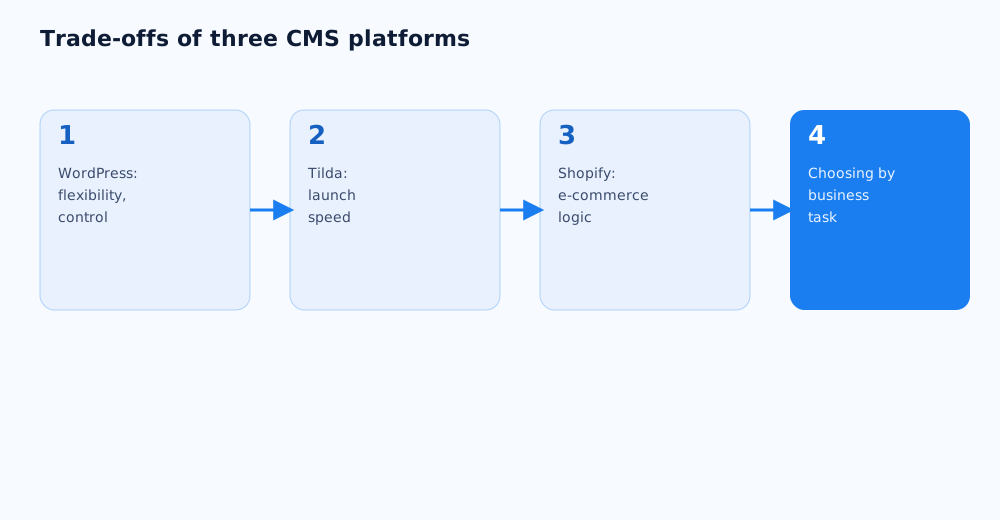
- WordPress — the best choice for a blog, a content-driven project, or a site where maximum control over SEO settings matters and a lot of articles are planned.
- Tilda — a good fit for a landing page, a brochure site, or a small project where launch speed matters more than deep technical control.
- Shopify — the best fit for an online store, where reliability and standardized e-commerce logic matter more than flexibility in URL structure.
- None of the three platforms guarantees rankings on their own — a CMS sets the ceiling on what's technically possible, not the actual outcome in search results.
Below: a detailed breakdown of each platform's capabilities and limitations, so the choice is deliberate rather than made by default.
02 How a CMS affects SEO
A CMS doesn't rank a site by itself, but it sets the boundaries of what's technically possible in the first place.
- URL structure control. Some platforms allow building any address hierarchy; others rigidly fix prefixes like
/products/or/page12345/. - Load speed. Website builders and cloud platforms usually handle speed on their own, while on self-hosted WordPress, speed depends entirely on configuration — more on how hosting affects SEO in how to choose a domain and hosting for SEO.
- Metadata and markup flexibility. What matters is whether Title, Description, canonical, robots.txt, and schema markup can be edited without platform restrictions, or only within a fixed interface.
- Content scalability. For a site with dozens or hundreds of articles, what matters isn't just the ability to create them, but how easily categories, tags, and internal linking can be managed at that scale.
03 WordPress: capabilities and limitations
WordPress remains the most flexible of the three platforms for SEO precisely because it's an open-source system with full code access and a wide range of SEO plugins.
- Pros. Full control over URL structure, meta tags, robots.txt, and schema markup; a mature SEO plugin ecosystem (Yoast SEO, Rank Math) for managing Title, Description, canonical, and XML sitemap without touching code; unlimited scalability for a blog with hundreds of articles and complex category/tag taxonomy.
- Cons. Speed and security are entirely on the site owner — without solid hosting, caching, and regular plugin updates, the site can become slow and vulnerable; that much flexibility means more decisions that need to be made correctly rather than handled automatically.
- When to choose it. Content projects, blogs, media sites, corporate sites with an active blog — anywhere real control over the technical side of SEO matters and content volume will keep growing.
04 Tilda: capabilities and limitations
Tilda is a website builder focused on launching visually elaborate pages quickly, and its SEO capabilities reflect exactly that priority.
- Pros. Fast launch with no developer needed; built-in basic SEO settings — Title, Description, Open Graph, and partial robots.txt editing through the "SEO and meta tags" interface; stable load speed with no separate hosting configuration required.
- Cons. URLs default to a format like
/page12345678/, and human-readable addresses need to be set up manually for each page; there's no full robots.txt editing via regex rules — individual pages can be hidden, but not blocked in bulk; the Clean-param directive available in the interface is honored by Yandex but not processed by Google, so managing URL parameters for Google requires other methods. - When to choose it. Landing pages, brochure sites, small projects without dozens of content pages, where launch speed and visual design flexibility matter more than deep technical control.
05 Shopify: capabilities and limitations
Shopify is a specialized e-commerce platform, and its SEO trade-offs come directly from being standardized around online stores.
- Pros. Proven, time-tested e-commerce logic — product cards, categories, and filters are already optimized for conversion; stable speed and infrastructure reliability on Shopify's side; built-in basic SEO fields for products and categories with no extra development.
- Cons. URL prefixes —
/products/,/collections/,/pages/,/blogs/— are rigidly fixed by the platform and can't be edited even on Shopify Plus; only the slug after the prefix can be changed, not the structure as a whole; full URL control requires a headless setup on Hydrogen, which needs separate development work. - When to choose it. Online stores of any size where reliable, predictable e-commerce infrastructure is the priority, and the fixed URL structure is offset with strong internal linking and breadcrumbs.
06 Comparison table
Below is a summary comparison of the three platforms on the parameters that matter most for SEO.
| Parameter | WordPress | Tilda | Shopify |
|---|---|---|---|
| URL control | Full | Partial (manual clean URLs) | Limited to the section prefix |
| robots.txt editing | Full | Partial (no regex) | Limited, via apps |
| SEO plugins/extensions | Rich ecosystem | Built-in basic settings | App Store with SEO apps |
| Out-of-the-box speed | Depends on hosting | Stable | Stable |
| Content scalability | High | Medium | Medium (product-focused) |
| Entry barrier without a developer | Medium | Low | Low-to-medium |
| Best fit for | Blog, media, content-driven corporate site | Landing page, brochure site | Online store |
07 Which CMS to choose by business type
The right CMS choice doesn't come from an abstract platform ranking — it comes from the business's specific task.
- A content project or blog aimed at organic traffic. WordPress — thanks to maximum control over technical SEO and ease of publishing a large volume of articles over time.
- A landing page for an ad campaign or a brochure site with no plan to grow a blog. Tilda — if content volume is going to stay small by design, the URL and robots.txt limitations rarely become critical.
- An online store with a product catalog. Shopify — standardized, reliable e-commerce logic usually matters more than URL flexibility, especially without a dedicated technical specialist on staff.
- A growing business with both content and sales. Here it's worth deciding which task takes priority — organic traffic through a blog or conversion in the catalog — and choosing a platform around the dominant task, rather than trying to cover both equally well with one CMS.
If it's hard to tell which platform fits a specific project, this is a decision worth making together with specialists — see Grottix's SEO services.
08 FAQ
Can Tilda's SEO be improved to match WordPress?
Partially — basic Title, Description, and Open Graph settings are available directly in Tilda, but the builder doesn't offer full robots.txt control via regex rules or the same content-scaling flexibility as WordPress. For a small site without dozens of articles, that's usually not a problem.
Does Shopify's fixed URL structure hurt top rankings?
Not on its own — Google handles fixed prefixes like /products/ and /collections/ just fine, as long as the rest of the site's structure is logical. The main SEO lever on Shopify isn't URL structure but product page quality, internal linking, and load speed.
Is it worth migrating from Tilda to WordPress for SEO reasons?
Not always — if the site stays a landing page or brochure site with a small number of pages, Tilda's limitations rarely become a bottleneck. Migration makes sense if the business plans to actively run a blog and publish dozens of articles a year.
Which CMS launches fastest without a developer?
Both Tilda and Shopify are built for launching without a programmer, thanks to ready-made blocks and templates; WordPress can also be launched independently, but proper SEO configuration usually needs either plugins or some basic technical knowledge.
Can a blog on Shopify be as effective as one on WordPress?
Technically Shopify has a blog, but it's less flexible in taxonomy and SEO settings than a WordPress blog — for a store publishing a handful of supporting articles per category, that's usually enough, while a full content strategy more often points to a separate WordPress blog or a headless setup.
Does switching CMS affect rankings a site has already earned?
Yes, there's a real risk — switching platforms often changes URL structure, and without proper 301 redirects and an updated sitemap, rankings can be lost; more on minimizing that risk is in the guide on changing domain and hosting.