

A disabled Facebook or Instagram ad account means Meta has stopped every ad running from it — usually with no advance warning and only a limited explanation in the interface. For a business that depends on paid social, that's an immediate stop to the flow of leads. Below: why this happens, how to figure out the real reason, how to file an appeal, and what to do if the account can't be recovered.
01 Short answer
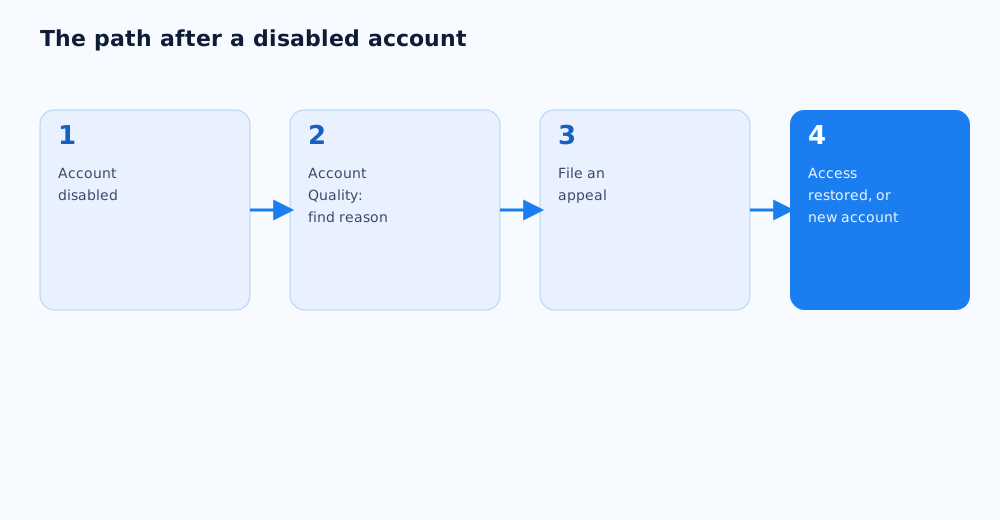
If an ad account is disabled, here's the order of operations.
- Open Account Quality in Meta Business Suite and check the exact reason for the restriction, if Meta discloses one.
- Check whether there's a "What You Can Do" section — if there is, a review is available.
- File an appeal through the link in the disable notification, or through the general Business Help Center support form.
- While the review is pending, avoid creating a new ad account with the same card or the same IP address unless absolutely necessary — it can complicate the review of the original account.
Below: the detail behind each step, and what to do if the appeal doesn't work.
02 Why Meta disables ad accounts
A disable notice rarely happens for no reason — it's almost always tied to one of three areas: the account itself, the ad content, or the website the ads point to. Meta's own list of advertising restrictions is in its help centre article on advertising restrictions.
- Account-level issues. Suspicious login activity, switching to a large payment straight away, logging in from an unusual location or device, or several accounts under one business with no clear structure.
- Ad-level issues. A restricted or prohibited product category, misleading claims, using someone's personal attributes in ad copy, or targeting based on sensitive categories.
- Website or landing page issues. No privacy policy, content that doesn't match what's being advertised, deceptive checkout practices, or technical problems loading the page.
Meta's automated systems review accounts and ads in the background, and some disables are false positives rather than real violations. That doesn't remove the need to check your own account against all three areas before filing an appeal.
03 Finding the exact reason
Before filing an appeal, it's worth pinning down exactly what triggered the block — that raises the odds the appeal succeeds the first time instead of requiring repeat submissions.
- Account Quality in Meta Business Suite is the first place to check: it names the specific violation or restriction when the system has identified one.
- The disable notification (in the interface or the email tied to the account) may link directly to the right appeal form for that type of violation.
- An empty "What You Can Do" section usually means an automatic re-review isn't available at this stage, and the case needs to go through general support instead.
- It's worth checking the account's recent history — a new admin added, a payment method changed, a new ad category launched — the timing often points straight at the cause.
04 Filing an appeal and what happens next
How to file an appeal depends on where Meta is showing the disable information — there's no single universal form for every case.
- If Account Quality shows a request-review button, that's the fastest path — available only to admins of the ad account.
- If there's no such button, the appeal goes through the general form in Meta's help centre article on troubleshooting a disabled ad account.
- The appeal should briefly and specifically explain which policy the business believes was misapplied, and what's been fixed if the issue is real — vague requests like "please unblock this" tend to move more slowly.
- A response can take anywhere from a few days to a few weeks — Meta doesn't publish a fixed timeline, and that's worth planning around when it comes to ad budget for that period.
05 If the appeal is denied
A denied appeal doesn't always mean there's nothing left to do — but the next step depends on whether it's a temporary restriction or a permanent ban.
- If the restriction applies to one ad or campaign rather than the whole account, the violation can be fixed and a new campaign launched without appealing the old one.
- If the whole Business Manager is disabled, it's worth checking access to other business tools through Meta's help centre guide to recovering a disabled or restricted account — sometimes a fix is possible through the Business Portfolio rather than the ad account directly.
- For a full, permanent ban, Meta states plainly that repeat appeals of the same decision usually don't change the outcome — at that point it's more productive to focus on setting up a new account correctly than to keep appealing the old one.
- It's worth saving the appeal documentation and correspondence — it helps when setting up a new account, to avoid repeating the same violation.
06 Setting up a new account without triggering another block
If the old account can't be recovered, the priority is not carrying the same behaviour patterns into the new one that likely caused the original disable.
- Start by fully setting up Business Manager and linking the business Page before adding a payment method — that signals to Meta that the account represents a real business, not one created just to run ads.
- Don't load a large balance right away — a sudden jump in spend on a new, unverified account is more likely to trigger an automatic review.
- Ramp the daily budget up gradually over the first few weeks instead of launching straight at maximum spend.
- Confirm the site and landing pages the ads point to fully meet the requirements — including a privacy policy and an accurate product description, with no claims that are hard to back up.
- Set up Business Manager and the Meta Pixel correctly from day one — it doesn't prevent a block on its own, but it cuts down on the technical errors Meta's systems can read as suspicious activity.
07 Preventing it: a checklist
Some disables are preventable by following a few ongoing habits, rather than only reacting after the first incident.
- Don't give ad account access to people whose own accounts have already been disabled — Meta links violations across accounts that share admins.
- Check Account Quality yourself on a regular basis instead of waiting for a disable notice — it shows warnings and current restriction status before things escalate to a full block.
- Re-read Meta's ad policies carefully whenever launching a new product or service category — what's allowed in one niche can be restricted in another (financial services, health, and real estate are regulated more tightly).
- Use several admins with clearly defined roles instead of handing full access to one person — that makes it much easier to trace which action caused a problem if one comes up.
If social ad campaigns keep running into blocks or restrictions, the cause is often systemic rather than random — in that case it's worth reviewing the account setup itself with a specialist. See Grottix's paid social services — from Business Manager setup to full campaign management.
08 FAQ
How long does it take to get a disabled Facebook ad account back?
Meta doesn't publish a fixed timeline — in practice a response can take anywhere from a few days to a few weeks, depending on the type of violation and how backed up support is. Complex cases needing manual review by a moderator usually take longer than automatic re-reviews.
Can I create a new ad account after the old one gets disabled?
Yes, that's technically possible, but the new account needs extra care: fully build out the business Page and Business Manager, ramp the budget up gradually, and avoid repeating whatever caused the previous disable. Meta links accounts through shared payment methods, devices, and admins, so a new account is no guarantee of a clean slate if the underlying cause isn't fixed.
Why did Facebook disable my ad account with no clear explanation?
Technically a reason is almost always shown in Account Quality, but the wording can be generic — a reference to a specific policy without details on exactly what triggered it. In that case it helps to review recent ads, account changes, and site content to narrow down the likely cause before filing an appeal.
What if my appeal gets denied more than once?
If Meta states the decision on the account is final, appealing the same case again usually doesn't change the outcome. At that point it's more effective to stop resubmitting and focus on setting up a new account correctly, taking the cause of the previous disable into account.
Does a disabled personal profile affect the business's ad account?
Yes, indirectly. If a personal profile that's an admin on the ad account gets disabled or restricted, it can affect access to the ad account itself and trigger extra scrutiny from Meta, especially if that profile has access to multiple ad accounts.
How can I tell an account is at risk of being disabled before it happens?
Account Quality in Meta Business Suite shows warnings and the current restriction status before they escalate into a full disable. Checking that section regularly is the most reliable way to catch a problem early and fix it before it escalates.