
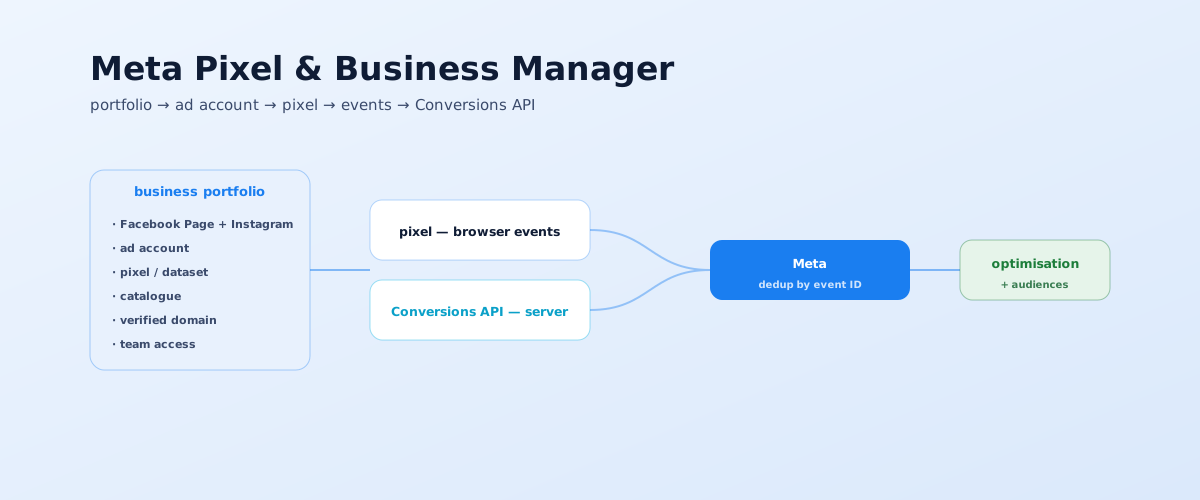
Before running Facebook and Instagram ads, you need the infrastructure: a business portfolio, an ad account, a pixel, and events. Without it, campaigns optimise blind — toward clicks, not leads and sales. Below is a step-by-step setup from scratch: from the portfolio to the Conversions API and verification.
01 What Meta's ad infrastructure consists of
Meta advertising doesn't run on a personal account but inside a business portfolio (Business Manager in the old interface). It's a separate management layer that unites all of a company's ad assets and separates access.
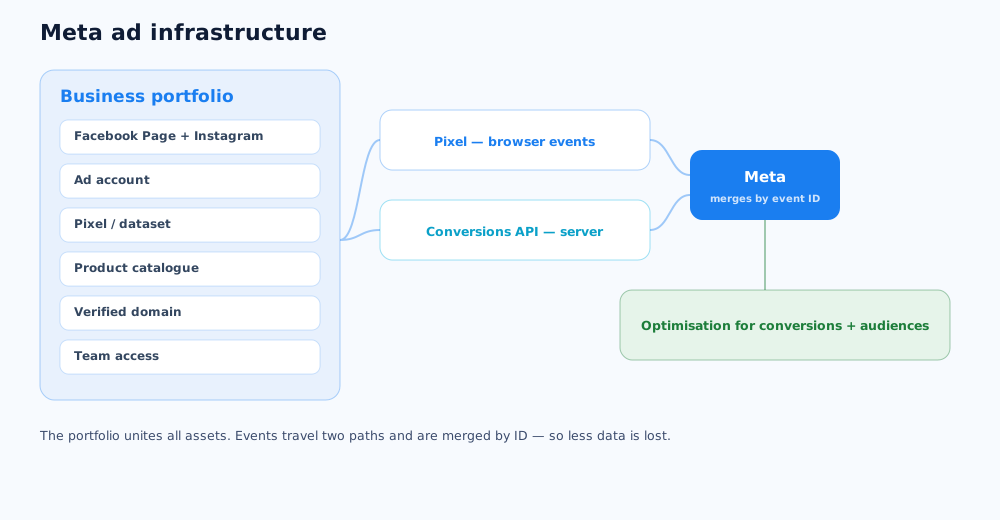
A portfolio holds these assets:
- The Facebook Page and Instagram account — ads run in their name;
- The ad account — where campaigns are created and history is stored;
- The pixel and dataset — the source of events from the site;
- The product catalogue — for dynamic ecommerce ads;
- A verified domain and access — security and teamwork.
The portfolio separates work assets from a personal profile: if an employee leaves, access is revoked while the account and pixel stay with the company.
02 Creating a business portfolio and ad account
The portfolio is created once and becomes the head of the whole ad structure. The process is in Meta's help on creating a business portfolio.
- on business.facebook.com, create a portfolio: company name, your name, and a work email;
- add the Facebook Page and Instagram account (or create them);
- create an ad account: country, time zone, and currency — these can't be changed later;
- invite the team and contractors with roles: access to the ad account, the Page, and the pixel is granted separately;
- attach a payment method in the ad account's billing settings.
Grant roles minimally: a contractor usually needs access to the ad account and pixel, not the whole portfolio.
03 What the pixel and Conversions API are
An event about an action on the site can reach Meta two ways, and using both at once is now recommended.
- The pixel — code on the site that sends events from the user's browser: view, cart, lead, purchase;
- The Conversions API — the same events, sent from your server straight to Meta, bypassing blockers and browser limits;
- Deduplication — if the same event arrives from both the pixel and the API, Meta merges them by a shared ID and doesn't count it twice.
After iOS tracking limits, the pixel alone loses a noticeable share of events, so the pixel + Conversions API pairing became the standard. How to get started with server events is in Meta's Conversions API documentation.
04 Creating and installing the pixel
The pixel is created in Events Manager inside the portfolio. It has a unique Pixel ID that links the site to your ad account.
The steps, per Meta's pixel installation guide:
- in Events Manager, open "Data sources" and create a dataset (pixel);
- copy the Pixel ID;
- choose an install method: a partner integration (Shopify, WordPress, Tilda and others — following the prompts), manual code in the
<head>of every page, or Google Tag Manager as a separate tag; - confirm the base page-view event (
PageView) fires on every page.
GTM is convenient if the site already has a container and other tags; pasting the code directly is faster for a simple site.
05 Setting up events
A page view alone is useless for optimisation — Meta needs to know about target actions. They're described through standard events with clear names.
What to configure:
- Standard events for the funnel —
Lead,Contact,CompleteRegistration,AddToCart,InitiateCheckout,Purchase; - Event parameters —
valueandcurrencyfor purchases, product IDs for the catalogue; - Setup method — code-free through Meta's event setup tool (by clicking site buttons) or via GTM and code for precise control;
- Conversion events — the ones campaigns will optimise toward; usually a lead or a purchase.
If events are set up wrong or don't fire, ads optimise in the wrong direction — one of the common causes covered in the article on why paid social ads fail.
06 Conversions API, domain, and iOS limits
Three settings without which, after iOS changes, ads lose optimisation accuracy and reporting completeness.
- An access token for the Conversions API — generated in Events Manager in the pixel settings; after that the server can send events directly;
- Domain verification — in business settings, confirm ownership of the domain (via a DNS record, meta tag, or file);
- Event priority (Aggregated Event Measurement) — Meta allows optimisation for at most 8 events per domain; the list and order are set by the business that verified the domain.
Without a verified domain and event prioritisation, some conversions simply won't be available for campaign optimisation, and reports for iOS users become incomplete.
07 Verification and links
After installation, confirm that events actually reach Meta and in the right form.
- Meta Pixel Helper — a Chrome extension; shows which events fire on a page and whether there are parameter errors;
- Test Events — in Events Manager, walk through to the target action: a browser event should appear, and a paired server event if the Conversions API is set up;
- Event Match Quality — a measure of how complete the event data is; the higher it is, the more precisely Meta finds the right audience;
- Ad tagging — campaign links are tagged with UTM parameters separately so traffic shows correctly in web analytics; how to do it is in the piece on UTM parameters.
It's worth cross-checking pixel data against an independent source — how to set one up is in the article on setting up Google Analytics 4. How much the ads this is all set up for cost is covered in how much Instagram and Facebook ads cost. Setting up the infrastructure and launching can be delegated — that's the paid social service.
A properly set up Business Manager lowers the risk, but doesn't guarantee protection from a block — see a separate guide on what to do if a Facebook or Instagram ad account gets disabled anyway.
Pixel data is one of the sources for lookalike audiences, and if the site also runs ads on TikTok, the conversion-tracking logic there will feel familiar — see the TikTok ads guide.
A correctly configured Pixel is only part of a specialist's job; the full set of criteria for choosing a targeting or PPC specialist is covered in a separate guide.
A configured Pixel and Business Manager also come in handy for ads that open straight into a customer conversation — a comparison of channels for this is covered in Viber, Telegram, or WhatsApp.
Pixel and Conversions API data only reach their full potential paired with a deal-tracking system — how to choose one and set up lead handoff is covered in how to choose a CRM and connect it to your ads.
Pixel data feeds both targeting tools at once — remarketing and lookalike; the difference between them and when to use each is covered in remarketing vs lookalike.
08 Frequently asked questions
What is the Facebook Pixel in simple terms?
The Meta Pixel is a small piece of code on your site that tells Meta what visitors do: view a page, add to cart, submit a form, purchase. Meta uses that data to optimise ads toward a specific action rather than just clicks, and to build audiences from visitors for retargeting and lookalikes.
How is Business Manager different from Business Suite?
Business Suite is the interface for day-to-day management of a Page and Instagram account: posts, messages, basic stats. Business Manager (in the new interface, Business settings and the business portfolio) is the management layer: ad accounts, pixels, catalogues, domains, and team access. Advertising needs this one.
How do I install the pixel on a website?
Three ways: through a partner integration (Shopify, WordPress, Tilda and other CMSs — following the on-screen steps), pasting the pixel code manually into the head section of every page, or connecting it via Google Tag Manager as a separate tag. After installation, check events with the Meta Pixel Helper extension and in Test Events.
Do I need the Conversions API if the pixel is already installed?
Yes, Meta recommends using them together. The pixel sends events from the browser and loses some data to blockers and iOS limits; the Conversions API sends the same events from your server. Events with the same ID are merged by Meta (deduplication), and more complete data improves optimisation.
How do I check that the pixel works?
Install the Meta Pixel Helper extension for Chrome — it shows which events fire on a page and whether there are errors. In Test Events inside Events Manager, walk through to the target action: a browser event should appear, and a paired server event if the Conversions API is set up.
Why verify a domain in Meta?
After iOS limits, Meta allows optimisation for at most 8 events per domain, and only the business that verified the domain in its settings can set their priority. Without verification, some events become unavailable for optimisation and conversion reporting is incomplete.