

01 Short answer: what's the difference
Remarketing shows ads to people who've already interacted with your business — visited the site, added a product to cart, engaged with a post. Lookalike does the opposite: it builds a new, cold audience of people who've never encountered your brand but resemble your existing customers in behavior and characteristics. One tool works the bottom of the funnel — bringing already-interested people back; the other works the top — bringing in new people.
Below: how each tool's mechanics work, where the line between them actually falls in practice, and how to place both across the funnel stages without wasting budget on overlapping impressions.
02 Remarketing: who you show it to, and when it works
Remarketing runs on data about a person's real interaction with the business — collected through a site pixel, a customer email or phone list, or engagement with social posts.
- site visitors who didn't submit an inquiry or complete a purchase — the classic scenario for bringing someone back into the funnel;
- people who added a product to cart but never checked out — one of the highest-return remarketing segments for an online store;
- existing customers for repeat purchases or cross-selling a related product.
A detailed technical setup for remarketing, including pixel and audience list work, is covered in remarketing and retargeting: the complete guide. Without a properly configured Meta Pixel, remarketing has no data to build its logic on in the first place.
03 Lookalike: who you show it to, and when it works
A lookalike audience is built by the ad platform's algorithm from a source list — customers, site visitors, engaged users — and finds new people with similar characteristics and behavior.
- launching ads to a new audience once the existing remarketing base is exhausted or too small for stable volume;
- scaling up after ads to a warm audience have already shown a good result — a lookalike built from actual buyers, rather than just site visitors, usually produces a higher-quality audience;
- expanding into a new market segment if there's customer data close to that segment.
The official description of how this audience is built is in Meta's help center on Lookalike Audiences, and step-by-step setup inside the ad account is covered in lookalike audiences on Facebook and Instagram.
04 The key difference: cold audience vs. warm audience
Behind the different tool names sits one fundamental distinction that drives both expected conversion rate and cost per lead.
- Remarketing (warm audience). People already know the business and took at least one action showing interest. Conversion is usually higher and acquisition cost lower, since there's no need to explain who you are or what you offer.
- Lookalike (cold audience). People are seeing the brand for the first time. Conversion is lower, acquisition cost higher, but it's the only way to grow beyond an already-collected contact base.
Comparing the two tools' performance on the same cost-per-click or cost-per-lead metric without adjusting for this difference is a common methodological mistake, and it usually leads to a wrong conclusion that lookalike "doesn't work."
05 Placing both tools across funnel stages
The sales funnel gives a natural logic for which tool to use at each stage, as long as you don't try to swap one in for the other where it doesn't fit.
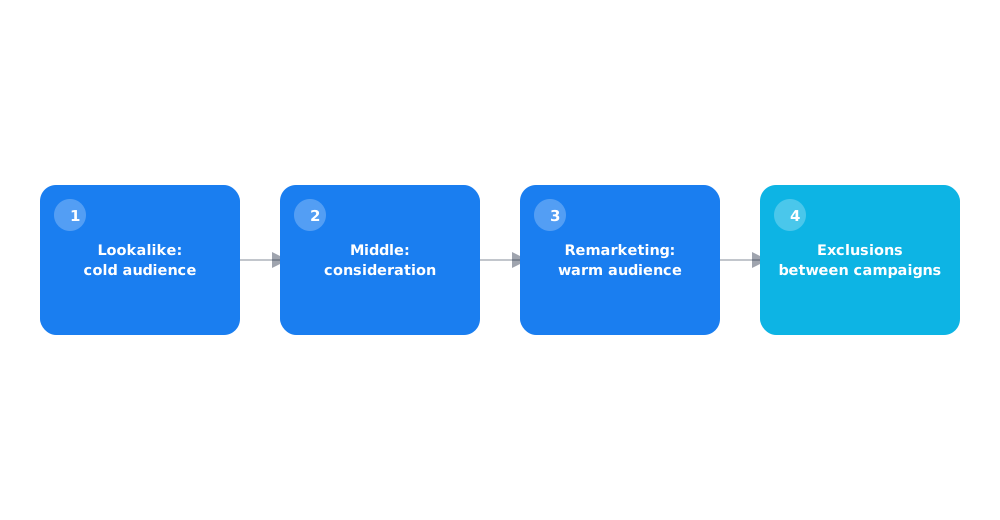
- Top of funnel (awareness) — a lookalike audience to reach new people who've never heard of the brand.
- Middle of funnel (consideration) — remarketing to site visitors who looked at a product or service but didn't submit an inquiry.
- Bottom of funnel (decision) — narrow remarketing to abandoned carts or incomplete inquiries with a more assertive offer.
- Post-purchase (retention) — remarketing to existing customers for repeat sales, and using that segment as a source for a new lookalike audience.
06 Can you run both at once without overlap
Running both tools in parallel isn't just possible — it's sensible. The risk is that, without exclusions, the same ad can accidentally show in both a lookalike campaign and a remarketing campaign, doubling spend on the same person.
The fix is explicitly excluding the remarketing audience (site visitors, existing customers) from the lookalike campaign at the ad set level, so each impression only counts toward one tool. That's a standard feature in the Meta ad account, available when setting up any ad set's audience.
07 Common mistakes when choosing between them
Most problems with these tools come not from technical setup, but from misunderstanding which job each one actually does.
- Launching lookalike as the only tool from day one. Without an existing customer or visitor base, the algorithm has nothing to build a quality similar audience from.
- Ignoring remarketing in favor of constantly chasing new customers. Bringing back already-interested people is almost always cheaper than acquiring new ones, and this part of the funnel is often undervalued.
- No exclusions between campaigns. Without explicitly separating audiences, budget gets spent showing the same person ads across multiple campaigns.
- Comparing lookalike and remarketing metrics without adjusting for audience temperature. This leads to the wrong conclusion that one tool "doesn't work," when in fact the comparison is between fundamentally different audiences.
08 FAQ
Which should I use first — remarketing or lookalike?
If there's already traffic or a customer base, starting with remarketing usually makes more sense — it almost always delivers a faster, cheaper result. Lookalike becomes relevant once you need to scale beyond the audience already collected.
Can I build a lookalike audience without customer data?
Technically yes, based on site visitors or post engagement, but that audience is usually lower quality than a lookalike built from actual buyers.
Why is remarketing usually cheaper than lookalike?
Because the remarketing audience already knows the brand and doesn't need an explanation of who you are or what you offer, which directly raises conversion and lowers acquisition cost compared to a cold audience.
How do I avoid showing the same ad twice to different audiences?
Explicitly exclude the remarketing audience from the lookalike campaign's settings at the ad set level — a standard feature in the Meta ad account.
Which funnel stage is remarketing best suited for?
The middle and bottom of the funnel — people who've already shown interest: visited the site, looked at a product, added it to cart, but didn't complete a purchase or inquiry.
Why can't I compare cost per lead in remarketing and lookalike directly?
Because they're fundamentally different in audience temperature — a warm remarketing audience converts more readily and cheaply almost every time, and comparing them without adjusting for that gives a distorted picture of performance.