

TikTok is the fastest-growing platform by reach among Ukrainian users under 35, but until recently Ukrainian businesses couldn't officially advertise on it. That changed in 2025. Below: what exactly changed, who TikTok ads are a good fit for, how to get access to the ad account, and how to set up a first campaign.
01 Short answer
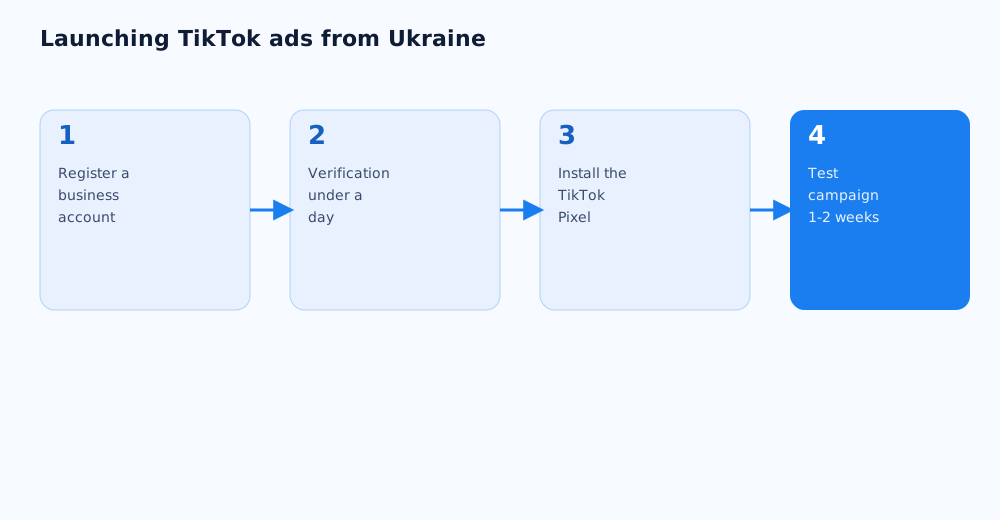
To launch TikTok ads as a Ukrainian business, here's the order of operations.
- Register a business account in TikTok Ads Manager at ads.tiktok.com, entering the company's legal details.
- Wait for account verification — usually takes less than a day.
- Install the TikTok Pixel on the site to track conversions before the first campaign even launches.
- Start with a small test budget and one format — In-Feed Ads, for example — to gauge audience response before scaling.
Below: the details on access for Ukrainian businesses, formats, and setup.
02 TikTok Ads is back in Ukraine: what changed
Since the start of the full-scale invasion in 2022, TikTok had suspended its advertising tools for Ukrainian advertisers — the platform stayed available to users, but businesses couldn't officially run ads on it. In April 2025, TikTok began restoring advertising tools for the first groups of Ukrainian customers after the pause, as reported by several business outlets.
That means Ukrainian companies can now officially launch campaigns from a Ukrainian legal entity, handle VAT, and run ads legally and transparently, rather than through intermediary foreign accounts, which some businesses used before official access returned. The business account verification process for Ukrainian companies has also been simplified compared with the earlier period.
03 Who TikTok ads are a good fit for
TikTok isn't a universal channel, and it's worth checking whether the platform's audience actually matches your target audience before launching.
- TikTok's audience in Ukraine is over 17 million users and still growing, but the platform's reach is strongest among people under 35.
- The short-video format works best for visual, emotional, trend-driven products — clothing, cosmetics, food, entertainment, educational content.
- B2B products and complex services with a long decision cycle tend to convert less directly through TikTok — the platform usually works better for awareness there than for direct leads.
- Products that need a detailed explanation before purchase are harder to promote in a short format — TikTok is better used for reach in that case, not as the only sales channel.
04 Getting access to TikTok Ads Manager
Registering a business account in TikTok Ads Manager doesn't take long, but it needs care at the start — some settings can't be changed once the account is created.
- Go to ads.tiktok.com and choose to register a business account.
- Enter a work email or phone number and create a strong password.
- Fill in the business details: country, time zone, billing currency, legal company name, and industry — these are locked in after the account is created, so it's worth entering them carefully.
- Complete account verification — usually takes less than a day.
- Turn on two-factor authentication right after creating the account — TikTok recommends this as a baseline security measure.
The official steps and the current interface are covered in TikTok for Business's guide to getting started with Ads Manager.
05 Ad formats and campaign objectives
TikTok offers several ad formats, and the choice should follow the campaign's objective rather than which format looks the most eye-catching.
- In-Feed Ads — video in the main feed that looks like organic content; good for reach and a first introduction to the brand.
- Spark Ads — boosts an existing organic video, including one made by a creator; keeps the engagement and comments of the original post.
- TopView — full-screen ad shown when the app opens, maximum reach and attention, but a higher placement cost too.
- Collection Ads — a format for online stores with a product catalogue, linking to a product showcase inside the app itself.
At launch it's worth picking one format and one clear objective — traffic, app installs, or conversions — instead of testing every format at once on a small budget.
06 Setting up the TikTok Pixel and tracking conversions
Without properly configured conversion tracking, there's no way to tell which TikTok ads actually generate leads or sales, rather than just views and clicks.
- The TikTok Pixel is a snippet of code installed on the site that sends TikTok data about visitor actions: viewing a product, adding to cart, purchasing. The official instructions are in TikTok's help article on the pixel.
- The pixel is created under Tools → Events Manager inside TikTok Ads Manager, and the setup and verification steps are covered in the guide to setting up and verifying the pixel.
- TikTok recommends setting up events that reflect the full customer journey on the site — from viewing a product page to completing a purchase — not just the fact of a site visit.
- The TikTok Pixel Helper browser extension is a convenient way to check the setup is correct — it shows which events fire on a page in real time.
If the site already has the Meta Pixel set up, the TikTok Pixel logic will feel familiar — both work on a similar principle of tracking events on the site.
07 Budget and first results
The first TikTok campaigns are best treated as a learning phase — for the algorithm and for the team running the ads — rather than a final verdict on the channel.
- It's sensible to start with a small test budget for 1–2 weeks to gauge impression cost and audience response before scaling up.
- Like any platform, TikTok's algorithm needs time to learn — judging a campaign's performance before 1–2 weeks of steady delivery is premature.
- Cost per lead on TikTok should be compared with other channels using one consistent method — covered in cost per lead: how to calculate and reduce it.
- Creatives on TikTok age faster than on other social platforms because of the short, trend-driven video format — refreshing videos regularly matters more than it does with static ads.
If launching TikTok ads from scratch feels like a lot, it can be handed off — see Grottix's paid social services.
08 FAQ
Can Ukrainian businesses advertise on TikTok right now?
Yes — since April 2025, TikTok has restored advertising tools for Ukrainian advertisers after the pause introduced at the start of the full-scale invasion. Ukrainian businesses can officially register ad accounts and launch campaigns from a Ukrainian legal entity.
How much does TikTok advertising cost?
The exact cost depends on the format, niche, and competition for the audience — TopView and full-screen formats cost more than In-Feed Ads. A sound approach is to start with a small test budget and see the actual impression and click cost in your own niche, rather than going by averages from someone else's case study.
Do I need the TikTok Pixel if the campaign is only for reach and awareness?
The pixel is still useful for reach campaigns, because it lets you later analyse which part of the audience that saw the ad went on to take a meaningful action on the site. Without the pixel, that connection stays invisible even if the ad actually worked.
Is TikTok a good fit for B2B companies?
TikTok rarely produces direct leads for complex B2B products with a long decision cycle, but it can work for brand awareness and recruiting. For B2B it usually performs better as a supporting channel than a primary one.
How often do TikTok creatives need refreshing?
More often than most other ad formats — TikTok audiences get used to a format quickly, and the same video loses effectiveness after a few weeks of active delivery. Plan for a steady stream of new short videos rather than one ad meant to run indefinitely.
Can existing organic videos be used for ads?
Yes — the Spark Ads format lets you boost an already-published organic video, whether it's your own or made by a creator under an agreement, keeping its likes, comments, and engagement instead of building a new video from scratch.