
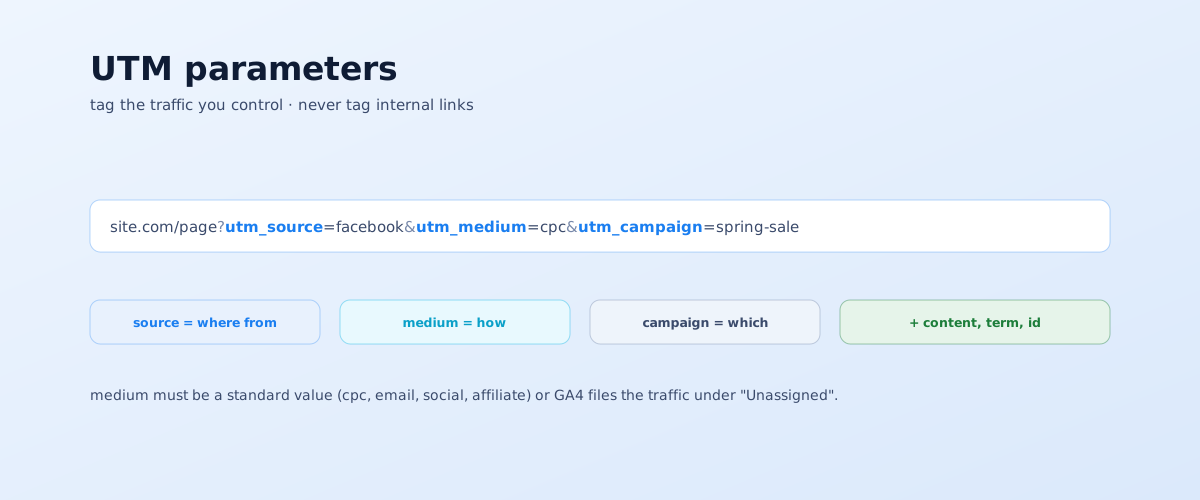
UTM parameters are what turn "traffic from social" into a real report: which campaign, which creative, and which channel brought the leads. Tagging looks trivial, but mistakes in it are exactly why budgets get judged blind. Below: which parameters exist, how they map to GA4 channel groups, how to tag different channels, and which mistakes to avoid.
01 What UTM parameters are and why they matter
A UTM parameter (from Urchin Tracking Module) is a set of values added to the end of a link after a ?. When someone follows that link, analytics reads the parameters and sorts the visit by campaign, source, and medium. Without them, all paid traffic and clicks from emails and affiliate links collapse into generic "direct" or "Unassigned".
Tagging is needed for any traffic you control:
- ads in Google Ads, Facebook, Instagram, TikTok;
- email and SMS campaigns;
- social posts with a link, link-in-bio;
- affiliate placements, QR codes, links in offline materials.
Organic search and direct visits shouldn't be tagged — analytics identifies them on its own, and a tag only breaks that.
02 The five UTM parameters
There are five parameters, each with its own role. Three are always required, two are added as needed; separately there's a utility utm_id for reconciling with ad platforms.
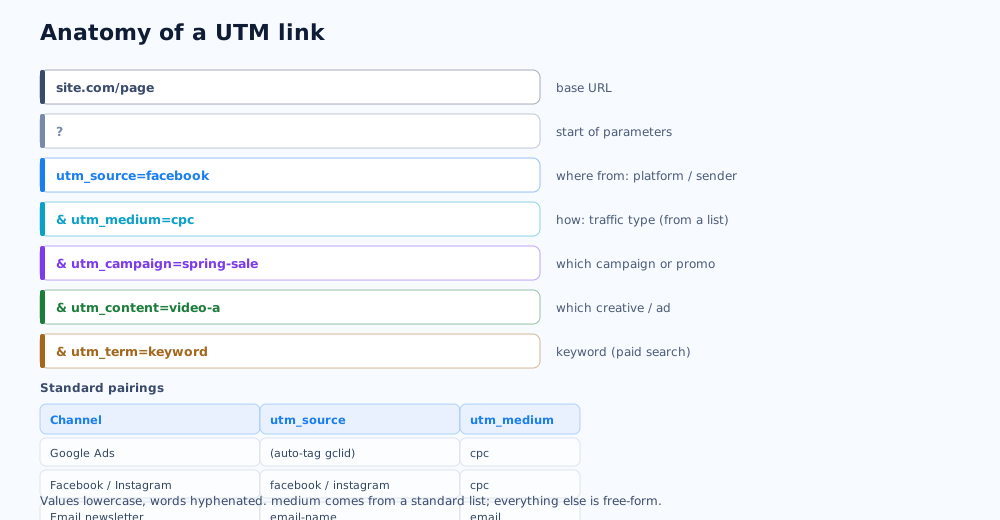
Per Google's documentation on campaign URLs, the parameters are:
- utm_source — the specific platform or sender:
google,facebook,instagram,newsletter-june; - utm_medium — the traffic type:
cpc,email,social,affiliate,banner; - utm_campaign — the campaign or promotion name:
spring-sale,black-friday-2026; - utm_content — distinguishes creatives and ads within one campaign:
video-a,static-b; - utm_term — the keyword, usually for paid search;
- utm_id — a campaign identifier for reconciling GA4 data with the ad platform.
03 How medium maps to GA4 channel groups
GA4 doesn't report traffic by every source and medium individually — it groups it into channels: Paid Search, Organic Social, Email, Referral, and others. The grouping rules are fixed, and they rely mainly on the utm_medium value.
What this means in practice:
- use standard medium values:
cpcfor paid search and paid clicks,emailfor newsletters,socialfor organic social,affiliatefor partners; - any custom value (
fb-ads,paidsocial,Email) won't match a rule — and the traffic lands in "Unassigned"; - the full rule list is in Google's help on default channel groups — check against it when building your convention.
Put simply: you don't invent medium — you take it from a limited list. The freedom is in source, campaign, and content.
04 A single naming convention
UTM tags don't break one at a time but systematically: one person on the team writing Email instead of email, and reports show two campaigns instead of one. So before you start you need a convention — one set of rules.
The minimum set of rules:
- lowercase only — GA4 is case-sensitive;
Facebookandfacebookare different sources to it; - hyphens between words, no spaces:
spring-sale, notspring saleor a mix withspring_sale; - 2–4 words per value — if it runs longer, the convention needs simplifying;
- one reference list of allowed source and medium values in a shared sheet everyone launching traffic checks;
- no personal data or stray characters in values.
A convention agreed once saves dozens of hours of "why don't the numbers match" later.
05 Tagging by channel
Each channel has its quirks: sometimes tags are applied automatically, sometimes manually in the interface, sometimes appended to the link by hand.
Google Ads
Manual UTMs for Google Ads usually aren't needed: turn on auto-tagging — it adds a gclid parameter to links, and with linked accounts GA4 gets the campaign, ad, and keyword on its own. Manual UTMs are only used if auto-tagging isn't available for some reason. How to set up the account itself is in the article on setting up Google Ads yourself.
Facebook and Instagram
Ad settings have a "URL parameters" field — that's where the tags go: utm_source=facebook (or instagram), utm_medium=cpc, utm_campaign, and utm_content for the specific creative. The platform's dynamic placeholders help avoid retyping tags for every ad.
Email and partners
For newsletters: utm_source is the email name or type, utm_medium=email, utm_campaign is the campaign theme. For affiliate links and QR codes: utm_medium=affiliate or utm_medium=qr, with the specific partner or medium in source.
06 What not to tag, and common mistakes
Most UTM problems aren't missing tags but tags in the wrong place or malformed. Sorting them out is easier than cleaning the data later.
- Don't tag internal links. Following a tagged link inside your own site overwrites the visitor's original source — the ad and search that brought them are lost. Google warns about this directly in its documentation.
- Don't tag organic and direct — analytics identifies them on its own.
- Tag after the hash. Parameters must come before the
#, or analytics won't see them. - Tag on a redirect. If the link points to a page that 301-redirects, some tags can be lost — tag the final URL.
- Missing utm_campaign — without it the campaign report is empty.
- Mixed case and spaces — the most common source of duplicates in reports.
07 Generators, verification, and UTMs in GA4
Assembling tags by hand in a notepad is a sure way to slip up eventually. There are tools for it and a clear way to check.
- Generator — Google's Campaign URL Builder for one-off links; a company generator with the convention baked in when several people launch traffic;
- Verification — open the link in incognito and check source, medium, and campaign in GA4's Realtime report;
- Where to see the result — the Traffic acquisition report, sliced by Session source/medium, Campaign, and First user source;
- Tag lifetime — a source sticks to a user until the next visit from a different source, so every tagged link matters.
How to set up GA4 itself so these reports work is covered in the article on setting up Google Analytics 4 from scratch. What to do with the metrics calculated from tagged traffic — CPL, CPA, ROAS — is in the piece on key metrics. Setting up end-to-end analytics and tagging can be handed to us — it's part of the work across all channels.
If UTM parameters are tagging traffic to a landing page built for ads, it is worth checking that the page itself actually converts that traffic — structure and common mistakes are covered in the landing page guide.
UTM tags show where a site visit came from, but not where a call came from; how to connect both data sources into one cross-channel view is covered in the call tracking guide.
08 Frequently asked questions
What are UTM parameters in simple terms?
UTM parameters are tags added to the end of a link after a question mark so analytics can tell which ad or email a visitor came from — for example utm_source=facebook, utm_medium=cpc, utm_campaign=spring-sale. Without them, paid traffic and email clicks often land in generic "direct" or "Unassigned", and channels become impossible to judge.
What's the difference between utm_source and utm_medium?
utm_source is the specific platform or sender: facebook, instagram, google, newsletter-june. utm_medium is the traffic type: cpc for paid clicks, email for newsletters, social for organic social, affiliate for partners. Source answers "from where exactly", medium answers "by what method". GA4 sorts traffic into channel groups mainly by medium.
Should I add UTM parameters to internal site links?
No, never. UTMs are for external traffic. Tagging a link inside your own site makes GA4 start a new session and overwrite the visitor's original source — the ad or search that brought them is lost. Inside the site, use GA4 events to track clicks, not UTMs.
Why does traffic land in "Unassigned"?
Most often because of a non-standard utm_medium value. GA4 assigns traffic to channels like Paid Search or Organic Social by fixed rules; if medium reads paidsocial, cpc-fb, or Facebook with a capital letter, the rule doesn't match and the traffic stays unclassified. The fix is standard values: cpc, email, social, affiliate.
Do UTM parameters work in GA4?
Yes, GA4 fully supports the five standard parameters plus utm_id for reconciling with ad platforms. The difference from older analytics is that GA4 is stricter about matching medium to channel groups, and that all values are case-sensitive: email and Email count as two different campaigns.
How do I check that a UTM link works?
Open the tagged link in incognito and check the Realtime report in GA4: your source, medium, and campaign should appear. After a day the data shows in Traffic acquisition. If you see source (direct) and medium (none), the link is malformed or the parameters sit after a # symbol.