

01 Short answer: why cross-channel analytics matters
Cross-channel analytics links ad data, site visits, and the actual outcome — a lead, a call, a sale — into one chain that shows which ads actually bring in customers, not just clicks. Without that link, ad metrics (clicks, impressions, CTR) live separately from sales, and budget gets optimized by feel rather than by actual revenue.
For a business where a meaningful share of inquiries comes in by phone rather than through a web form, the missing piece is usually call tracking. Without it, calls simply never show up as conversions in the ad account, and automated bidding only optimizes for online form submissions — quietly losing sight of a chunk of real sales.
02 What call tracking is: static and dynamic
Call tracking swaps the phone number shown on a site depending on the traffic source, so you can tell where a caller came from. There are two main approaches, and which one to use depends on traffic volume and budget.
- Static call tracking. Each channel (Google Ads, Facebook, organic search) gets its own fixed number. Cheaper, but doesn't distinguish between individual campaigns or ads within the same channel.
- Dynamic call tracking. The number changes individually for each site visitor for the duration of their session, which ties a call to a specific ad, keyword, or even device. More precise, but needs a larger pool of numbers and costs more.
For a site with modest traffic and one or two ad channels, static call tracking is usually enough. Dynamic tracking earns its cost once call volume is high and it matters to know performance at the level of a specific ad, not just the channel as a whole.
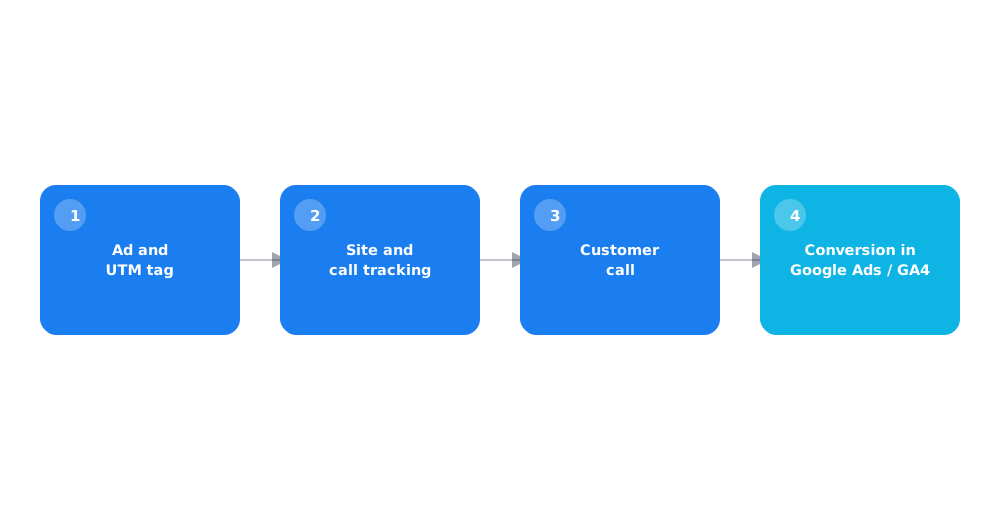
03 How to pass calls into Google Ads and GA4 as conversions
Simply logging a call is useless for optimizing ads if that data never makes it back into the ad platforms as a conversion. The mechanics differ between Google Ads and GA4.
- In Google Ads, calls tracked through a Google forwarding number, or imported from an outside call-tracking system, count as phone call conversions — which lets automated bid strategies factor them into optimization.
- In GA4, a call can be passed in as a custom event through a call-tracking integration or manually via the Measurement Protocol, then used as a key event for reporting and attribution.
- Without that step, a call stays visible only inside the call-tracking tool's own dashboard and has no effect on ad automation whatsoever.
Setting up the basic events in GA4 that call tracking later builds on is covered in setting up Google Analytics 4 from scratch — with analytics not properly configured, there's nothing for a passed-in call to attach to.
04 A minimal stack to start without Roistat
Full cross-channel analytics platforms like Roistat come with ready-made dashboards, but they cost a meaningful amount and are overkill for a business with one or two ad channels. A working minimal stack can be built from simpler, often free components.
- A static or dynamic call-tracking service to swap numbers and log calls in the first place.
- UTM tags on every ad link to connect a visit to a specific campaign — how to build these correctly is covered in the UTM tags guide.
- GA4 with key events configured to receive call data.
- A CRM, or at minimum a spreadsheet, where calls and inquiries are logged with a deal status — without this, cross-channel analytics stops at "a call happened" instead of "a call led to a sale."
That's enough to see which channel and campaign actually bring in calls that turn into sales, rather than just calls that generate inquiries.
05 Common setup mistakes
Most cross-channel analytics problems come not from the technology being complicated, but from setup details skipped at the start.
- Too small a number pool for dynamic tracking. If there are fewer numbers than simultaneous visitors, some calls get attributed to the wrong source.
- Manually logging deal status with no link to the analytics system. The real outcome of a call stays in a salesperson's head, not in a report.
- Counting every call as a conversion with no filtering. Spam calls and repeat contacts from existing customers distort the real picture of ad performance.
- No regular check that data is still flowing correctly. Integrations can quietly break after a site or CRM update with no obvious error.
06 How to read the report and what to look at
A finished cross-channel analytics report is only useful when it's read by comparing channels and campaigns against the same metric, not by staring at absolute numbers.
- the share of calls that turn into a sale, by channel — not just the raw number of calls;
- the cost of a call that led to a sale, not the cost of any call;
- how these numbers trend over time, not a one-day snapshot.
If what you actually need is the spend behind a single sale, the full method is covered in calculating cost per lead (CPL) — cross-channel analytics with call tracking just adds calls as another lead source into that same formula, not a different one.
07 When cross-channel analytics isn't worth it
Not every business needs full call tracking and system integration — there are situations where it's added complexity rather than a useful tool.
If calls make up a small share of inquiries compared to web forms and chat, or if a business runs a single ad channel with no real choice to make between traffic sources, the cost of setting up and maintaining call tracking may not pay for itself. In that case, it's more sensible to first make sure the basics — GA4, UTM tags — are configured correctly, and add the call-tracking layer later as ad volume and the number of channels grow.
Call tracking solves half the problem — call data still needs to come together with other leads in one place; how to choose a system for that is covered in how to choose a CRM and connect it to your ads.
08 FAQ
What is call tracking in simple terms?
A technology that swaps the phone number shown on a site depending on the traffic source, so you can tell which ad campaign a caller came from. There's a static version (one number per channel) and a dynamic one (an individual number per visitor).
Does a small business need Roistat for cross-channel analytics?
Not necessarily — a minimal stack of call tracking, UTM tags, GA4, and logging deal status in a CRM covers a business with one or two channels. Full platforms make sense with a large data volume and many traffic sources.
How do calls show up in Google Ads reporting?
Through a Google forwarding number in an ad or extension, or by importing phone call conversions from an outside call-tracking system — after that, the call counts as a conversion and gets factored into automated bid strategies.
What's the difference between static and dynamic call tracking?
Static tracking assigns one number per ad channel and can't tell campaigns within it apart. Dynamic tracking assigns an individual number to each site visitor for their session, which ties a call to a specific ad or keyword.
Which calls shouldn't count as conversions?
Spam calls, misdials, and repeat contact from existing customers who aren't a new lead — without filtering these out, they distort the real performance picture of ad campaigns.
Where should I start setting up cross-channel analytics?
By confirming basic web analytics (GA4) and UTM tags on ad links are already configured correctly — call tracking adds calls into that system, it doesn't replace it.