
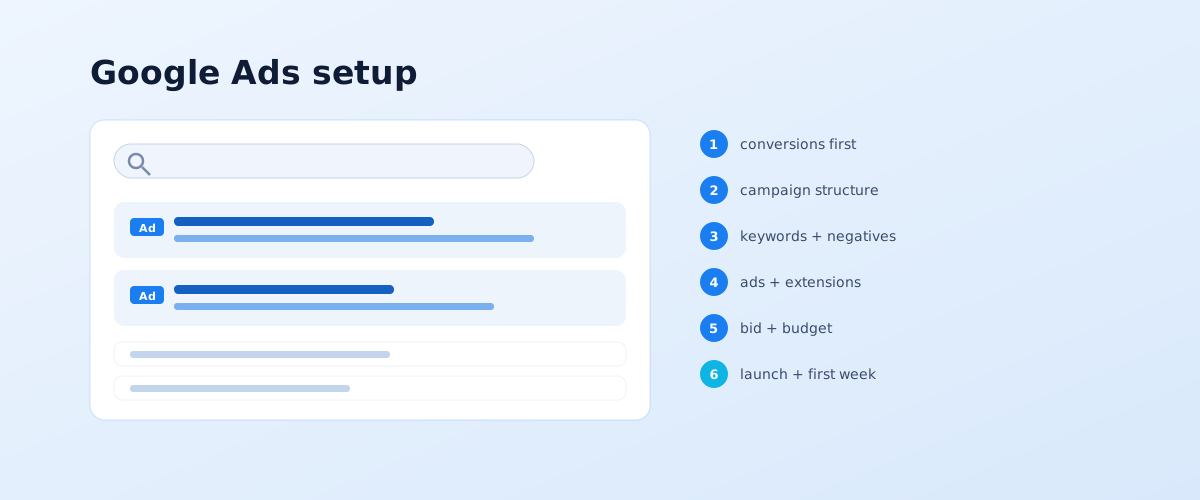
Setting up Google Ads yourself is doable, but most budget waste happens not in the interface but before it — because of skipped preparation. If you launch a campaign with no conversion tracking, no negative-keyword list and no idea how much money a test needs, the money goes and there is no data to draw conclusions from. Below is a step-by-step order: what to do before launch, how to build the structure, keywords and ads, how to set bids, and what to check in the first week.
01 The short answer: what to do before launch
Before you go into Google Ads, four things need to be closed. Without them the campaign will technically launch but will run blind, and the reports will not show whether it pays off.
- Analytics and conversions. GA4 installed, tracking set up for the target action — a form, a call, a completed order.
- The landing page. Fast, with a clear offer and one form, not a generic "Services" page.
- A negative-keyword list. Non-target queries collected in advance: "free", "DIY", "job", "reviews", the names of other cities.
- A budget calculation. An understanding of how many clicks and conversions a day you need and whether the money covers it — figures at the end of the article.
Google covers the account and first steps in general in the Google Ads Help Centre. Below is the practical order for a Search campaign specifically.
02 Step 1. The account and conversion tracking
After creating the account, the first thing to do is set up conversion tracking — before launching any campaigns. Without it the system optimises delivery blind: it does not know which clicks led to a lead and cannot bring their cost down.
How to set up conversions for a services site:
- define the target action: a form submission, a click on the call button, a completed order;
- create a conversion in Google Ads and set it up via Google Tag or a GA4 event;
- use the diagnostics tool to check the event fires on a real action on the site;
- mark one conversion as primary — that is what the system will optimise toward.
Google describes the mechanics of conversion measurement in a separate help section. Until the conversion fires correctly, do not launch the campaign.
03 Step 2. Campaign structure: goal, type, geo
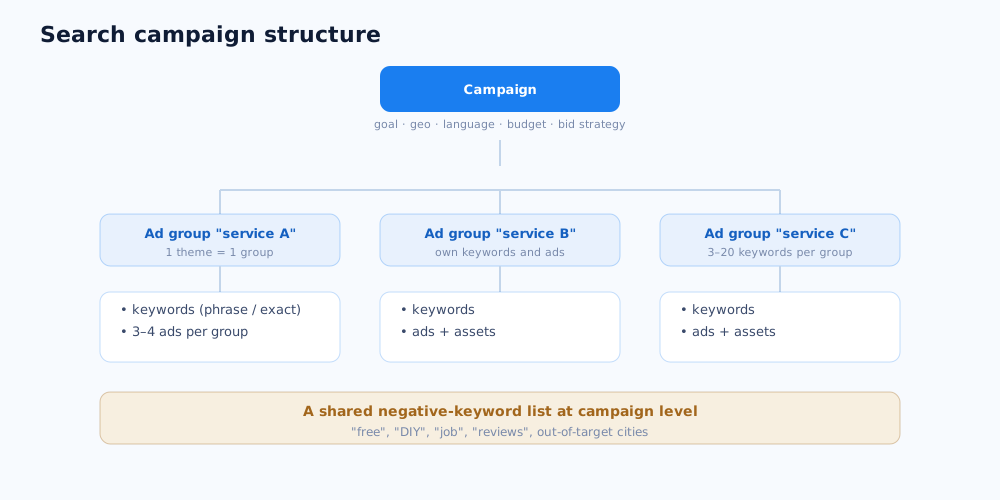
The structure determines how manageable the advertising will be. The diagram below shows the base framework of a search campaign: one campaign sets the shared settings, ad groups split it by theme, and inside the groups are keywords and ads.
Campaign goal and type
A beginner should use a Search campaign with the "Sales" or "Leads" goal. It is clearer in the reports than Performance Max: you see specific queries, ads and bids and can manage them by hand. The "Traffic" or "Awareness" goal is not suitable — it brings cheap clicks, not leads.
Geo, language, schedule
Set an exact area — the city or region you actually serve — and the "Presence: people in your targeted locations" option, not "interest". Set the language to the interface language of the audience. Narrow the ad schedule if leads are only handled during business hours and there is no one to process them outside.
How many campaigns to start with
One. A common beginner mistake is to launch 4–5 campaigns in parallel "to test". On a small budget each gets 2–3 a day and none gathers enough data to optimise. Until the budget covers several full campaigns, run one — on the most important direction.
04 Step 3. Keywords and negatives
Keywords determine which queries the ads show for, and negatives which queries they do not. A mistake either way costs budget: keywords that are too broad bring non-target traffic, ones that are too narrow give no volume.
Collecting keywords and match types
Collect keywords for each group with Keyword Planner and competitor data, split them by theme: one service — one group, 3–20 keywords per group. At the start use phrase and exact match — they give control over which queries get impressions. Broad match is turned on later, once there is working conversion tracking and a large negative list.
The negative-keyword list
A shared negative list is created at campaign level before launch and topped up every week from the search terms report. A base list includes: "free", "DIY", "used", "job", "work", "employee reviews", the names of cities you do not serve, and competitor names if you do not want to show for them.
05 Step 4. Ads and assets
The ad is what a person sees in the results, and it decides whether they click and at what price. Make 3–4 ads per group so the system can compare them and show the best.
What matters in the ad text:
- the group's key query in the headline — this raises relevance and lowers the cost per click;
- a specific offer, not generic words: "measurement and quote in 1 day", not "quality windows";
- a call to action and, where appropriate, a time limit or a promotion condition;
- a match with what the landing page says — otherwise the person leaves and the click is paid for.
Additionally, add assets (formerly extensions): sitelinks, callouts, a phone number, prices. They increase the ad's footprint and visibility, and Google factors them into the Quality Score.
06 Step 5. Bids, budget and the learning phase
A beginner does not need to manage bids by hand for each keyword — at the start you choose an automated strategy, but with a limit. A sensible option: "Maximise conversions" with a target cost per conversion, or "Target CPA" if you already know an acceptable cost per lead for the niche.
For the budget, the learning-phase rule applies: until the campaign gathers enough conversions per week, the system optimises poorly and the cost per lead swings. The practical minimum is a budget for 10–15 clicks and at least one conversion a day. At a CPC of 1–1.5 that is around 450–600 per month per campaign; in competitive niches with a CPC of 5 or more, 1,500–2,000. If you cannot allocate that, it is better not to launch Google Ads and instead narrow the task or accumulate budget — the same principle applies to splitting money across channels, covered in the article how to allocate a marketing budget.
07 Step 6. Launch and the first week of optimisation
After launch, do not touch the campaign for the first 3–5 days — big edits reset the learning phase. But you do need to watch it daily and against a specific list.
What to check in the first week:
- The search terms report — which phrases actually got impressions and clicks; everything irrelevant straight into negatives.
- Budget spend — is the daily limit being spent; if not, the audience is too narrow or the bid is low.
- Conversion firing — is lead data coming into Google Ads, does it match the CRM.
- Clicks with no leads — which keywords and ads bring traffic but no conversions; those are candidates to pause or rework.
Typical beginner mistakes: launching with no conversion tracking, the "Traffic" goal instead of "Leads", broad match from day one, no negatives, several campaigns on a small budget, and edits every day. If the cost per lead is not falling after a month or the niche is too competitive, hand the management over — how we run paid traffic together with the site and analytics is described on the services page; the choice between search and organic is covered in SEO vs PPC, and which metrics to track in ROAS, ACoS, CPL and CPA explained.
To judge campaigns by leads rather than clicks, set up analytics and tagging before launch — Google Analytics 4 and UTM parameters.
Once basic Search campaigns are set up and have gathered conversions, the next step is Performance Max: one campaign across all of Google's inventory.
Ads bring the traffic, but the page they land on is what converts it — how to structure that page and its offer is covered in the landing page guide.
After launching a campaign, it's worth setting up a negative keyword list right away so budget doesn't go to irrelevant clicks, and then periodically checking the account against a Google Ads account audit checklist.
Besides standard Search campaigns, the same account can run local campaigns to drive visits to a physical location.
The same Google Ads account also supports YouTube video campaigns — formats and setup are covered in a separate guide.
Once there are many campaigns and edits need to happen in bulk, the web interface stops being convenient — how a desktop app speeds that up is covered in Google Ads Editor: bulk campaign management.
08 Frequently asked questions
How much budget do you need to launch Google Ads?
The practical minimum is a budget for 10–15 clicks and at least one conversion a day. In niches with a cost per click of 1–1.5 that is roughly 450–600 per month for one campaign; in competitive niches with a CPC of 5+, 1,500–2,000. With less, the campaign will not gather enough data to optimise and the money is wasted.
Which campaign type should a beginner choose?
A Search campaign with the "Sales" or "Leads" goal and conversion tracking in place. It is easier to manage and clearer in the reports than Performance Max: you see specific queries, ads and bids. Performance Max and display formats are best added later, once search already brings steady leads.
Which keyword match types should I use?
At the start, phrase and exact match: they give control over which queries the ads show for. Broad match is turned on later, and only with working conversion tracking and a large negative-keyword list, otherwise it quickly spends the budget on irrelevant queries.
How soon will the first leads come in?
The first clicks arrive on the day of launch; the first leads usually within a week, if the offer and the landing page are sound. A stable cost per lead settles over 2–4 weeks — that is how long the system needs to gather data to optimise. In the first days the cost per lead swings, and that is normal.
What to check in the first week after launch?
The search terms report — which phrases actually got impressions and clicks; add the irrelevant ones to negatives. Also: whether the daily budget is being spent, whether the conversion fires, which ads and keywords bring clicks with no leads. Do not make big edits in the first 3–5 days — they reset the learning phase.
When is it better to hand Google Ads to a specialist?
If the niche is competitive and the CPC is high, if the budget is large and the cost of a mistake grows, if the cost per lead is not falling after a month of work, or if you need to run several campaign types at once. On a small budget in a simple niche, a DIY setup works fine.