
Performance Max is a Google Ads campaign type that shows ads across all of Google's inventory from a single budget and goal. The automation takes over bidding, formats, and placements, while the advertiser controls goals, assets, audience signals, and exclusions. Below is how PMax works, who it suits, and how to set up a campaign without handing the budget to the algorithm blind.
01 What Performance Max is and where ads show
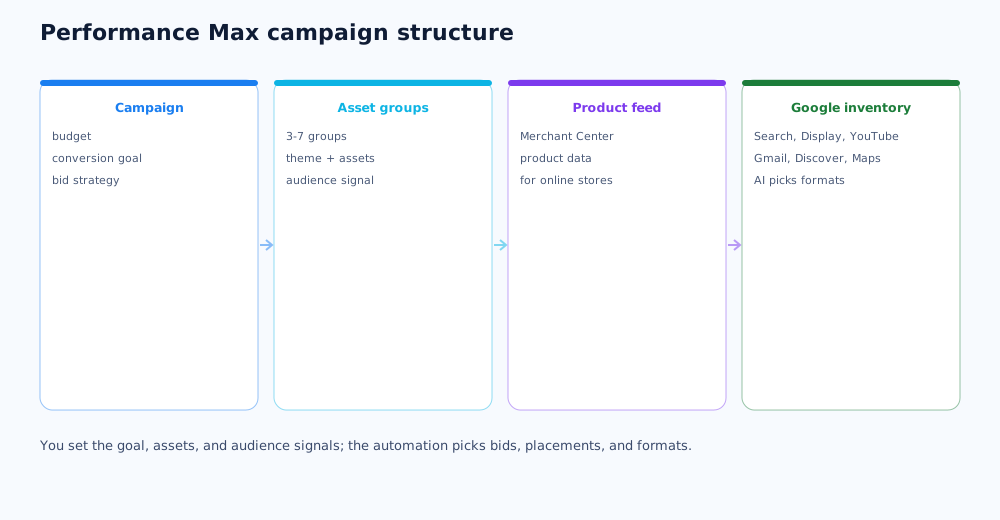
Performance Max (PMax) is a goal-based campaign: you set which action matters (a lead, a purchase, a call), and the system optimises impressions toward it. Unlike separate campaigns per channel, PMax works across all of Google's inventory at once.
One campaign spans these placements:
- Google Search and search partner sites;
- the Display Network;
- YouTube;
- Gmail, Discover, and Google Maps.
PMax was once criticised as a black box, but by 2026 advertisers have levers: negative keywords, reports by asset group and channel, and experiments to compare against Search campaigns. The full description is in Google's help on Performance Max campaigns.
02 When Performance Max fits and when it doesn't
PMax amplifies what already works but doesn't create demand or rescue a campaign with no data. Knowing this saves budget.
Performance Max is worth launching if:
- you run an online store with a product feed and a conversion history;
- conversion tracking is set up and you get at least a few dozen target actions a week;
- you need to scale a combination that already brings leads on Search or Shopping.
Hold off if conversions are near zero and analytics isn't set up, the niche is very narrow, you need full control over the query list, or the budget only covers 5–10 conversions a week — then the system won't exit learning.
03 Preparation before launch
PMax quality is almost entirely set by what's prepared before the campaign is created. The algorithm needs a goal, data, and materials.
What should be ready:
- Conversion tracking — key events in analytics and their import into Google Ads; how to set up the foundation is in the article on Google Analytics 4;
- A product feed and Merchant Center for a store — without a feed, PMax for ecommerce loses most of its point; general product data requirements are in the ecommerce SEO guide;
- First-party data — customer and subscriber lists for audience signals;
- Creative — logos, images in various formats, at least one video (or the system builds one from your materials, and the result is unpredictable).
An element missed at this step can't be made up with campaign settings — it caps the campaign throughout.
04 Step-by-step campaign setup
Assembling the campaign takes about fifteen minutes if the prep is done. The order of steps in the Google Ads interface is:
- Create a campaign, choose a goal and the Performance Max type.
- Set conversion goals — the actions the campaign optimises toward.
- Set the budget and bid strategy: Maximise conversions with no target at the start, then target CPA (tCPA) or target ROAS (tROAS).
- Set geo and languages; for a local business, restrict to the relevant regions.
- Turn off final URL expansion at the start — it sends traffic to any page on the site, and that's something to enable deliberately.
- Create the first asset group with assets and an audience signal.
After publishing, leave the structure alone for 2–4 weeks — covered in the learning phase section.
05 Asset groups and audience signals
An asset group is a set of assets on one theme plus its own audience signal. Groups are how you structure the campaign — for example, separate groups per product category or customer segment.
How to work with groups and signals:
- 3–7 groups per campaign. Fewer, and the algorithm can't segment; more, and the budget thins out;
- The splitting rule. If one asset in a group shouldn't be shown to all of its audience, split the group;
- An audience signal is a hint, not targeting. The strongest signals are your customer lists and retargeting audiences; how to build them is covered in the article on retargeting and remarketing;
- Search themes are added to suggest relevant queries until the system has data.
Asset requirements and the order of building a group are in Google's help on building an asset group.
06 Keeping control of the automation
PMax is more controllable than it seems. The control tools are worth switching on right away, not after the first wasted budget.
- Negative keywords at the account or campaign level — brand terms first, so PMax doesn't claim cheap brand traffic;
- Placement exclusions — cutting mobile apps and irrelevant sites;
- The asset group report and Insights — what shows, on which themes, and with what return;
- Experiments — a direct comparison of PMax with a Search campaign on part of the traffic to see the real contribution;
- Scripts and rules — automatic alerts on a spike in spend or a drop in conversions.
Without these settings PMax really does behave like a black box — but that's the advertiser's choice, not a limit of the tool.
07 The learning phase and common mistakes
The first 1–2 weeks after launch (sometimes up to 4 with few conversions) the campaign is in the learning phase: metrics jump, cost per conversion runs above target. That's normal if you don't interfere.
What breaks results most often:
- sharp changes to structure, bid strategy, or budget in the first weeks — learning restarts;
- launching with no conversions set up — nothing to optimise toward;
- one asset group for the whole catalogue instead of themed ones;
- final URL expansion on with no control over landing pages;
- no exclusion of brand queries;
- judging the campaign by clicks and impressions rather than cost per conversion and ROAS.
If you're still learning Google Ads, start with the account basics — covered in the article on setting up Google Ads yourself, and launching and managing PMax can be delegated as part of the work on paid channels.
If the product feed for Performance Max is not ready yet, setting up Merchant Center and the feed structure is the place to start — covered in the Google Shopping guide.
Performance Max isn't the only place AI operates in Google Ads; a broader look at what AI already does in PPC is covered in a separate article.
08 Frequently asked questions
How is Performance Max different from a Search campaign?
A Search campaign shows text ads only on Google Search for specific keywords you control. Performance Max, with one budget and one goal, shows ads across all of Google's inventory — Search, Display, YouTube, Gmail, Discover, Maps — and the automation picks asset combinations and audiences. You set the goal, assets, and audience signals, but not a keyword list.
Is Performance Max suitable for a beginner?
The campaign is easy enough to assemble, but without conversion tracking and a minimum volume of data PMax optimises blind and burns budget with no result. A beginner is better off starting with a regular Search campaign, building up conversions, and adding Performance Max once there's something to optimise toward.
How much budget does Performance Max need?
There's no universal figure — aim for the campaign to gather at least 30–50 conversions a week, or the system won't exit the learning phase. Size the budget from the cost per target action in your niche: at a 10-dollar cost per conversion that's roughly 300–500 dollars a week, plus a buffer for the first 2–4 weeks of learning.
Can I exclude brand queries from Performance Max?
Yes. At the account or campaign level, add a negative keyword list with your brand terms so PMax doesn't absorb cheap brand traffic and inflate its own performance. Also exclude unwanted placements and, if needed, specific sites and apps.
What matters more in Performance Max — assets or audience signals?
Both matter, differently. Assets determine what the user sees and which formats the system can serve: the more quality headlines, descriptions, images, and videos, the wider the reach. Audience signals speed up learning by telling the algorithm where to start. Weak assets cap the ceiling; weak signals only slow the start.
How long is the Performance Max learning phase?
Usually 1–2 weeks, sometimes up to 4 with few conversions. Metrics are unstable during this period, and that's normal. The key is not to change structure, bid strategy, or budget sharply: any major change restarts learning and pushes back a stable result.