
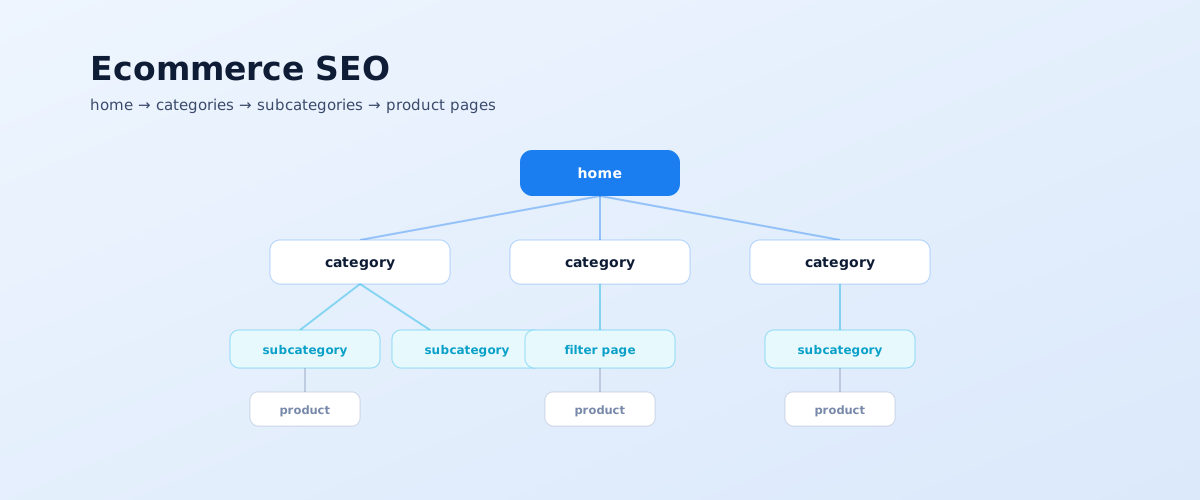
Ecommerce SEO differs from promoting an ordinary site in scale: thousands of URLs, auto-generated filter pages, duplicates, and an assortment that changes constantly. The winner isn't whoever writes the most text but whoever builds the right structure and clears the technical clutter. Below is a full guide: from the catalogue tree to structured data, content, and links.
01 Where to start: ecommerce SEO priorities
The main mistake at the start is diving straight into product-page copy. A store's main organic traffic goes not to product pages but to category pages and filter landing pages, so the order of work should be different.
A sensible sequence looks like this:
- keyword research and catalogue structure — a category tree mapped to demand clusters;
- a decision on filters — which combinations become separate pages;
- category page optimisation — headings, internal linking, useful content;
- product page optimisation — unique descriptions, specs, structured data;
- the technical layer — duplicates, canonicals, pagination, speed, sitemap;
- content and links — a blog, buying guides, external links and mentions.
Each step builds on the previous one: optimising categories before the structure is designed is wasted time.
02 Catalogue structure and keyword research
The catalogue structure is a map of which queries the store can even compete for. If a demand cluster has no page of its own, there's nothing to rank for it.
From demand to structure
First gather the keywords and split them into clusters by intent and SERP overlap — the process is covered in detail in the article on keyword research. Then design a category or subcategory for each major cluster: "laptops" → "gaming laptops", "laptops for work", "ultrabooks". Google doesn't use URL structure to work out a site's hierarchy directly — it relies on internal links, so it's important to connect the menu, categories, and subcategories with explicit links, as Google explains in its guide to ecommerce site structure.
Which filters to turn into landing pages
Users phrase some queries as a filter: "Nike trainers", "fridges under 15000", "red dresses". Combinations with real demand are worth turning into separate indexable pages with their own titles and URLs. The guide is search volume data: if a "category + filter value" pair has demand, build the page; if not, keep it out of the index.
03 Optimising category pages
The category is a store's main organic landing page. Its job is to show the assortment quickly, help narrow the choice, and make it clear to the search engine which query it answers.
What to work on for a category page:
- Title, H1, and meta description — with the category's main query, without listing every synonym in a row;
- A short useful text — how the subcategories differ, what to consider when choosing, which brands are stocked; not a wall of text for volume;
- Internal linking — links to subcategories, popular filters, and top products on the page itself;
- Breadcrumbs with BreadcrumbList markup — helpful for both the user and the search engine;
- Speed and layout stability — category pages with long product lists are heavy; watch Core Web Vitals separately;
- Pagination — pages 2, 3, N must be reachable via links and have unique titles; the canonical on paginated pages points to themselves, not to the first page.
A well-optimised category page tends to bring several times more organic traffic than an individual product page, because it captures high-volume top-of-funnel queries.
04 Optimising product pages
A product page usually covers a narrow query for one model, but there are thousands of them, and together they bring noticeable traffic. The main problem is identical supplier-feed descriptions on hundreds of stores.
What strengthens a product page:
- A unique description — at least rewritten, ideally your own: who it's for, how it differs, what's in the box;
- A title by the pattern "product + brand + model + key spec", not just a SKU;
- Specs in a table — structured data used to find the product by attributes;
- Photos and video with alt text — several angles, real images, not just the supplier's render;
- Reviews and rating — unique user content and a trust signal;
- "Similar" and "bought together" blocks — internal linking and retention;
- Product, Offer, and AggregateRating markup — per Google's ecommerce structured data requirements; it produces rich snippets with price, availability, and rating.
Products with variants (size, colour) are usually merged onto one page rather than spawning a dozen near-identical URLs.
05 Technical specifics of ecommerce
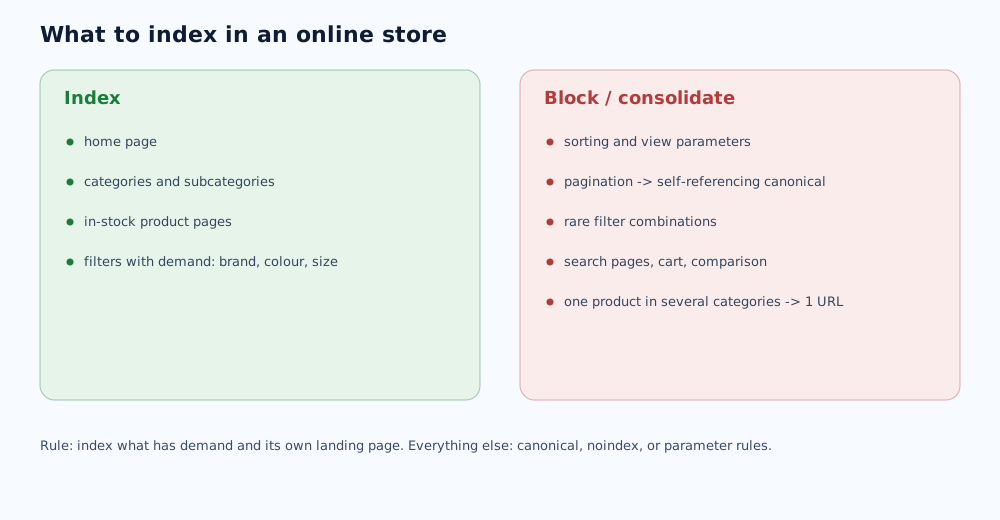
It's the technical layer that most often holds a store back: filters and sorting generate thousands of near-identical URLs that dilute crawl budget and compete with each other.
Faceted navigation and duplicates
Filter combinations split into two groups. With demand — separate pages with unique titles. Without demand — kept out of the index: a canonical to the parent category, noindex, or URL parameter handling. Filtering is convenient via AJAX, but the URL must change so the page can be opened from a direct link.
Canonicals, pagination, and one product in several categories
The same product reachable from several categories should have one primary URL that the other variants' canonicals point to. Google covers the general principles of handling duplicates in its documentation on consolidating duplicate URLs. www/non-www, trailing-slash, and http/https duplicates are removed with server-level redirects.
Sitemap, speed, and availability
Only indexable categories, filter landing pages, and in-stock product pages go into the sitemap. Out-of-stock products aren't deleted silently: the page stays with a label and a block of alternatives, or gets a 301 to the category if the product is gone for good.
06 Content and commercial factors
Beyond categories and product pages, a store needs content that reaches the user early in the decision and guides them toward a purchase.
- A blog and buying guides — for informational queries ("how to choose a vacuum", "how X differs from Y"), with links to relevant categories;
- The "article → category" link — every guide leads to a commercial page with the matching assortment;
- User reviews on products and in categories — unique content and a commercial signal;
- Trust factors — clear delivery, payment, and return terms, contacts, and a price on the page rather than "ask us".
It's also worth preparing content for AI-assisted results: how that works and what to change on pages is covered in the article on AI Overviews and GEO.
07 Links, analytics, and common mistakes
Links and correct analytics are what separates a store that grows from one that stalls after basic optimisation.
What to watch:
- Links — reviews and roundups, topical directories, PR, expert pieces and guides; how to build them without risk is in the article on link building;
- Analytics — GA4 ecommerce, Search Console reports by category, tracking the visibility of filter landing pages;
- Merchant Center and the product feed — a correct feed helps both free product listings and ads.
Common mistakes: betting on product pages instead of categories, indexable filters with no demand, wall-of-text SEO copy, silently deleting product pages, ignoring duplicates and pagination. A full self-check list is in the piece on the SEO audit. How it works in practice shows in our case studies — the electronics store and the home goods store. Full-service store promotion is SEO services.
Beyond SEO, a store is usually also promoted paid: Performance Max with a product feed for ads, and the Rozetka and Prom.ua marketplaces as a separate sales channel.
The linking scheme for categories, product pages, and blog articles mentioned above is covered in more depth in the separate internal linking guide.
How to set up the product feed itself and launch product listing ads is covered separately in the Google Shopping and Merchant Center guide.
How to research keywords specifically for catalogue categories, product pages, and filters is covered in the separate ecommerce keyword research guide.
08 Frequently asked questions
Where do I start with ecommerce SEO?
With catalogue structure and keyword research, not product-page copy. First gather queries, group them into clusters, and design the category and subcategory tree so every demand cluster has its own landing page. In parallel, decide which filters become standalone pages. Only then does optimising the categories and product pages themselves make sense.
What matters more for traffic — product pages or category pages?
Category pages and filter landing pages. They capture high-volume queries like "buy X", "X brand Y", "cheap X" and reach the user earlier in the buying cycle. Product pages matter too, but each usually covers a narrow query for one model. A store's main organic traffic goes to categories.
Does a category page need SEO text?
A short useful block — yes; a 3,000-character wall of text at the bottom — no. The text should help the user choose: how subcategories differ, what to look at when buying, which brands are stocked. If it's written only for the search engine and adds no value, skip it — assortment, structure, and links matter more for ranking.
What do I do about filters in SEO?
Split them into two groups. Combinations with clear demand (brand, size, colour, use case) become separate indexable pages with unique titles and, where possible, text. All other combinations are kept out of the index via a canonical to the parent category, a meta robots noindex, or URL parameter rules — otherwise filters generate thousands of near-identical pages.
How do I handle duplicates in an online store?
Set canonicals: pages with sort parameters, pagination, and most filters point to the canonical version of the category. The same product available from several categories should have one primary URL. Products with variants (colour, size) are usually merged onto one page. www/non-www and trailing-slash duplicates are handled with redirects.
What should I do with an out-of-stock product?
Don't delete the page if the product will return or has alternatives. Keep the page with an out-of-stock label, the price, and a notify button, and add a block of similar products. If the product is discontinued with no replacement, 301-redirect to the parent category or a suitable alternative rather than serving a 404.