
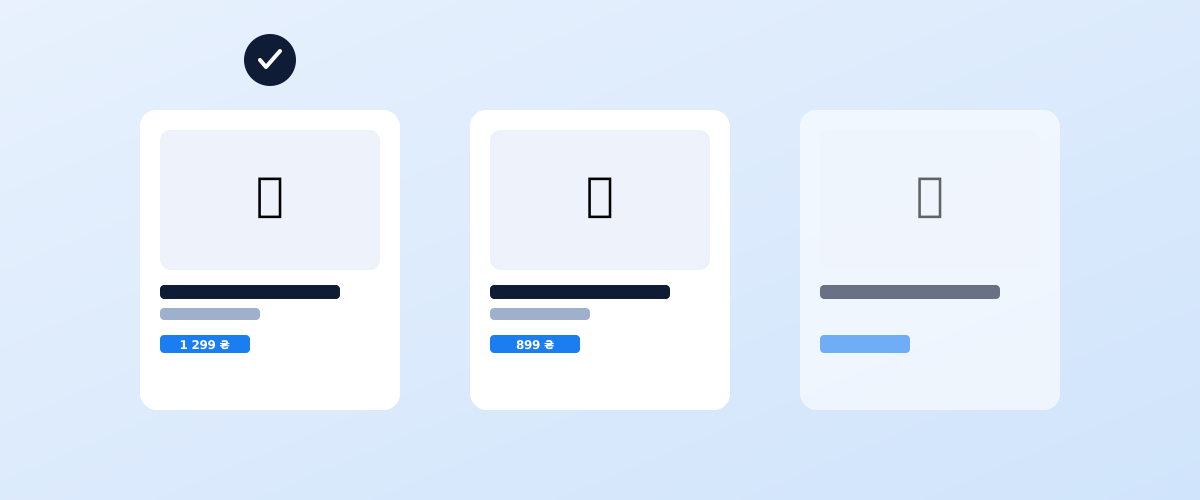
The product listings with a photo, price, and store name near the top of Google's results are not a separate ad network — they are a pairing of two services: Merchant Center, which holds structured data about every product, and Google Ads, which uses that data to run the ads. Once that pairing makes sense, launching a new campaign takes hours, not days.
01 What Google Shopping is and how it differs from regular ads
A standard text ad in Google Ads is built around keywords the advertiser picks by hand. Product ads work differently: instead of keywords, the system matches a user's query against product attributes from the feed — title, category, specs — and decides on its own which product to show for which query.
That leads to a practical consequence worth internalising: the quality of Shopping ads depends not on how well the ads are written but on how complete and accurate the product data is. A thin or inaccurate feed limits reach just as much as a small keyword list limits a regular campaign.
02 Creating a Merchant Center account and verifying the site
A Merchant Center account is created separately from Google Ads, even though the two get linked later. Signing up takes a few minutes, but it requires verifying ownership of the site — without that step, no feed can be uploaded.
Site verification uses one of the methods familiar from Search Console: an HTML tag on the page, a file uploaded to the server, Google Analytics or Google Tag Manager, or a DNS record. If Search Console is already set up for the site, the same verification method usually works for Merchant Center too — the details of ownership verification are covered in the article on Google Search Console. After verification, the account also needs a country of sale and currency set — these cannot be changed later without creating a new account, so it is worth getting them right the first time.
03 The product feed: required attributes and common disapproval reasons
A product feed is a file or data source that lists every product in the store with a set of standardised attributes. Google Shopping reads the feed, not the site directly, which is why the feed's quality determines everything that follows.
The required attributes without which a product will not pass review: a unique product ID, title, description, a link to the product page, a link to the image, availability, price, and a Google Product Category. The format requirements for each attribute are covered in detail in Google's product data specification.
The three most common reasons products get disapproved: a mismatch between the price or availability in the feed and the actual product page on the site; a missing GTIN on a branded product that requires one; and low-quality images — watermarks, text overlaid on the photo, or resolution below the minimum. A full list of common issues and their causes is in Google's Merchant Center policies help article.
04 Linking Merchant Center to Google Ads
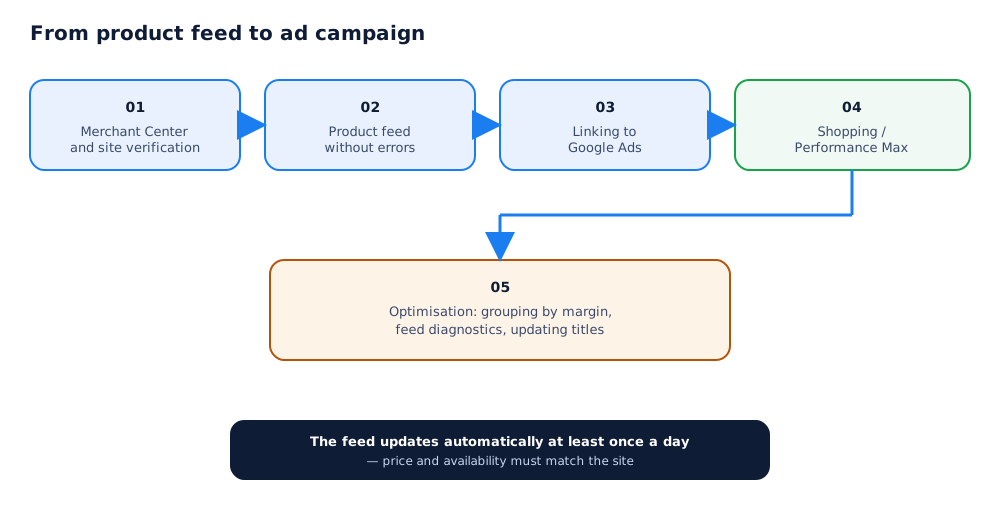
Approved products in Merchant Center do not show up in ads on their own — the account needs to be linked to Google Ads first. Linking works in either direction: the link request can be sent from Merchant Center or from the Google Ads interface, and the other side then confirms it.
Once linked, product data becomes available inside Google Ads as a feed source for building campaigns, rather than a separate dataset that needs to be duplicated by hand. Any change to price, stock, or the catalogue in the feed automatically carries through to campaigns already running, with no need to rebuild them.
05 Campaign types: Shopping and Performance Max for products
Once accounts are linked, two fundamentally different approaches to running product ads become available, and the choice between them decides how much manual control stays with the advertiser.
Standard Shopping campaigns show product ads only in Search and the Shopping tab, letting an advertiser manage bids by individual product group and prioritise the most profitable items. Performance Max uses the same feed but shows ads across every Google surface at once — Search, YouTube, Gmail, Discover, and partner sites — with the system optimising bids and budget allocation automatically. A detailed walkthrough of setting up and running Performance Max, including for products, is in the dedicated Performance Max guide.
06 Google's site requirements: returns, payment, stock
Beyond the technical requirements for the feed itself, Google also checks how well the merchant's site as a whole meets buyer expectations — a layer of requirements that is easy to overlook while focused only on data structure.
The site needs to clearly and easily show: return and exchange terms, accepted payment methods, real contact information for the business, and shipping information with approximate timelines. Missing any of these can get the whole account disapproved, not just individual products — Google treats this as a risk to the buyer, not just a formality.
07 Optimising product campaigns after launch
Launching a campaign is only the start: without ongoing attention to the data, product ad performance stagnates or gradually declines as the feed's information goes stale.
The main areas to work on after launch: grouping products by margin and priority so budget automatically shifts toward the most profitable items; regularly checking the diagnostics report in Merchant Center for new warnings and disapprovals; and updating product titles and descriptions to match how customers actually phrase their searches — an often-overlooked step, even though the quality of a feed's text attributes directly determines which queries a product shows up for at all. Where to find that phrasing is covered in the general ecommerce SEO guide, and if part of the catalogue also sells on marketplaces, similar product-page logic applies there too — see the article on promoting products on Rozetka and Prom.ua. Setting up and managing product campaigns can be delegated as part of paid search services.
The product feed built for Google Shopping can also power Meta Ads — which channel to prioritise is covered in Google Ads or Facebook Ads for an online store.
Google Shopping isn't the only way to sell beyond your own site; paid promotion tools on Ukrainian marketplaces are covered in advertising on Prom.ua and Rozetka Ads.
08 Frequently asked questions
How long does product review take in Merchant Center?
Usually a few hours to 3 business days for the first feed review. A brand-new account can take longer, up to a week. If products stay stuck in "Under review" past that window, it is worth checking the feed structure for errors.
Why do products get disapproved even though the feed looks correct?
The most common cause is not the feed itself but a mismatch between the feed data and the actual product page on the site: price, availability, or the title differ from what Google's crawler sees on the landing page. Another common cause is a policy violation — for example, no clearly stated price or shipping terms on the site page itself.
Can Google Shopping run without a website, using only a feed?
No. Every product in the feed must link to a real landing page for that product on the merchant's own site, showing the same price, availability, and details. Google Merchant Center is a way to structure catalogue data for ads, not a standalone marketplace.
What is the difference between standard Shopping campaigns and Performance Max for products?
Standard Shopping campaigns show only product listing ads and give control over individual product groups and bids. Performance Max uses the same product feed but also shows ads across every Google surface — Search, YouTube, Discover, Display — and manages bidding automatically, trading some control for reach.
Is a GTIN required if the manufacturer never assigned a barcode?
If a product genuinely has no manufacturer GTIN — handmade goods or a private-label product with no barcode, for example — the feed can set identifier_exists to false. For most branded products a GTIN is required, and its absence is a common cause of disapproval.
How often does the product feed need to be updated?
Automatically, at least once a day, through a regularly refreshed feed file link rather than a one-off manual upload. Price and stock levels need to reflect the actual state of inventory — advertising a product that is really out of stock leads to customer complaints and can lower the account's standing.