
An online store has hundreds or thousands of pages of the same type — categories, subcategories, product pages, filter pages — and the general approach to keyword research for a services site only partly applies here. Not because the principles differ, but because the scale and repetitive structure call for a system rather than researching keywords for every page by hand.
01 How ecommerce keyword research differs from a regular site
The core principles covered in the general guide to building a keyword list still apply: seed terms, expansion, cleaning, clustering. The difference is scale and repetition: the same keyword logic gets applied not to a handful of unique pages but to hundreds of near-identical categories and thousands of product pages.
That creates three problems specific to ecommerce: a template is needed to research keywords for an entire class of pages rather than each one individually; a decision has to be made about filter pages, which can technically outnumber actual products by orders of magnitude; and cannibalisation needs to be designed against from the start, because similar products and categories naturally produce similar, competing queries.
02 Researching keywords for catalogue categories
A catalogue category is usually the most commercially valuable page in its section — it typically captures the bulk of traffic for broad queries like "buy sneakers" or "gaming laptops". Category keyword research sits at the intersection of the product group's name and the qualifiers shoppers typically add.
Sources for category keywords: the product group's name in the phrasing customers actually use, not the internal name in the inventory system; common qualifiers — brand, price tier, purpose, target audience; and data on which queries send competitors traffic on comparable category pages specifically, not product pages. All three sources, combined with general commercial keyword research, produce a set that then gets split between the category and its subcategories.
03 Researching keywords for product pages
A product page competes for a different layer of queries — more specific, often including a model number, SKU, or exact name. Unlike categories, it makes no sense to research unique keywords for every single item in the catalogue by hand.
A practical approach: research keywords individually, down to synonyms and colloquial model names, only for flagship, high-demand products; use a template for the rest of the catalogue that auto-generates the title and description from the name, category, brand, and key specs; and write product descriptions around the real questions shoppers ask about that type of product, rather than copying the manufacturer's spec sheet word for word.
04 Working with filters and faceted navigation
Faceted navigation — filtering by brand, colour, size, price — can technically generate a near-unlimited number of URL combinations, and most of them carry no independent search value. Indexing every combination is a reliable way to create thousands of thin pages competing with each other.
The decision comes down to a combination of criteria: the filter combination has noticeable independent search demand — "women's nike sneakers" is searched separately from the general category, for example; the page has enough products that it does not look empty; and the combination does not duplicate an existing category page in meaning. If even one criterion fails, it is more sensible to close the filter page off from indexing with a canonical tag pointing to the parent category than to leave it open just in case. Google's own position on consolidating similar and duplicate URLs is covered in the documentation on canonical URLs.
05 Clustering and mapping keywords to pages
After researching keywords for categories, products, and filters, a task just as important as the research itself follows: mapping the collected queries to specific pages so each page answers its own intent without overlapping its neighbours.
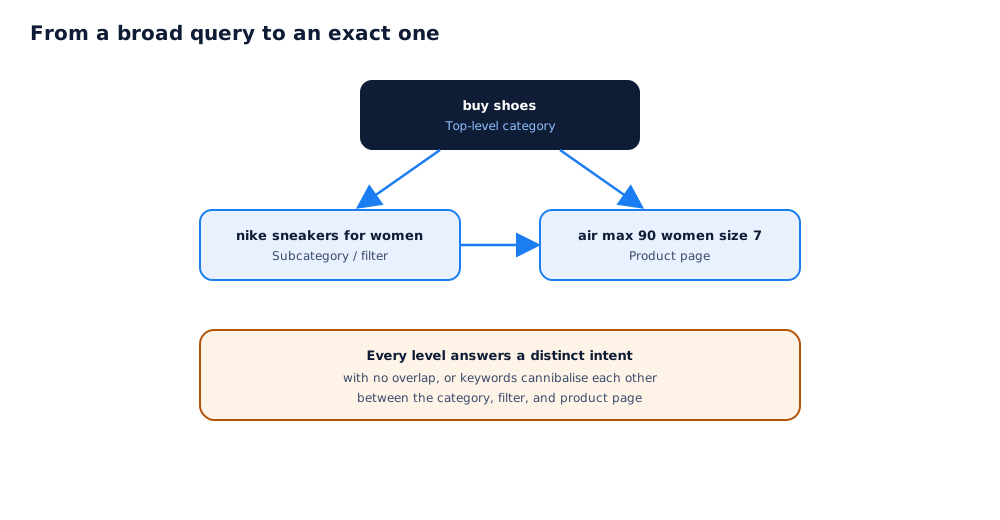
A practical mapping rule: broad general queries ("buy shoes") belong to the top-level category; qualified queries with a brand, gender, or purpose belong to a subcategory or an indexed filter page; and exact queries with a model number or SKU belong to a specific product page. How Google specifically approaches an ecommerce catalogue's structure and this kind of hierarchy is covered in Google's guide to ecommerce site structure.
06 Common mistakes: cannibalisation and duplicate meaning
Most keyword problems for an online store surface not during research itself but during the mapping stage, when several pages end up targeting the same query.
The most common mistakes: a category and a subcategory with an almost identical keyword and product set, leaving Google unable to decide which page to show; a filter page that duplicates the meaning of a category that already exists in the catalogue; and product pages with identical descriptions for product variants (different sizes or colours of the same model), which compete with each other instead of consolidating equity on one page with a variant selector.
07 Where to start with a large catalogue: prioritisation
Covering a catalogue of several thousand products with full keyword research in one pass is not realistic, and trying to do it all at once is not the best use of time.
A sensible order of work: start with the top-level categories that define the whole catalogue's structure and capture the most traffic; move on to the products and subcategories that bring in the largest share of revenue or margin, not alphabetical order; and only then work through the long tail of rare products and narrow filter combinations. How this fits into a store's broader SEO strategy is covered in the pillar article on ecommerce SEO, and the linking scheme between categories, product pages, and blog articles is covered in the internal linking guide. If there are no resources to research and map keywords for a large catalogue in-house, this can be delegated as part of an SEO campaign.
A finished keyword list only reaches its full potential on a platform that doesn't restrict URL structure and category metadata; what to check when picking a CMS for an online store is covered in the CMS comparison for SEO.
08 Frequently asked questions
Do I need separate keywords for every single product page?
No, not for a large catalogue. It only makes sense to research keywords individually for the best-selling flagship products; for the rest, a title and description template that automatically pulls in the name, category, and key attributes is enough.
How do I tell that two keyword clusters are actually cannibalising each other?
Check Search Console: if one page or another from the same site keeps ranking for the same query, rather than a competitor, that is a sign of cannibalisation. Another signal is both pages showing up for the same query at the same time, but at low, unstable positions, because Google cannot decide which one is more relevant.
Should every filter combination be open to indexing?
No. Only index filter combinations that have real, independent search demand and enough products that the page does not look empty. The rest are fine as navigation only, closed off from indexing with a canonical tag pointing to the parent category.
What should be done with categories that have fewer than 5–10 products?
Fold them into a broader category as a subsection instead of giving them their own landing page, until the range grows. A thin page with a couple of products and almost no unique text ranks poorly on its own and can come across as low-value to a visitor.
How do I prioritise if the catalogue has thousands of products?
Start with the categories and products that bring in the largest share of revenue or margin, not with alphabetical order. Covering thousands of product pages with full keyword research in one pass is not realistic, but the top 20% of a catalogue usually accounts for most of the traffic and sales.
Can the same keyword research be reused for a marketplace listing?
Product name and spec keywords, yes — those are universal. But page structure and how keywords map to categories on a marketplace are set by the platform's own rules, not your site's architecture, so a relevance map for a marketplace has to be built separately.