
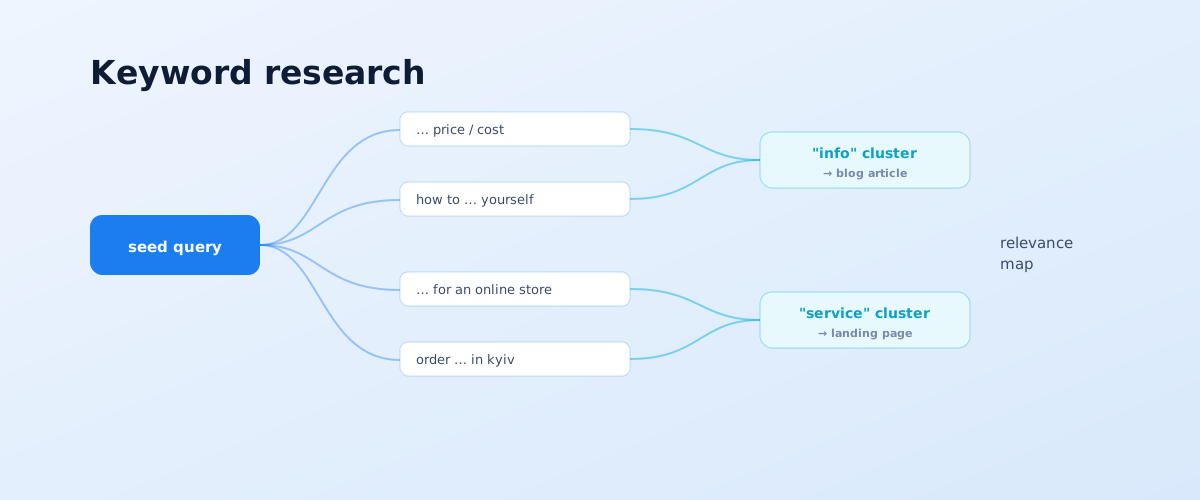
A keyword list is a set of the queries people use to look for your products or services, split into groups and mapped to pages of the site. Without it, SEO turns into guessing: you cannot tell which pages you need, what to write about, or what even counts as a result. Below are five steps to build a keyword list for a Google-focused site: from the first seed terms to a map where every cluster of queries is matched to a specific page.
01 What a keyword list is and what it is made of
A keyword list is not just a long list of key phrases but a structure. In it, queries are grouped so that each group corresponds to one page with one search intent. Built correctly, the list immediately answers the question of which pages the site should have and which queries to rank them for.
The list has several layers:
- Seed terms — short base phrases that name a direction: "plastic windows", "SEO promotion", "flower delivery".
- Expansions — everything people add to a seed: qualifiers, questions, locations, product attributes, synonyms.
- Clusters — groups of queries that logically belong on one page because they share an intent and a similar SERP.
- Relevance map — a "cluster → page" table that ties the list to the site structure.
02 Step 1. Seed terms: where to start
Building the list starts not with tools but with what you already know about the business. Seed terms are the names of your services, product categories and catalogue sections in the form customers phrase them, not the form they take in your internal system.
Where to get seed terms:
- the site structure and menu — each item is usually a seed;
- the price list and catalogue — the names of product groups and services;
- how customers phrase their request in enquiries, emails and calls;
- the sites of 3–5 competitors in the top — their sections and landing pages.
The first step produces a list of a few dozen short phrases. It is not a list yet but a set of growth points: from each seed, dozens and hundreds of refined queries branch out next.
03 Step 2. Expanding the list
At this step you collect, for each seed, all the real variants people add to the query. Expansion is done from several sources in parallel — each gives its own slice, and together they cover most of the demand.
Google Keyword Planner and Search Console
Keyword Planner in Google Ads shows query variants and their approximate volume for the region you need; an account is required, but you do not have to run ads. How to use it is described in Google Ads help on Keyword Planner. If the site already has traffic, the Performance report in Search Console is the most accurate source: it shows the queries the site actually appears for.
Paid tools: Serpstat, Ahrefs, SE Ranking
These platforms collect queries from their own databases, show volume, competition and — importantly — which queries competitors rank for. A "missing keywords" style report reveals phrases competitors rank in the top for while your site does not. For a small project a base plan or a trial is enough.
Suggestions and competitor keywords
Google search suggestions (what drops down as you type) and the "People also search for" block at the bottom of the results are a free source of real phrasings. Add a manual review of competitor landing pages: which queries they are obviously optimised for is clear from the headings and the text.
The free path
If there is no budget for paid tools, a working list is built from the combination of Keyword Planner + Search Console + suggestions + "People also search for" + a manual competitor analysis. It is slower and less complete than with the platforms, but for a services site with a few areas it is enough to build a structure and start promotion.
04 Step 3. Cleaning: negatives, junk, duplicates
After expansion the list holds hundreds and thousands of phrases, and a large part of them is not needed. Cleaning removes everything that will not bring target traffic — otherwise the list bloats and clustering produces junk groups.
What is removed at this step:
- Negative words — markers of the wrong intent: "free", "DIY", "used", "job", "employee reviews", the names of other cities if you work in one.
- Irrelevant queries — phrases with the same word but about something else: "spring" the season versus "spring" the part.
- Duplicates and near-duplicates — word reorderings and typos Google already treats as one query.
- Zero-volume queries — if volume data is available, phrases nobody searches for can be set aside.
Cleaning is convenient to do in batches: first run the list against stop words, then eye over what is left. It cannot be fully automated — some decisions depend on knowing the niche.
05 Step 4. Clustering: by intent and by the SERP
Clustering is splitting the cleaned list into groups, each of which can be targeted on one page. A mistake here is the most expensive: if you put queries with different intent into one cluster, the page will not reach the top for any of them.
Clustering is done in two passes:
- By intent. First the queries are split into groups by goal: informational ("how to choose", "what is"), commercial ("buy", "price", "order"), navigational (by brand). One cluster — one intent.
- By the SERP. Then within an intent the queries are grouped by how similar their top 10 is. If Google shows largely the same pages for two queries, they can be targeted together. Clustering tools do this, but the result is always checked by hand.
To work out the intent when it is not obvious from the words, look at the SERP: whatever Google already shows in the top for that query is what it considers the right answer. Google says plainly in its SEO Starter Guide that a page should match what people are actually searching for.
06 Step 5. The relevance map: which cluster to which page
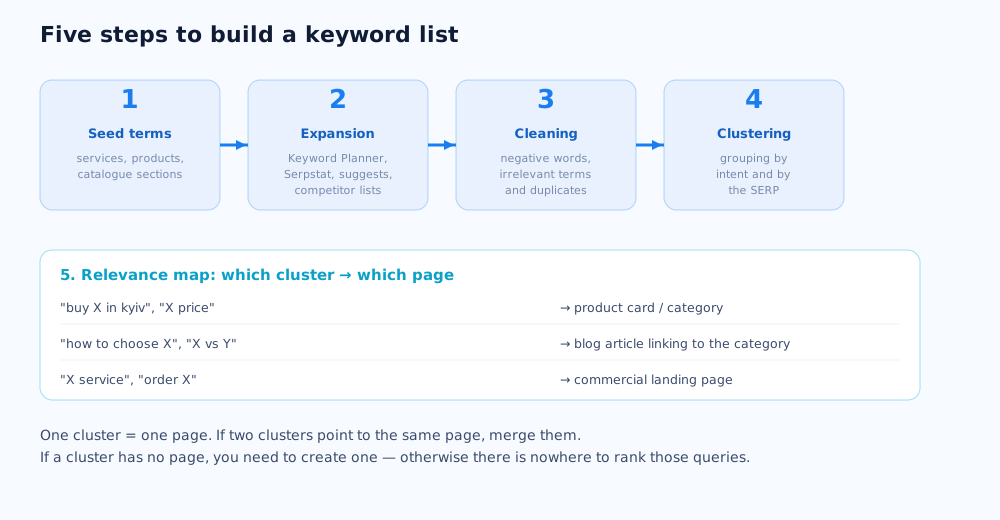
The last step turns the list into a work plan. The relevance map is a table where every cluster is matched to a specific page of the site: an existing one or one that needs to be created. Without this mapping, the list is just a list — you can neither write content from it nor measure progress.
How the map is built:
- a commercial cluster ("X service", "buy X in the city") → a service landing page or a product category;
- an informational cluster ("how to choose X", "X vs Y") → a blog article that links internally to the commercial page;
- if a cluster has no suitable page — that is a brief for a new page;
- if two clusters insistently point to the same page — merge them into one.
A finished relevance map is the content plan: you can see how many new pages are needed, which existing ones to rework, and in what order. All the work on the site follows this map — from copy to internal linking, which we cover in the pillar piece how to promote a website to the top of Google yourself.
07 Common mistakes in keyword research
Most problems with a keyword list come not from a lack of tools but from breaking the logic at one of the steps. Below are the mistakes that show up most often.
- One page for many intents. Trying to rank one page for both "buy X" and "how to choose X" is a sure way to reach the top for neither.
- High-volume queries only. Ignoring the long tail deprives the site of the traffic that is easiest for a young project to win.
- A list with no relevance map. A set of queries not tied to pages does not turn into work and sits unused.
- Queries for pages that do not exist. You built a cluster but never created the page — so there is nothing to rank those queries on.
- Built once and forgotten. Demand changes; a list not reviewed every six months goes stale.
A finished keyword list is the foundation the rest of SEO rests on. What to do once the list and the map are ready is covered in the articles a DIY SEO audit checklist and how long does SEO take. If you would rather not build the keyword list and structure alone, it can be delegated — see SEO promotion.
For an online store the relevance map is built around categories and filters — see the ecommerce SEO guide for how. A separate query cluster often lives on external sites — that's where the link building guide helps.
Some topics for new pages come not from tools but from competitor analysis in SEO and paid ads — from queries that already bring traffic to others.
Ready clusters turn into an article queue through a content plan for a blog — with prioritisation and links to commercial pages.
For B2B sites, keyword selection follows different logic — precision matters more than volume; more on that in the article on B2B SEO.
Researching keywords for an online store's categories, product pages, and filters has its own specifics, covered in the ecommerce keyword research guide.
Beyond Keyword Planner, a few other free tools help with building and checking a keyword list — the full roundup is in free SEO tools to get started.
Expanding and roughly clustering a keyword list can be sped up with AI tools — an overview organized by task is in a separate article.
Some of the queries gathered will be phrased as full questions rather than short keywords — closer to how voice queries are phrased; whether a site needs separate optimization for that is covered in voice search and SEO.
08 Frequently asked questions
What free keyword research tools are there?
Google Keyword Planner (a Google Ads account is required, no need to run ads), the Performance report in Search Console for a site that already has traffic, Google search suggestions, and the "People also search for" block at the bottom of the results. Serpstat, Ahrefs and SE Ranking give a limited number of free checks per day. For a small site this set is enough to build a working list.
How many keywords should a keyword list have?
There is no right number — the size of the list is set by the site structure, not the other way round. For a services site with 5–7 areas it is usually 300–800 keywords; for a mid-size online store, thousands. The guide: one cluster of a few same-intent keywords per landing page. If there are more keywords than pages can cover, part of the list is not needed yet.
Why is SERP-based clustering better than manual grouping?
SERP-based clustering groups keywords by how similar their top 10 is: if Google shows largely the same pages for two queries, they can be targeted on one page. This is more accurate than manual logic because it reflects how the search engine itself sees the closeness of queries. A manual check is still done afterwards — tools sometimes get rare queries wrong.
What if a cluster has no page?
That cluster is a brief for a new page. If the queries are commercial, you create a landing page for the service or category; if they are informational, an article that links to the commercial page. Ranking queries with no matching page on the site is impossible: Google has nothing to rank for that cluster.
How do I work out the intent of a query?
The most reliable way is to look at what Google already shows in the top 10 for that query. Product cards and categories mean commercial intent; articles and guides mean informational; official brand sites mean navigational. The words in the query also hint: "buy", "price", "order" are commercial; "how", "what is", "reviews" are more often informational.
Does the keyword list need updating?
Yes, every 3–6 months. New query phrasings appear, seasonal demand shifts, services and products are added. Search Console data also shows queries the site already gets impressions for that are not in the list — worth adding and building pages around.