
A content plan isn't a list of topics "to think about" — it's a tool that ties articles to the business's money: it shows what to write, in what order, and which commercial page each piece supports. Below is a five-step method and a table template you can use to build a plan in a day.
01 Why you need a content plan, not "writing when inspired"
A blog with no plan usually looks like this: a few articles on scattered topics written when convenient, with no link to services and no measurement. That blog brings neither traffic nor leads, and gets shut down six months later as "didn't work".
A content plan solves three things:
- Predictability — it's clear what will ship in the next 2–3 months and why;
- A link to the money — every article leads to a commercial page and supports promotion;
- Team efficiency — writers and editors work through a priority queue, not random requests.
Next: the five steps that turn "we need a blog" into a working plan.
02 Step 1. Goals and the link to the money
The first thing you fix is why the blog exists. For a business the goal is almost always one: bring organic traffic to commercial pages and warm the audience up to an enquiry.
For each future topic, answer two questions in advance: which service or category it strengthens, and through which anchor the internal link will point to it. It helps to sort topics by funnel stage: top (broad informational queries), middle (comparisons, "how to choose"), bottom (close to purchase — prices, reviews, guarantees). Topics with no link to at least one commercial page don't make the plan. How this logic works in practice is shown in the article on SEO services — content strategy is part of the service there.
03 Step 2. Where topics come from
Blog topics aren't invented at a desk — they're gathered from sources that reflect real demand and real audience questions.
Working topic sources:
- The keyword list — query clusters with no page yet on the site; how to build it is in the article on keyword research;
- Competitor analysis — topics competitors get traffic for where you have nothing (content gap); the method is in the article on competitor analysis;
- Customer questions — what's actually asked in sales, support, comments;
- Search Console — queries the site already shows for at positions 8–30 that lack a page of their own;
- Niche trends — new tools, platform changes, seasonal topics.
The output is a long list — usually 30–60 topics, of which the near-term plan will take a slice.
04 Step 3. Prioritising topics
A topic list on its own isn't a plan — you have to decide what to write first. Priority is set not by volume alone but by a sum of factors.
A topic moves up the queue if it has:
- confirmed search demand;
- high business relevance — it brings the target audience, not a random one;
- a realistic shot at the top 10 given competition and the site's age;
- a clear commercial page it strengthens;
- a visible content gap — competitors in the top, you're not;
- long-term, evergreen demand.
The start of the plan gets warm topics (close to an enquiry) and "easy" ones — long tail, low competition — so the blog starts producing results sooner.
05 Step 4. Formats and article structure
The format isn't chosen by the writer but by search intent: look at the top 10 for the query and match the page type, then make it more complete — Google states in its SEO starter guide that a page should match what people are looking for. A how-to, a comparison, a roundup, a term explainer, a review — each intent has its format.
A base structure that fits most informational articles:
- a short answer to the main question in the first paragraphs;
- H2 and H3 sections for the subtopics competitors cover, plus the ones they miss;
- an FAQ block on real follow-up questions;
- at least two internal links — one to a commercial page, one to a related article;
- at least one image that earns its place — a diagram, a table, an example.
Each article gets a short brief: main query, secondary queries, H2–H3 structure, what must be covered, internal links. Checking the finished piece against the questions in Google's helpful content document is a good final pass. How to write a title and description for that brief that get clicks is in the article on Title and Description meta tags.
06 Step 5. Frequency, resources, and a calendar
A plan lasts exactly as long as the team can sustain it. So the pace is set to resources, not ambition.
What to account for:
- Frequency — 1–2 articles a week for most blogs; consistency beats bursts;
- Roles — writer, editor, SEO specialist (keywords and linking), design for images;
- Calendar — a table with publish date, topic, owners, and status;
- Buffer — 20–30% of the time for updating already-published articles, not only new ones.
If there aren't resources for a regular pace, it's more honest to plan 2–3 strong articles a month than to schedule eight and ship none.
07 The content plan template and how to measure it
The plan is best kept as one table where each row is an article and the columns answer every question about it before it's written.
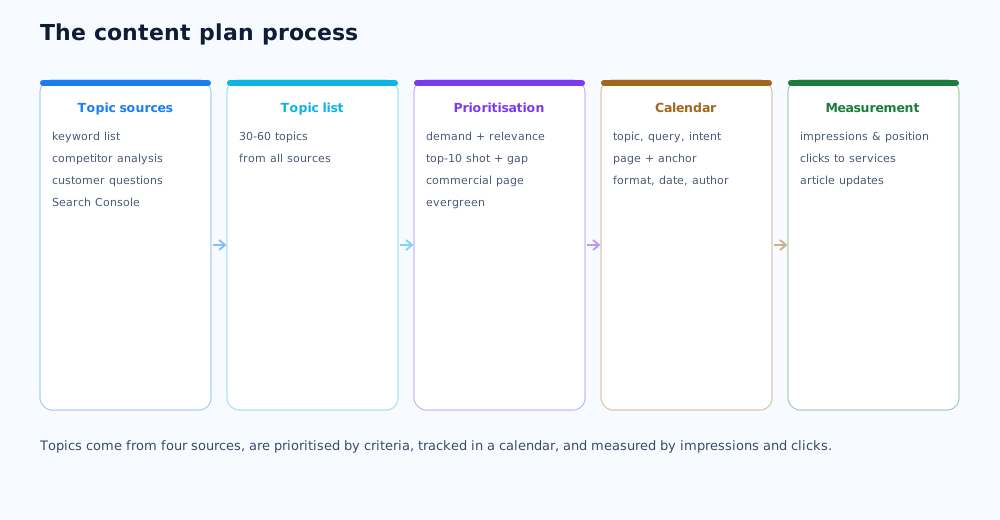
The minimum set of table columns: topic and working title, main and secondary queries, search intent, cluster, commercial page and anchor for linking, format, status, publish date, author, internal and external links. Judge the blog by growth in impressions and average position in Search Console, organic traffic to articles, clicks from articles to commercial pages, and leads the blog was part of the path for. Review the plan quarterly: add new topics, refresh articles that slipped, and reinforce the ones close to the top. How to fit the blog into the wider channel mix is covered in the article on integrated marketing, and which topics will matter over the next year is in the SEO trends 2026 overview.
For B2B companies, a content plan is built around funnel stages and the different roles in a purchasing decision — that approach is covered in the article on B2B SEO.
08 Frequently asked questions
How do I start a content plan for a blog?
Start with the goal: decide which commercial pages the blog should support and through which topics. Then gather a keyword list, split it into clusters, and draft a topic list. Only then move to prioritisation and a calendar. A content plan that starts from a list of "what we feel like writing about" almost always produces articles with no traffic.
How many articles per month should I publish?
A workable pace for most blogs is 1–2 articles a week, so 4–8 a month. Consistency matters more than volume: three quality pieces a month on a plan beat ten random ones in one sprint followed by silence. Set the pace to the team's resources, not the other way around.
How do I come up with blog topics?
You don't invent topics, you find them: from the keyword list (query clusters with no page of their own), from competitor analysis (content gaps), from real customer questions in sales and support, from the Search Console report (queries with impressions but positions 8–30). Topics invented off the top of your head rarely match real demand.
How do I tell whether the blog is working?
By four metrics: growth in impressions and average position in Search Console, organic traffic to specific articles, clicks from articles to commercial pages, and leads the blog was part of the path for. Pageviews and time on page are supporting figures — you can't judge payback by them.
Does a small business need a content plan?
Yes, and even more so: a small business has fewer resources, and every article has to work. The plan doesn't have to be complex — a table of 15–20 topics tied to services, with a format and a publishing order, is enough. That alone separates a systematic blog from a chaotic one.
How long until the blog produces results?
The first articles start gathering impressions in 1–2 months, noticeable organic traffic in 4–6 months, and a steady flow in 6–12 months of regular publishing. A young site takes longer; the long tail, internal linking, and external links to the best pieces speed it up.