
The title and description are the first thing a user sees about your page in results, before any click. They decide whether someone clicks or scrolls past — and the title also shapes how precisely Google understands the page. This guide covers how to write them, why Google sometimes rewrites them, and how to check meta tags across a whole site.
01 Why titles and descriptions matter and how Google sees them
The <title> element and the meta description don't show on the page itself — they work in results, in the browser tab, and when a link is shared to messengers and social media.
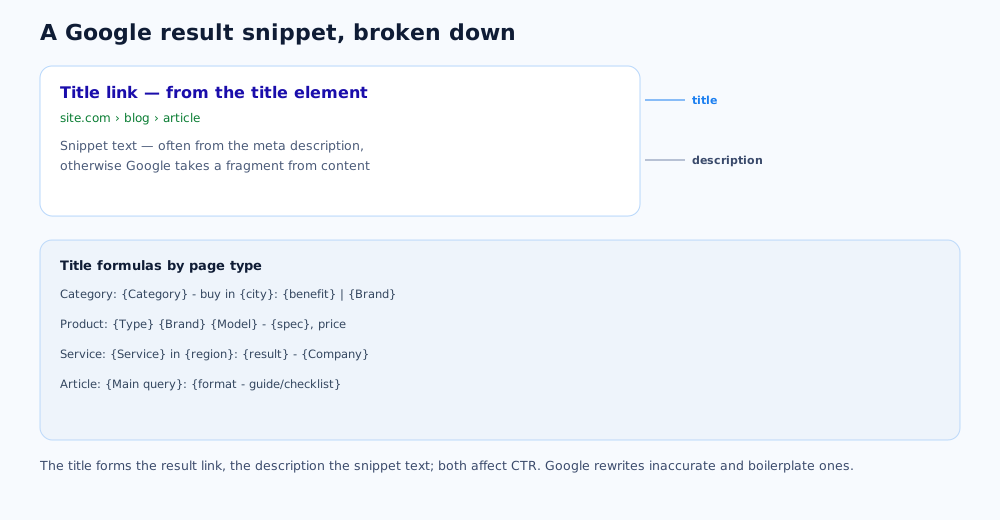
How it works:
- The title becomes the result link; Google's rules are in the document on title links;
- The description is used as snippet text "if it might give users a more accurate description", per the document on snippets; otherwise the snippet is built from page content;
- both affect CTR — the share of clicks from impressions — and the title also helps Google determine the page topic.
The takeaway: write them first for the person deciding whether to click, and add keywords naturally.
02 Title: length, structure, keywords, mistakes
A good title explains in a few words what's on the page and sets it apart from neighbouring results. Start with the main point, not the brand.
What to aim for:
- Length — no hard limit, but the title is truncated to device width; a practical guide is around 55–60 characters, key part first;
- Structure — "main query + modifier + brand": for example, "Website SEO Audit: A Checklist — Grottix";
- Key query — near the start and phrased naturally, not as a list;
- Uniqueness — a distinct title per page; boilerplate and repeated titles get rewritten more often.
Common mistakes: comma-separated keyword lists, identical titles on dozens of pages, empty "Home" or "Services", and a title where the key part comes after a long intro and is lost on truncation.
03 Description: why it matters if it doesn't affect ranking
The description doesn't lift positions, but it controls what text represents the page in results — and therefore the click. It's an ad line, not a place for keywords.
How to write it:
- one or two sentences on the substance of the page: what the person gets and why to click;
- unique per page; for large catalogues, from a template with the page's data filled in;
- no keyword lists — Google often ignores those descriptions and builds the snippet itself;
- it's fine to include specifics not as a sentence: price, timeline, contents, guarantee.
A length guide is roughly up to 150–160 characters in mobile results; longer text is cut, so put the point first.
04 Why Google rewrites meta tags and how to avoid it
Google doesn't have to show your title and description verbatim. It substitutes its own version when it thinks that's clearer for the user.
Google changes the title link when the original title is:
- uninformative or too generic ("Products", "Catalogue");
- boilerplate and repeated across many pages;
- keyword-stuffed;
- not matching the page content or the specific query.
Google replaces the description with a content fragment when that answers the query better. You can't fully block rewriting, but the odds drop when title and description are accurate, unique, and written for the page's real intent. The rules are in the same Google documents — on title links and snippets.
05 Templates for common page types
For a site with hundreds of similar pages, meta tags are generated from templates and only priority pages are hand-tuned. The formula depends on the page type and intent.
Working patterns:
- Store category — "{Category} — buy in {city/country}: {short benefit} | {Brand}";
- Product page — "{Type} {Brand} {Model} — {key spec}, price | {Store}";
- Service page — "{Service} in {region}: {for whom/result} — {Company}";
- Blog article — "{Main query}: {format — guide/checklist/comparison}";
- Local page — "{Service} {district/city} — {contact benefit}".
How the catalogue structure these store templates are written for is built is covered in the ecommerce SEO guide.
06 How this ties to CTR and positions
Meta tags are one of the few tools that can move traffic without changing positions: the same position with a more clickable title brings more visits.
How to work with this systematically:
- in Search Console, find pages with many impressions but a low CTR relative to their position;
- rewrite their title and description for the queries they show for;
- after 2–4 weeks compare CTR on the same queries — it's a hypothesis, not a guaranteed lift;
- don't rely on tricks like emoji and caps for their own sake — they help only when they reinforce meaning.
How to track positions and read CTR in Search Console for correct conclusions is covered in the article on checking your site's rankings.
07 Mass checking and rollout
On a mid-sized site, meta tags are fixed in bulk, not page by page: find the problems first, then fix with templates and hand-tuning.
- A crawler (Screaming Frog and similar) reports empty, duplicate, and overly long titles and descriptions;
- Search Console shows which queries a page actually shows for and whether it's out of sync with its title;
- CMS templates cover the mass of similar pages;
- Hand-tuning — for the home page, key services, top categories, and articles.
Checking meta tags is part of a broader site SEO audit; how snippet requirements are shifting in the age of AI search is covered in the SEO trends 2026 overview. Rewriting meta tags across a whole site can be done with our help too — it's part of SEO services.
08 Frequently asked questions
Does the description affect rankings?
Not directly — meta description content isn't a ranking factor. But the description often becomes the snippet text in results, and a good snippet raises CTR — the share of clicks from impressions. That indirectly affects traffic, so the description is written to be worth clicking, not just to fill a field.
Why does Google show a different title than mine?
Google rewrites the title link if it decides the original title is uninformative, boilerplate, keyword-stuffed, or doesn't match the page content or the specific query. To avoid it, the title should be unique, describe that page specifically, and align in meaning with what's on it.
How long should a title be?
The tag has no hard limit, but in results the title is truncated to the device width — a practical guide is around 55–60 characters, with the important part first. A longer title is fine if the key part is at the start so it survives truncation.
Should I put the brand name in the title?
Usually yes, at the end: "Main query — modifier — Brand". It helps recognition and doesn't hurt as long as the brand doesn't crowd out the key phrase. For the home page and brand queries the company name can go first. On pages with a long title the brand is sometimes dropped so meaning isn't lost on truncation.
Can I use one description for several pages?
No. Identical or near-identical descriptions on different pages are a common mistake: Google then more often builds the snippet from content itself, and meta tag reports show mass duplicates. For large catalogues, descriptions are generated from a template with the specific page's data filled in.
How do I check meta tags across the whole site?
Run the site through a crawler (Screaming Frog and similar) — it flags empty, duplicate, and overly long titles and descriptions. Also check in Search Console which queries a page shows for: if the title doesn't reflect those queries, rewrite it. Priority pages are fixed by hand, the rest via CMS templates.