
Checking rankings is not about the numbers themselves but about knowing whether SEO is working and where to go next. The catch is that a "site's position" is not a fixed value: Google shows different results to different people, and the number you see in your browser almost never matches the real picture. Below are four ways to check positions, from a quick manual look to professional monitoring, with an honest breakdown of where each one lies and how to read the data correctly.
01 The short answer: which method for which job
There is no single "correct" method — there are four, and each covers its own job. In short, the choice depends on how many queries you track and how often. Below is the quick logic of the choice, followed by a separate breakdown of each method with setup and pitfalls. The list of queries worth tracking itself comes from the keyword list — how to build it is covered in a separate guide.
- Search Console — the primary tool: free, data straight from Google, showing average position, impressions and clicks for each query. Suitable for everyone.
- Manual check — for a quick look at 3–5 key queries right now. Inaccurate, but sometimes needed.
- Free online checkers — for a one-off check of 10–20 queries with no sign-up.
- Paid trackers — when there are dozens or hundreds of queries and you need daily monitoring with history and competitor comparison.
02 Method 1. Manually in search — and why it is inaccurate
The most obvious method is to type a query into Google and see where the site sits. It is free and instant, but by default it gives a distorted result, because Google tailors the results to the specific user. To get at least an approximation of the average picture, the check has to be done correctly.
How to check correctly
A few steps help minimise personalisation. They do not give perfect accuracy, but they remove the crudest distortions that make your own site look higher than it is for most users.
- Open a window in incognito mode to disable search history and sign-in.
- Set the region you need: in search settings or by adding a city to the query.
- Check mobile and desktop results separately — they differ, and in most niches most traffic is mobile.
- Count the position among organic results, excluding ad blocks and often the AI answer block.
Why the number is still approximate
Even with perfect preparation, a manual check remains an estimate. Google still factors in your device, precise geolocation by IP and dozens of other signals, and the results themselves fluctuate during the day due to recalculation and tests. It also does not scale physically: you can check 5 queries this way, but not 200. So the manual method works as a quick one-off look, not as the basis for evaluating SEO performance.
03 Method 2. Google Search Console
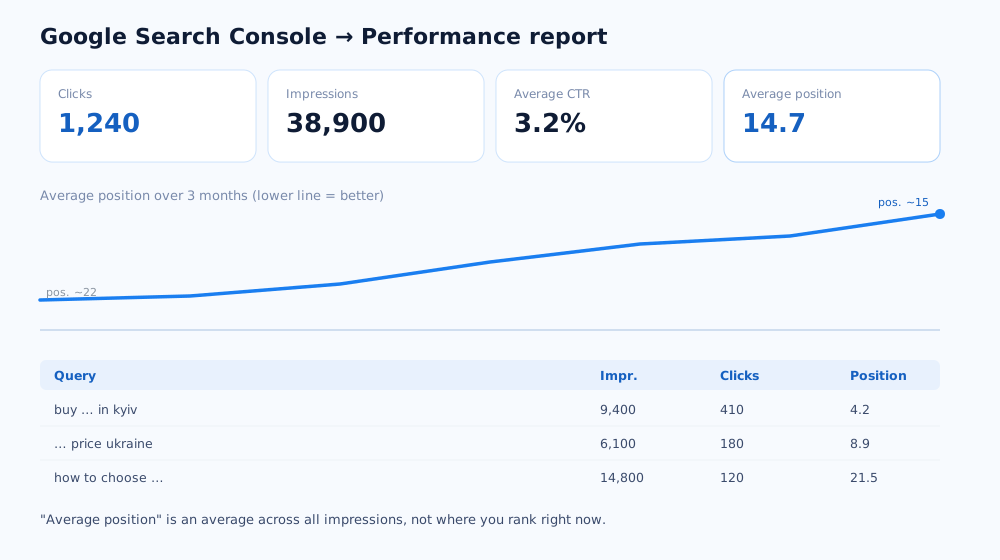
Search Console is a free Google service that shows which queries the site actually appears for, at what average position, and how many impressions and clicks it gets. This is first-party data, not a third-party estimate, so it is where you should start; the tool itself is documented in detail in Google's Performance report help.
How to set it up and verify the site
To get data you need to add the site to the service once and confirm that it is yours. The procedure takes a few minutes and is described in Google's help on verifying site ownership. In short:
- Add the property — by domain (covers all subdomains and protocols) or by URL prefix.
- Verify ownership by one of the methods: a DNS record, an HTML file on the server, a tag in the code, or access via Google Analytics or Tag Manager.
- Wait: the first data appears in 1–3 days, and a full history builds over a couple of weeks.
How to read "Average position" and not panic
The main trap in Search Console is treating average position as your place in the top. It is not: it is an average across all impressions of a page for all queries over the period. If the site started appearing for new queries where it currently sits at position 40, average position gets worse, even if you moved from 8th to 4th on your main commercial queries. So you should look not at the overall number but at the trend for specific queries and pages: filter the report by the query you care about and look at the position trend for that query alone.
04 Method 3. Free online checkers
These are services where you enter a domain, a list of queries and a region, and the system shows the position for each. They are handy when you need to quickly check 10–20 queries with no Search Console setup — for example, when auditing someone else's site or before you have console access.
Things to keep in mind with free checkers:
- Free limits are small — usually a few dozen checks a day.
- Data is pulled at the moment of the request and stored nowhere: there is no history or charts, and you cannot compare with last month.
- Different services may show different positions for the same query due to differences in data centres and check parameters.
They are not suitable as the primary monitoring tool, but for a one-off "look right now for a list of queries" task they work fine.
05 Method 4. Paid rank trackers
When there are dozens or hundreds of queries and positions need to be tracked over time, you need a dedicated tracker: Serpstat, SE Ranking, Ahrefs, Rank Tracker and similar. They automatically pull positions every day for a fixed region and device, build charts, show which pages rank for each query, and let you compare trends against competitors.
What these services add over the free methods:
- History for each query over months and years — you see a trend, not a point.
- Breakdown by region, city, language and device type in one report.
- Tracking competitors on the same queries and gauging the gap.
- Alerts on sharp changes and entering or dropping out of the top.
The choice of a specific service depends on the number of queries and the budget; for a small project a plan for 100–300 keywords is enough. Search Console stays in the picture — the tracker complements it with precise positions, while the console provides clicks, impressions and data on which queries actually bring people in.
06 How often to check and what counts as normal
Positions in Google fluctuate every day: updates roll out, factors are recalculated, results variants are tested. Because of this, daily checks create a sense of constant drops and spikes that are not really there. Look at positions less often and over a longer horizon.
- Once a week — a sufficient frequency for most projects: you see the trend without drowning in daily noise.
- Swings of 3–5 positions day to day are normal, not a problem, especially outside the top 10.
- Assess the trend over 4–8 weeks — a steady move up or down over a month or so says more than a two-day spike.
- Cross-check against Google updates — if many queries dropped at once and competitors also shifted, it is most likely an update, not an on-site error.
07 Common mistakes when checking positions
Most wrong conclusions about rankings come not from the tools but from how their data is read. A few typical mistakes that lead to false alarm or, conversely, to complacency.
- Checking your own site from your own browser without incognito — Google remembers that you visit your site often and inflates its position for you personally.
- Judging SEO by a single average position in Search Console — without a query breakdown it is misleading, as described above.
- Checking positions without a fixed region — for a local business, the position in your own city and across the country can differ several times over.
- Ignoring the difference between mobile and desktop results — if the audience is mostly on phones, mobile positions are what to go by.
- Panicking over a single day — a one-off dip most often recovers on its own within a week.
Properly set-up rank monitoring is part of the regular work on a site, alongside content and technical work. How it is built into the promotion process can be seen on the SEO promotion page; how long it takes to expect ranking growth at all is covered in the article how long does SEO take. And if you are still choosing between organic and paid traffic, the breakdown of SEO vs PPC will help. And if positions keep sliding and it is not an update, it is worth running a full technical review against the DIY SEO audit checklist.
For a local business, positions in Google Maps and the local pack are tracked separately — how, and what affects them, is covered in the article on local SEO.
If positions are there but clicks are few, it's often the title and description — how to improve them is in the article on Title and Description meta tags.
Beyond ways to check rankings, a full SEO workflow needs a few more categories of free tools — the roundup is in free SEO tools to get started.
08 Frequently asked questions
How do I check my rankings for free?
Two free ways: Google Search Console (the Performance report shows the average position for each query directly from Google) and a manual check in incognito mode with the region set. Free online checkers work for a one-off look at a few queries, but not for ongoing monitoring.
Why do my client and I see different positions for the same query?
Google personalises results: region, search history, device and language all affect position. That is why a manual check gives different numbers for different people. It is more objective to look at average position in Search Console or tracker data with a fixed region and a depersonalised check.
How often should I check rankings?
Once a week is enough for most projects. Results fluctuate daily due to updates and recalculation, so daily checks create noise and a false sense of drops. A trend over 4–8 weeks is more informative than a two-day spike.
Is average position in Search Console my place in the top?
No. It is an average across all impressions of a page for all queries over the selected period. If new queries were added where the site is still low, average position gets worse even if you moved up on your main queries. You need to look query by query and page by page.
Can I check a competitor's rankings?
There is no Search Console data for someone else's site, but paid services like Serpstat, Ahrefs and SE Ranking estimate a competitor's visibility and positions across a shared query database. Accuracy is approximate, but it is enough to compare trends and gauge the gap.
Rankings dropped in a single day — what should I do?
First check whether the set of queries changed and whether a Google update is rolling out. Then make sure the page is reachable and indexed. A one-off dip of 1–2 days usually recovers on its own; act if the decline holds for a week and is confirmed in Search Console.