
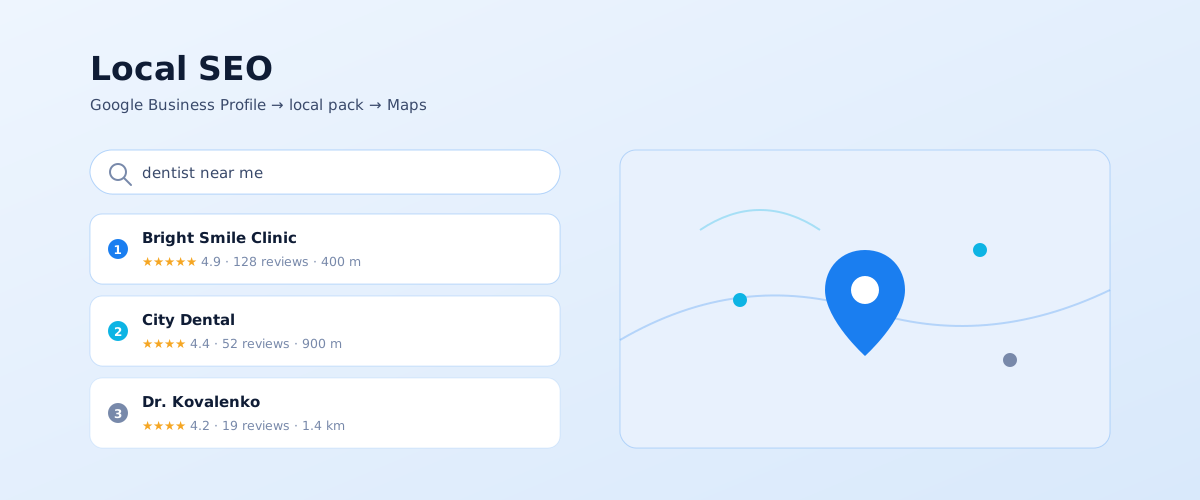
When someone searches for "dentist," "coffee shop near me," or "phone repair Odesa," Google shows a map with three business listings rather than ten blue links. That's the local results, and getting into them follows a separate set of rules. Local SEO is the work of making a business appear in Google Maps and the local pack for queries with geographic intent. Below is a full walkthrough: from creating a Business Profile to ranking factors and how the profile connects to your website.
01 What local SEO is and who needs it
Local SEO is promotion in the part of Google's results tied to location: the three-listing local pack in ordinary search, the Maps tab, and the Google Maps app. Unlike classic SEO, where a site competes for positions across a whole country, local ranking also depends on where the business and the searcher physically are.
Local results trigger for two query types: those that name a place ("tyre fitting Lviv") and those that don't, where Google infers the location ("tyre fitting," "where to eat"). The second type is often called "near me" search, and its share keeps growing alongside mobile.
Local SEO doesn't pay off for everyone. It works for a business with one of these ties to a place:
- a physical location customers visit — a shop, clinic, salon, cafe, or garage;
- a service area with call-outs — food delivery, cleaning, handyman, towing;
- a link to a city or district even with a closed office — a lawyer, real-estate agent, or tutor.
It's nearly useless for an online store shipping nationwide, a service with no geography, and a B2B company serving a whole country from one office. Those projects need ordinary SEO services without the local pack.
02 How Google's local results work
Before optimising anything, you need to know exactly where you want to appear. Local results aren't one place but several connected surfaces, and getting into each depends on its own set of signals.
The local pack, Local Finder, and Maps
The local pack is the three-listing block with a map that Google inserts into ordinary results for queries with geographic intent. Below it, a "More places" link opens Local Finder — an expanded list of businesses. Separately, the Maps app and web version let people search directly. All three surfaces draw from one source — your Google Business Profile — but the three-listing pack is the most competitive.
How local results connect to your website
The Business Profile and the website work together. The profile handles presence in Maps and the pack; the website reinforces the profile, because Google weighs the relevance and authority of the linked page, its content, and its link profile. A business with no website can rank in Maps but loses to a competitor that has a well-built landing page for the same service and city.
03 Creating and verifying a Google Business Profile
A Google Business Profile (formerly Google My Business) is the free tool you use to control how your business looks in Search and Maps. Without a verified profile, local promotion is impossible: Google simply has nothing to show in the listing.
Registration and business details
The profile is created in a Google account on the Business Profile page. At the start you enter the name exactly as it appears on the storefront, the business category, the address or service area, a phone number, and a website. Enter data without embellishment: adding a city or keywords that aren't on the sign breaks Google's rules and gets the listing demoted or rejected. Google's official step-by-step is in the help article "Get started with Google Business Profile".
Verification methods
Google needs to confirm you're connected to the business. It chooses the method, and there isn't always just one:
- Video — a recording showing equipment, signage, the surroundings, and work from the inside; currently the primary method for many categories;
- Postcard with a code to the physical address — takes up to two weeks;
- Phone or email — not available to everyone; depends on category and region;
- Search Console — if the site's domain is already verified in your account, the profile is sometimes verified automatically.
When verification fails the first time, it's usually an address mismatch, missing signage in the video, or another business already registered at that address.
04 Optimising the profile: what to fill in and why
How complete the profile is affects both ranking and conversion: someone in the pack picks between three listings in seconds, and details decide it. Work through every section, not just the name and address.
These elements have the biggest impact:
- Categories. The primary category is the strongest relevance signal you control. Choose it as precisely as possible ("bakery," not "cafe") and cover the rest with secondary categories.
- Services and products. Individual entries with names and descriptions are phrases Google associates with the listing.
- Business description. Up to 750 characters on what you do and for whom, with no keyword stuffing.
- Photos. Real shots of the storefront, entrance, interior, team, and work. A storefront photo helps customers find the door and helps Google match the listing to the place.
- Opening hours, including holidays and special dates: wrong hours hit trust directly.
- Attributes — card payment, wheelchair access, Wi-Fi, parking; for some queries these act as filters.
- Google Posts — short updates about offers, news, and events that keep the profile active.
- The Q&A section — add typical questions in advance and answer them as the business, before random users do.
The profile isn't a one-time setup. Google favours listings that are updated regularly: new photos, fresh posts, a current service list.
05 Reviews: how to earn them and how to reply
Reviews are one of the few factors visible to the user and influencing ranking at the same time. Google weighs their count, average rating, recency, and how steadily they arrive, plus keywords in the text. A listing with 40 fresh reviews almost always beats one with 200 reviews that are two years old.
A few tactics build a steady stream of reviews without breaking the rules:
- ask for a review right after a successful sale, while the impression is fresh;
- share a short link to the review form — available in the profile dashboard — on the receipt, a QR code, an SMS, or an email;
- don't screen customers: asking only happy ones to review (review gating) is against Google's policies;
- don't buy reviews or write them yourself — Google detects manipulation and removes offending listings.
Reply to every review, positive ones included. Handle negatives calmly, on the substance, with a way to fix the issue: the reply is read less by the author than by future customers. Copy-paste template replies look worse than no reply at all.
06 Local ranking factors
Google names three factors that decide the order of listings in local results. Knowing which ones you influence and which you don't saves budget and nerves. The wording is from Google's official help on local ranking.
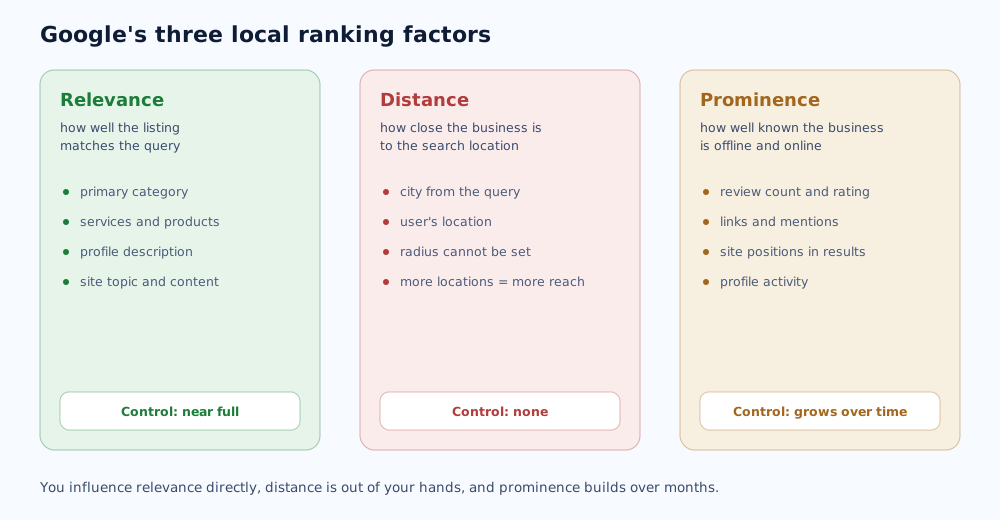
Relevance
How well the listing matches the query. This is the factor you influence most: a precise primary category, filled-in services and products, the description, and a matching site topic. If someone searches "children's dentist" and your services only say "dentistry," the listing loses to a competitor with an explicit "pediatric dentistry" service.
Distance
How close the business is to the search location. Google uses either the city named in the query or the user's current location. You can't influence this directly — there's no setting to "widen the radius." The only legitimate way to cover more ground is to run several real locations, each with its own profile.
Prominence
How well known the business is, offline and online. This includes the count and quality of reviews, mentions and links to the site, the site's positions in ordinary results, and profile activity. It's the slowest factor: it grows with the business's reputation and can't be gamed quickly.
07 The website for local queries and data consistency
The profile does its best work when a solid website sits behind it. This is where local SEO meets ordinary SEO, following the same principles described in the guide on how to run a site SEO audit.
On the website side, a few things strengthen local positions:
- Local landing pages — separate pages for "service + city" or "service + district" pairs when you work in several locations. Each with unique content, not one swapped word.
- NAP consistency — name, address, and phone must match to the character across the site, the profile, and every directory. Inconsistent phone formats or an old address dilute the signal.
- LocalBusiness markup — structured data with the address, hours, and contacts. The requirements are in Google's LocalBusiness structured data documentation.
- Directory and map presence — listings in relevant directories and aggregators with identical NAP data add prominence.
You track results with the reports in the profile itself (calls, directions, clicks to the site), Search Console for local pages, and regular position checks on geo queries — methods we covered in the article on how to track your site's rankings in Google. For a multi-location business, grid tracking is worth a separate look: listing positions across different points in the city.
How local SEO fits into an overall promotion strategy and how long it takes is covered through a high-competition example in the piece on SEO for a medical clinic. We used a similar approach in the dental network case study.
Reviews on that profile affect more than local rankings — they shape the brand reputation across search results, covered in the SERM guide.
For law firms, consultancies, and other service businesses, local SEO is only part of a bigger picture; the full approach is covered in the SEO for professional services guide.
A properly filled-out business profile helps not just classic local SEO, but also how AI systems recognize a brand; more on that in brand AI visibility.
A filled-out Google Business Profile matters not just for organic local SEO but also for launching paid Google Ads local campaigns.
08 Frequently asked questions
How do I add my business to Google Maps?
Create a Business Profile in your Google account, enter the name, category, address or service area, phone, and website, then complete verification — usually by video or a mailed postcard with a code. Once approved, the listing appears in Search and Maps. You don't add it to Maps separately: Maps pulls its data from the profile.
Why is my business not showing on Google Maps?
Common causes: the profile isn't verified or verification was rejected, the listing is under review after edits, there's a duplicate at the same address, the name breaks Google's rules, or the business is in the index but ranks below the top three for competitive queries due to weak relevance and few reviews. Check the status in the profile dashboard.
How long does local SEO take?
First movement on low-volume and neighbourhood queries shows within 1–2 months of completing the profile and getting the first reviews. Competitive queries in a major city centre take 4–8 months of consistent work: reviews, profile content, local landing pages, and links. Exact timing depends on the niche and how crowded the map is.
Do I need a website for Google Maps ranking?
Technically no — a listing can rank without a site. But all else being equal, a business with a relevant website and local landing pages outranks a competitor with no site, because Google weighs the relevance and prominence of the linked page. For competitive niches a website is essential.
How do I get more Google reviews?
Ask for a review right after the sale, send the customer a short review link from the profile dashboard, put a QR code on the counter and the receipt, and follow up by SMS or email. You cannot pay for reviews or ask only satisfied customers to leave one — both break Google's policies.
Can I widen the radius my listing shows in?
No. Distance to the user is a factor you can't control through settings. To cover more areas, open additional real locations with separate profiles, or build prominence so the listing shows farther out on less competitive queries.