
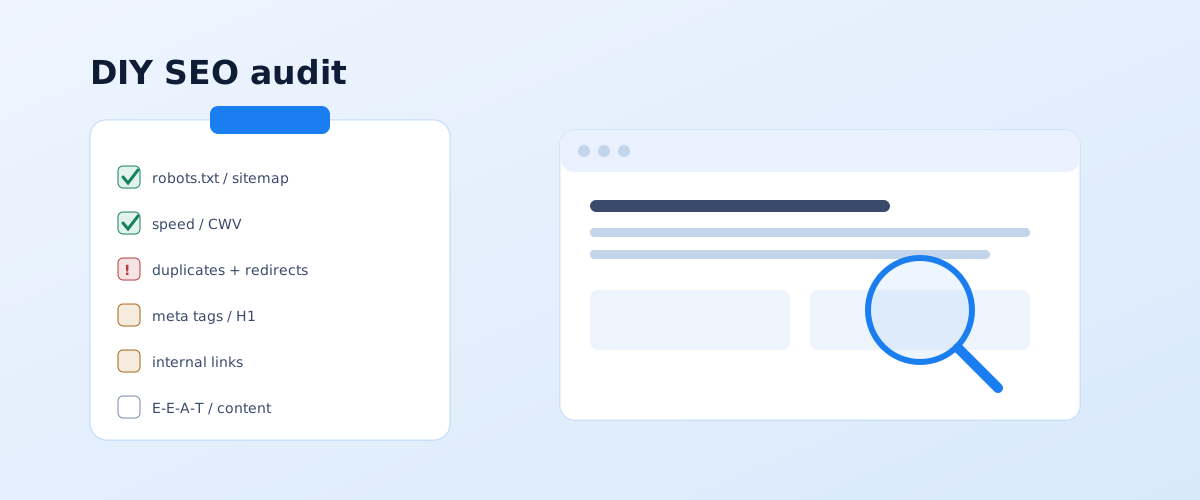
An SEO audit is a check of the site against a list of items that answers one question: what is stopping the site from getting more traffic from search. A basic audit can be done yourself and for free — you need Search Console, a couple of browser tools, and an hour or two per block. Below is a checklist across five areas and, more importantly, how to prioritise what you find so you do not spend weeks on trivia while critical issues stay open.
01 The short answer: what an SEO audit is and where to start
An SEO audit checks three things in order: whether Google sees the site at all, whether it understands what each page is about, and whether it considers the page useful enough to show in the top. The checklist splits accordingly into a technical block, on-page optimisation and content, plus external factors and analytics.
Before the check, decide why you are running it — the emphasis depends on that:
- A scheduled audit — every six to twelve months, a full run through the list.
- Before launching promotion or ads — focus on the technical side and landing pages so traffic does not go to waste.
- After a traffic drop — first look at what changed: site release dates, Google updates, the indexing report in Search Console.
- After a migration or redesign — focus on redirects, canonicals, and keeping the structure and meta tags intact.
The output of an audit is not a report for its own sake but a prioritised task list: what to fix immediately, what to plan for the month, what can wait. How to set those priorities is covered at the end of the article.
02 What you need: free tools
For a DIY audit of a small site, a set of free tools is enough. Paid tools speed the work up and are needed for large sites, but the baseline picture comes from the free ones too.
- Google Search Console — reports on indexing, performance, Core Web Vitals, mobile usability, manual actions. The main data source.
- PageSpeed Insights and Lighthouse — load speed and Core Web Vitals for specific URLs, with recommendations.
- Screaming Frog SEO Spider — a site crawler; the free version covers up to 500 URLs and shows response codes, duplicate meta tags, broken links, redirects.
- Serpstat, SE Ranking, Ahrefs Webmaster Tools — free tiers for a quick check of visibility and the backlink profile.
- A manual SERP check — the
site:operator to gauge how many pages are indexed, plus viewing the cache and the mobile version.
03 The technical block
The technical audit checks whether the search engine can crawl and index the site normally. This is the first thing to close: while there are blocking errors here, everything else is pointless.
Indexing: robots.txt, sitemap, Search Console
Check that robots.txt does not block needed sections, that sitemap.xml exists, serves current URLs and is referenced in robots.txt. In Search Console, open the indexing report: how many pages are indexed, how many are excluded and why. Mass exclusions labelled "Crawled — currently not indexed" or "Discovered — currently not indexed" signal a quality or structure problem. The format and submission requirements for a sitemap are covered in Google's sitemap documentation.
Speed and Core Web Vitals
Run the key page types (home, category, product, article) through PageSpeed Insights and check the field data in Search Console. Google factors page speed and layout stability into its assessment of a page — this is described in its page experience guide. It is critical if Core Web Vitals are in the red on mobile for most pages.
Duplicates, redirects, canonicals
One of the most common reasons a site does not grow is a single page being reachable at several addresses: with and without a trailing slash, with and without www, with parameters, http and https. Check that all variants 301-redirect to one canonical URL and that the canonical tag on pages points to the page itself, not to another page by mistake.
The mobile version and HTTPS
Google indexes the site by its mobile version, so it must carry the same content and the same links as the desktop one. Check that the site is fully on HTTPS with no mixed content, and that there is no horizontal scrolling or tiny tap targets on a phone.
04 On-page optimisation
This block checks whether Google understands what each page is about and how they connect. Errors here do not block indexing but keep you out of the top.
Meta tags and headings
Use the crawler to check that every promoted page has a unique title and description, that the title reflects the main query and does not get cut off, and that the page has exactly one H1 that does not repeat the title word for word. Empty, templated and repeating meta tags are a classic online-store problem.
Structure and URLs
Assess whether the structure is logical: is it clear from the URL and breadcrumbs where a page sits, are important pages no more than three clicks from the home page. URLs should be human-readable, without long identifiers and superfluous parameters.
Internal linking
Check that important pages link to other important pages with meaningful anchors, that there are no orphan pages with no inbound links, and that link equity does not leak into utility sections. Informational articles should link through to commercial pages rather than stand in isolation.
05 Content
Once the technical side and on-page optimisation are sound, most of the growth comes from the content and its match to what people are actually searching for. At this step you check not the length of the text but the completeness of the answer.
- Intent match. Compare your page type with what Google shows in the top 10 for the target query: if it shows round-ups and comparisons and you have a short service description, the page does not match the intent.
- Completeness. Does the page close the question in full and the adjacent sub-questions, or will the user have to keep searching.
- E-E-A-T. Is it clear who stands behind the content: an author, expertise, facts about the company, reviews. Especially important for health and finance topics.
- Cannibalisation. Are there two or three pages fighting for the same query and getting in each other's way. How to check this by positions is in the article how to check your Google rankings.
- Outdated data. Prices, dates, interface screenshots, links to stale material.
06 External factors and analytics
The last block covers what sits outside the site itself and checks that the data for measuring the result is collected correctly.
- Backlink profile. Via Search Console or the free tiers of tools, look at how many domains link to the site, whether there is a spike of spam links, whether the anchors look natural.
- Mentions and the business listing. For a local business — is Google Business Profile filled in, do the name, address and phone match across all directories.
- Analytics. Is GA4 set up, are conversions and leads tracked, is the account linked to Search Console. Without correct analytics you cannot tell whether SEO is working.
07 How to prioritise the issues you find
After the checklist run you have a long list of findings. The mistake is to start fixing whatever is easier or more visible. The right order is by impact on traffic: first what blocks, then what slows, and only then the trivia.
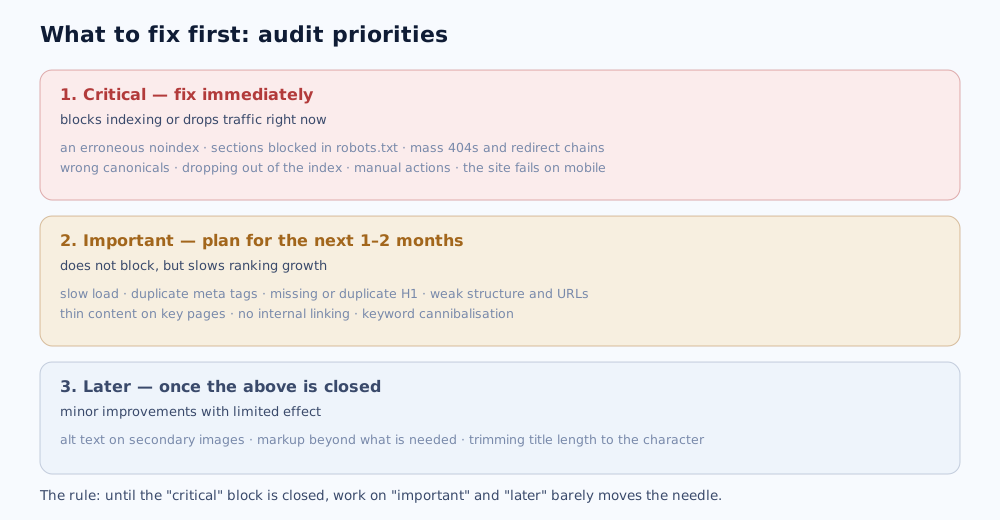
In practice it looks like this: assign every finding from the audit to one of three levels. The "critical" level is everything that blocks indexing or drops traffic right now; those items go into work immediately. The "important" level is what does not block but keeps you from growing: speed, duplicates, structure, thin content; that is a plan for 1–2 months. The "later" level is targeted improvements with a small effect; you get to those once the first two are closed.
What to do next with a finished task list is in the pillar article how to promote a website to the top of Google yourself, and if the audit showed there is no foundation and everything needs building from scratch, start with the piece how to do keyword research. You can commission an independent audit with a priority breakdown on the SEO promotion page.
If the audit finds no clear problems and the site still isn't growing, see the breakdown in why your site isn't ranking on Google. For online stores, the specifics of auditing the catalogue and filters are in the ecommerce SEO guide.
An audit shows the state of your site, while the bar is set by the top competitors — how to measure it is covered in the article on competitor analysis in SEO and paid ads.
If the audit flags duplicates and weak titles, how to rewrite them correctly is in the article on Title and Description meta tags.
Part of the data for an audit comes straight from Google: how to read the Performance and Page indexing reports is covered in the Google Search Console guide.
If the audit is happening alongside a new site launch or a redesign, the separate sequence of steps and the redirect map are covered in the SEO checklist for a website launch or redesign.
A separate technical part of an audit is the link structure itself: how to build it and find pages nobody links to is covered in the internal linking guide.
A DIY technical audit doesn't require paying for tools — which free services cover most of the basic checks is covered in a roundup of free SEO tools to get started.
Some items in a technical audit depend directly on the site's platform — what can and can't be configured on WordPress, Tilda, and Shopify is covered in the CMS comparison for SEO.
A technical audit is the foundation; who should actually fix what it finds is covered in SEO agency, freelancer, or in-house specialist.
Some audit items concern site performance — a detailed breakdown of the Core Web Vitals metrics and how to improve them is in a separate guide.
Technical metrics aren't the only thing Google evaluates; a site's expertise and authority are covered in E-E-A-T and personal brand.
Some audit steps can be sped up with AI tools for SEO — an overview of what they handle well and what still needs a person is in a separate article.
The link profile is only one part of a full audit; a dedicated walkthrough of finding toxic links and safely removing them is in our backlink audit and toxic links guide.
08 Frequently asked questions
Can an SEO audit be done for free?
A basic one, yes. Google Search Console, PageSpeed Insights, the browser's built-in Lighthouse, and the free tiers of Screaming Frog, Serpstat or SE Ranking cover most of the technical and content checks. Paid tools are needed for deep backlink analysis and mass crawling of large sites.
How long does a DIY SEO audit take?
For a site of 20–50 pages, one or two working days to run the checklist and another day to draw up a prioritised task list. For an online store with thousands of pages, a week or more, because you need a crawl and analysis of template issues that repeat across every product page.
How often should I run an audit?
A full audit every 6–12 months, and always after major changes: a redesign, a move to a new CMS, a structure change, the launch of a new section. Between full audits it is enough to check the indexing report and Core Web Vitals in Search Console monthly.
What matters more — the technical audit or the content?
The technical audit first: if pages are not indexed, are duplicated, or the site fails on mobile, content quality is irrelevant — Google will not see it or cannot assess it properly. Once the technical base is sound, most of the growth then comes from the content and its match to intent.
Do I need a professional audit if I did one myself?
A DIY audit closes the obvious problems, and that is often enough to start. A professional audit is worth it if there is no growth six months after the fixes, if the niche is competitive, or if the site is large and the errors are systemic — a specialist's fresh eye finds what has been overlooked.
Which errors are the most critical?
The ones that block indexing or drop traffic right now: an erroneous noindex, needed sections blocked in robots.txt, mass 404s and redirect chains, wrong canonicals, manual actions, a broken mobile version. Until these are fixed, work on the other items barely moves the needle.