
Most free SEO tools only cover part of the job, not the whole process of promoting a site, so it makes more sense to build a toolkit around specific stages of the work rather than grabbing tools by name. Below: a roundup of free tools grouped by task — from keyword research to proofreading — with a note on what each one is for and where the free tier genuinely runs out.
01 Short answer
Getting started with no budget for paid subscriptions takes five categories of tools.
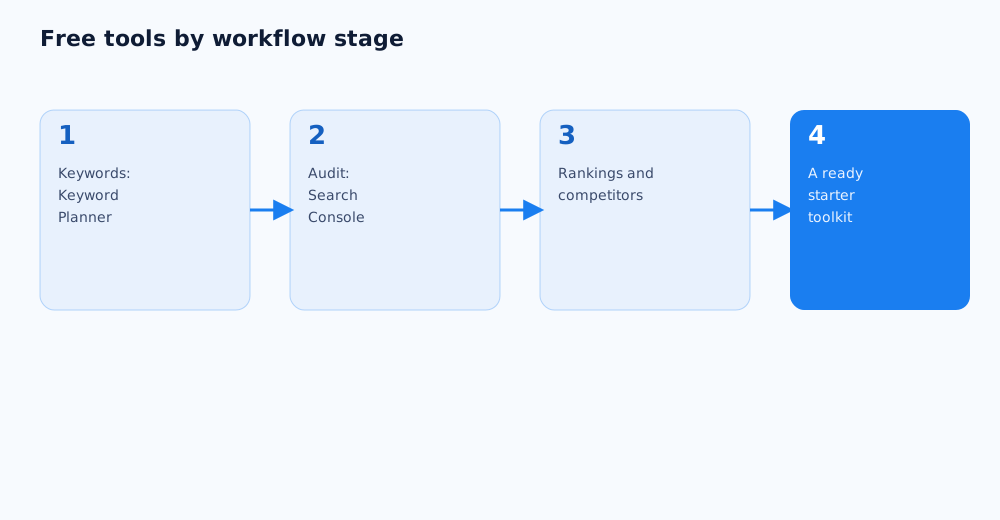
- Google Keyword Planner — for finding keywords and estimating their search volume.
- Google Search Console — for checking indexing, technical errors, and the real queries the site already shows up for.
- Google PageSpeed Insights — for checking load speed and the main technical issues on a page.
- Manually checking the SERP and Google's autocomplete — for understanding intent and how people actually phrase a search.
- The free daily limits on Ahrefs, Serpstat, or SE Ranking — for a targeted look at competitors when the site's own data isn't enough yet.
Below: more detail on each category, and an honest look at where the free tiers run into limits.
02 Keyword research
Gathering keywords is the first task in any SEO project, and there's genuinely enough free tooling here to build a working keyword list without paying for anything.
- Google Keyword Planner. Shows query variants and approximate search volume for a region; it needs a Google Ads account, but running an ad isn't required — see Google Ads help on Keyword Planner for details. The full process of building a keyword list with this and other tools is covered in the keyword research guide.
- Google's autocomplete and the "People also search for" block. A free source of real phrasing that people actually use, rather than what seems logical to whoever is building the keyword list.
- Google Trends. Shows how interest in a topic changes over time and by region — useful for gauging seasonality and choosing between similar query phrasings.
03 Technical site audits
Technical problems are the most common reason good content doesn't perform, and Google's own free tools cover most of the basic checks here.
- Google Search Console. Indexing reports, Core Web Vitals, and manual actions — the baseline minimum for any site that wants organic search traffic.
- Google PageSpeed Insights. Checks load speed and specific technical issues on a page, with recommendations on what to fix.
- Mobile usability (built into PageSpeed Insights). Shows how correctly a page displays and functions on mobile devices.
- Screaming Frog's free tier (up to 500 URLs). Crawls a small site in full and surfaces broken links, duplicate titles, and other technical issues in one report.
For a fuller technical audit checklist, see a DIY SEO audit checklist.
04 Rank tracking
Rank tracking isn't about vanity — it's about seeing whether an SEO strategy is actually working, and free methods provide enough data for a smaller site.
- The Performance report in Search Console. Shows real rankings, impressions, and clicks for the queries the site already appears for — the most accurate free source of ranking data.
- Manual checks in incognito mode. Fine for spot-checking a handful of priority keywords, but doesn't scale to dozens of queries and can be skewed by personalisation and location.
- The free rank-check limits in Serpstat, SE Ranking, or similar tools. Provide a capped number of checks per day — enough for periodic monitoring of a few priority terms.
For the pros and cons of each method in more detail, see how to check your Google rankings.
05 Competitor analysis
A full competitor analysis usually needs paid data on someone else's traffic and backlinks, but part of the picture is available for free too.
- Manually reviewing top-ranking competitor pages. Headlines, structure, and content make it clear which queries a page is optimised for, even without specialised tools.
- The free daily limits on Ahrefs, SE Ranking, or Serpstat. Give a handful of free checks a day — enough for a targeted look at a few key competitors' core metrics.
- SimilarWeb's free tier. Gives a rough estimate of traffic and sources for larger sites; accuracy drops noticeably for smaller niches.
For the full competitor analysis methodology, see how to analyse competitors in SEO and paid ads.
06 Checking content and copy
Content quality is hard to reduce to a single number, but a few free checks help catch obvious problems before a page goes live.
- Plagiarism/uniqueness checks. A basic check that the copy isn't lifted from elsewhere and doesn't duplicate other pages on the site or a competitor's.
- Readability and style checkers. Help spot overly long, convoluted sentences and stock phrases that make a page harder to read.
- Manually checking the H1-H3 structure. Can't be fully automated, but a quick manual pass confirms the heading hierarchy matches the query's intent instead of just being stuffed with keywords.
07 Where free tools run into limits
Free tiers are almost always enough to get started, but it helps to know upfront where they genuinely constrain the work, rather than spending time trying to work around a limit instead of upgrading.
- Backlink data in free tool tiers is usually cut down substantially compared with a paid subscription — not enough for serious link analysis.
- The number of daily rank checks and competitor lookups is strictly capped — on a growing project with dozens of keywords, that becomes a real bottleneck quickly.
- Historical data and trend charts are often paid-only — the free tier shows a current snapshot rather than a timeline.
- Once the workload grows, it's worth weighing a paid subscription to one or two tools against handing the work to a specialist — see Grottix's SEO services for the latter.
Beyond the classic free services, more and more SEO tasks are now handled by AI tools; an overview organized by task — keywords, audits, content, analytics — is in a separate article.
08 FAQ
Can a site be promoted using only free tools?
At the start, yes — especially for a smaller site in a moderately competitive niche. As the project grows and the work gets more complex, free-tier limits (backlink data, daily check caps, historical data depth) start to show, and part of the work either moves to a paid plan or gets done by hand.
Do I need a Google Ads account to use Keyword Planner?
Yes, a Google Ads account is required to access Keyword Planner, but running and paying for ads isn't — the account can exist with no active campaigns.
How accurate are free rank-tracking methods?
The Performance report in Search Console is the most accurate free source, since it shows Google's actual data rather than a simulated result. Manual checks and third-party free limits give an approximate picture and work fine for spot-checking, not for tracking dozens of keywords comprehensively.
Does Screaming Frog replace a full technical audit?
The free tier (up to 500 URLs) is good at catching common technical issues — broken links, duplicate metadata, heading problems — but it doesn't replace a comprehensive audit that also covers speed, mobile usability, and overall site structure.
Is it worth starting with paid tools if the budget allows?
Not necessarily right away — it's usually smarter to first learn the tasks on free tools, so it's clear which data and features are actually needed before paying for a tier that goes mostly unused.
How often should rankings and technical health be checked?
Technical metrics in Search Console are worth checking at least monthly, and immediately after publishing new pages or major changes. Rankings for priority keywords are worth tracking weekly, to catch both gains and drops early.