
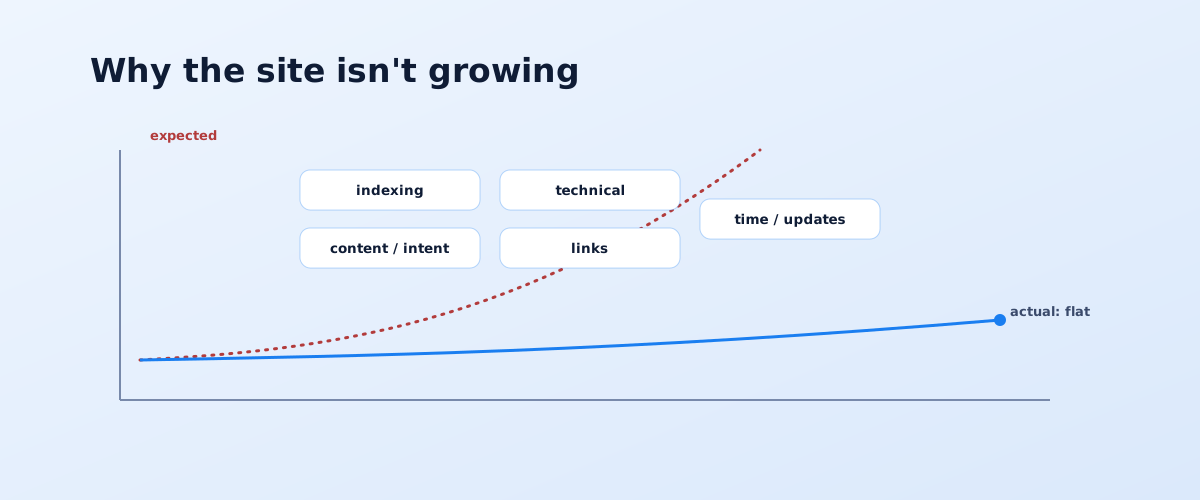
"My site isn't growing in Google" isn't one problem but at least three different situations, and each is fixed differently. Before changing anything, you need to know which one you're in: the site isn't indexed, it's indexed but not ranking, or it ranked and then dropped. Below are 12 concrete causes grouped by type, and a step-by-step action plan.
01 Start here: the three scenarios
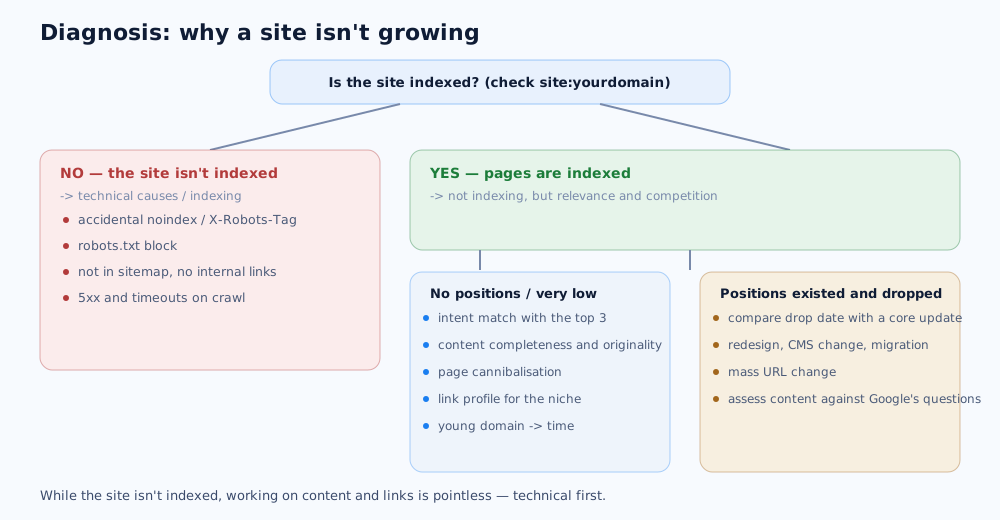
The first step is deciding which of the three situations applies. Everything else follows from it: look for a technical block, work on content, or deal with an algorithm update.
The scenarios are:
- The site isn't indexed. A
site:yourdomainquery in Google shows few pages or none. The problem is technical — Google physically can't add the pages to its index. - The site is indexed but doesn't rank. Pages show up under
site:, but for target queries they aren't even in the top 50. The issue is relevance, content, and competition, not indexing. - Rankings existed and dropped. Traffic grew, then fell sharply or gradually. You need to line the drop date up against what changed on the site and in Google's algorithms.
A quick check takes five minutes: site: plus a glance at the Search Console reports. What you do next depends on the scenario.
02 Diagnosis with Search Console and analytics
Search Console is the only source that shows the site through Google's eyes. Before forming hypotheses, pull data from two or three reports together.
What to check in Search Console
The Page Indexing report shows how many URLs are indexed and why pages didn't make it in. The Performance report shows impressions, clicks, CTR, and average position by query and page. The Manual Actions section shows whether the site has any manual penalties. If impressions and clicks fell together, it's an indexing or coverage issue; if impressions hold but clicks fell, the problem is positions or snippets.
Line the drop date up against a change log
Write down when the decline started and compare it with what happened: was a Google core update rolling out, was there a redesign, a CMS change, a move to another domain or protocol, a mass URL change, an ad campaign starting or stopping. A match with an update and a match with your own edits call for different responses.
03 Technical causes (1–5)
Technical problems block growth entirely: until they're cleared, work on content and links has almost no effect. This is the first thing to check.
- 1. The page is blocked from indexing. An accidental
noindexin a meta tag orX-Robots-Tagheader, or arobots.txtblock left over from development, is the most common reason pages aren't in the index. - 2. The crawler can't find the pages. Not in
sitemap.xml, no internal link points to the page, nesting too deep, or navigation that's JavaScript-only — Google may never reach the content. - 3. Duplicates and wrong canonicals. The same content on several URLs (with parameters, trailing slash, www and non-www), or a canonical pointing to the wrong page — Google picks the wrong canonical version or splits the signals.
- 4. Slow loading and failed Core Web Vitals. Page experience metrics are a tie-breaker ranking factor; details are in Google's page experience documentation.
- 5. Mobile version and rendering issues. Google evaluates the site by its mobile version; if that's missing content, the layout breaks, or key text loads via a script that doesn't run, positions drop on every device.
How to check these yourself, step by step, is laid out in the piece on the SEO audit checklist.
04 Content causes (6–9)
If pages are indexed but not in the top, the cause is almost always content: it's either not about what the user is looking for, or weaker than what already ranks.
- 6. Content doesn't match search intent. An article built for a commercial query, or a product page for an informational one. Google looks at what's already in the top for the query and expects the same page type. How to read intent is covered in the article on keyword research.
- 7. Thin or unoriginal content. Two paragraphs on a commercial page, supplier-feed product descriptions with no editing, text stitched together from other people's articles — that content has nothing to stand out with.
- 8. Cannibalisation. Two or three pages on the site are optimised for one query and compete with each other — Google can't tell which to rank and puts none of them in the top.
- 9. Content weaker than the current top 10. The page answers the query, but less completely, less recently, or without the expertise Google expects in health and finance topics (E-E-A-T).
05 Link and reputation causes (10)
Links remain one of the primary factors, especially in competitive niches. But here the problem is more often strategy than quantity.
- 10. The link profile doesn't match the niche. For a competitive query the site has almost no external links or brand mentions; or the opposite — the profile shows traces of risky buying and sharp unnatural spikes, so Google discounts part of the links.
One key point: a competitor almost never can hurt your site with links — Google decides which links to trust, as stated directly in Google's search position FAQ. How to build links without risk is covered in a separate piece on link building.
06 Strategy, timelines, and algorithms (11–12)
Sometimes the site is fine and there's no growth because of unrealistic expectations or external factors you can't change quickly.
- 11. A young domain and unrealistic timelines. For its first 3–6 months a new site barely ranks for competitive queries. That's not a bug but a normal trust-building period; how long to wait is covered in detail in the article on SEO timelines.
- 12. Betting only on high-volume queries, or being hit by a core update. Chasing two or three broad queries with no long tail brings a new site almost no traffic. And if positions dropped across many queries at once after an update, you need to assess the content honestly against Google's "helpfulness" questions and improve it, not look for a quick trick.
07 What to do: a step-by-step plan
Order matters: first clear what blocks growth entirely, and only then work on what lifts positions.
- Confirm indexing:
site:, the Page Indexing report, and a re-indexing request for priority URLs if needed. - Clear technical blockers:
noindex,robots.txt, canonicals, server responses, mobile version. - Check intent match: open the top 3 for each target query and compare the type and completeness of your pages.
- Strengthen content above the average in the top: cover subtopics competitors miss, add specifics and current data.
- Set up internal links to priority pages with relevant anchors.
- Work on links and brand mentions — gradually and from topical sources.
- Give it time and measure progress in Search Console: impressions and average position move before traffic does.
The full promotion roadmap these steps fit into is in the pillar article on how to get a site into Google's top yourself. If you'd rather not diagnose and fix it alone, the diagnosis and prioritisation can be delegated — it's part of SEO services.
Before drawing conclusions, it is worth getting comfortable with the diagnostic tool itself — how to read the Performance and Page indexing reports is explained in detail in the Google Search Console guide.
If the drop in rankings lines up with a new site launch or a redesign, the first thing to check against is the SEO checklist for a website launch or redesign — it covers the typical technical causes of exactly that kind of drop.
One technical cause of stalled growth is poor Core Web Vitals scores; what that means and how to improve them is covered in a separate guide.
08 Frequently asked questions
Why isn't my site in Google even though it's been live for a while?
Check indexing with a site:yourdomain query in Google and the Page Indexing report in Search Console. If no pages are indexed, the cause is technical: an accidental noindex, a robots.txt block, no internal links or sitemap, or 5xx server responses during crawling. If pages are indexed but there's no traffic, the issue is relevance, content, and competition rather than indexing.
How do I figure out why my rankings dropped?
Open the Performance report in Search Console and compare the drop date with a change log: does it line up with a Google core update, a redesign, a CMS change, a domain migration, or an ad campaign. A drop across hundreds of queries at once is almost always an algorithm update; a drop on specific pages points to a technical error or lost intent match.
How long should a new site wait for growth?
First positions on low-volume queries appear in 2–4 months, visible growth in 4–6 months, and stable results in a competitive niche take 6–12 months or more. A new domain barely ranks for competitive queries in its first months regardless of content quality. We cover the full timeline in a separate article.
Can a competitor hurt my site with links?
In the vast majority of cases, no. Google decides which links to trust and ignores spammy ones without penalising the receiving site — Google states this directly in its search position FAQ. The Disavow tool is only needed when a large volume of artificial links has already caused a manual action.
Does site speed affect rankings?
Yes, but as a tie-breaker rather than a primary factor. Core Web Vitals and page experience are taken into account, and all else being equal a fast page beats a slow one. But speeding up a page that doesn't match search intent and is weaker than competitors on content won't get it into the top on its own.
My site is indexed but still gets no traffic — why?
It means pages are in the index but not reaching the top 10 for their queries. Typical causes: content doesn't match intent (Google expects a different page type), the material is weaker than what's already ranking, cannibalisation between several of your own pages, targeting only high-volume terms with no long tail, or a link profile too weak for the niche.