

A negative keyword list tells Google which queries should never trigger your ads, even when the main keyword technically matches. Without it, part of the budget goes to clicks that will never turn into a lead: job seekers, "DIY" searchers, people looking for reviews about the company, cheaper alternatives, or free versions of a paid product. Below: how negative keywords work, where to source them, and how to set them up so they save budget instead of blocking the traffic you actually want.
01 Short answer
Negative keywords work the opposite way from regular keywords: instead of "show this ad for this query", they tell the system "never show this ad if the query contains this word". Four actions cover most of the problem quickly.
- Seven to ten days after launch, open the search terms report and see which real phrases actually triggered your ads.
- Exclude the obviously irrelevant ones: "free", "DIY", "jobs", "employee reviews", and any cities or regions you don't serve.
- Build an account-level negative keyword list in Google Ads and attach it to every new campaign by default.
- Recheck the report every 2–4 weeks while the campaign is active and getting impressions.
Next: what negative keywords are made of, where to find them, and the mistakes that most often cancel out the savings.
02 What negative keywords are and how they work
A negative keyword is a query or part of a query that stops an ad from showing, even if the rest of the phrase matches an active keyword in the campaign. Technically it is the same keyword-matching mechanism as a regular keyword, just inverted: the system is not looking for a match to show the ad, it's looking for a match to hide it.
The difference is most visible with broad match. The keyword "phone repair" on broad match can trigger an ad for "phone repair DIY video tutorial" — a technical match, but a completely different intent. A negative keyword like "DIY" at the campaign or account level shuts down that entire layer of irrelevant impressions at once, instead of one query at a time. If the campaign isn't set up yet, start with the basic structure covered in how to set up Google Ads yourself.
03 Negative keyword match types
Negative keywords have the same three match types as regular keywords, and the choice determines how broadly or narrowly the exclusion works. Google's own reference is the Google Ads help page on negative keywords; here's what it means in practice.
- Broad match (a bare word, e.g. free) — blocks any query that contains all the words in the negative phrase, in any order. The most aggressive option: a two-word negative like "used phones" would also block "phones used for testing".
- Phrase match (in quotes, e.g. "do it yourself") — blocks a query only if the words appear in that exact order, but allows extra words around them. More precise than broad match.
- Exact match (in brackets, e.g. [repair free]) — blocks only the query that matches word for word, with nothing added. The narrowest and safest type: it cannot accidentally block a related, valid query.
For short, unambiguous words like "jobs" or "free", broad match is usually safe. For phrases that overlap with valid queries even partially, start with phrase or exact match — it lowers the risk of accidentally excluding converting traffic.
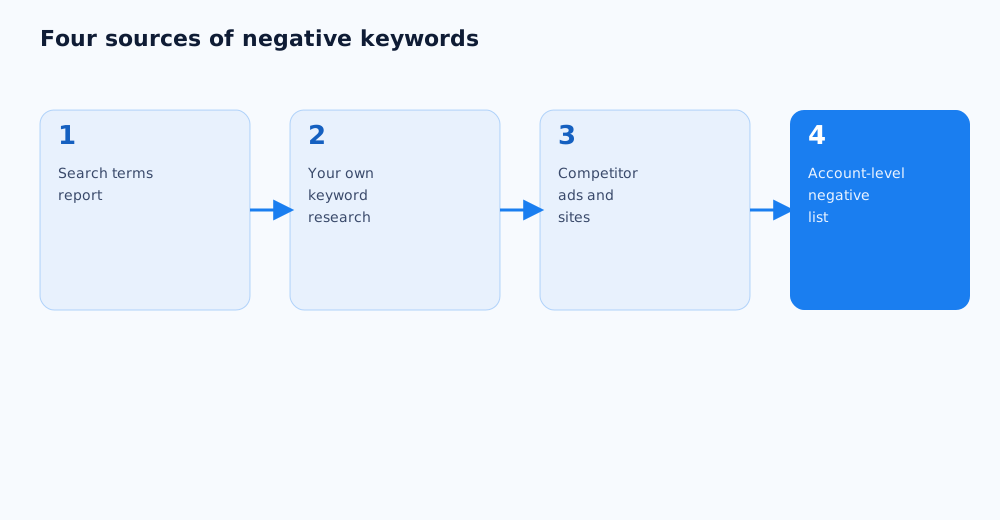
04 Four sources for your negative keyword list
A negative keyword list is not built once at the start — it grows with the campaign as real query data accumulates. Four sources are worth checking on a regular basis.
- The search terms report. The main source: it shows the real phrases people typed when your ad appeared, including ones that don't literally match your keywords because of broad or phrase match.
- Your own keyword research. Building the keyword list for a campaign usually surfaces groups of clearly irrelevant queries along the way — add them as negatives before launch, without waiting for impressions.
- Competitor ads and sites. If a competitor operates in an adjacent but different niche (parts instead of finished devices, say), their product category names are a good source of negatives for your own campaign, especially after a proper SEO and paid ads competitor analysis.
- Internal business rules. Cities you don't ship to, brands you don't sell, services you don't offer — this list is usually longer than it looks at first, and it's worth writing it down formally when the account is first set up.
05 How to build the list and apply it to campaigns
In Google Ads, negative keywords can be added two ways: directly inside a specific campaign or ad group, or as a centralized list at the account level. For most accounts the right approach is a mix of both.
- Negatives that apply to the whole business ("jobs", "free", "DIY", irrelevant cities) go into an account-level list attached to every current and future campaign.
- Negatives specific to one campaign or ad group (so campaigns for different product categories don't cannibalize each other's queries) get added at that level instead.
To build a shared list, go to Tools and Settings → Negative keyword lists in Google Ads, create a list, and add the negatives line by line with a match type for each. From there, attach the list to the campaigns that need it — a one-time step for existing campaigns, and the same list can be reused as a template for new ones. The exact interface steps are in the official guide to negative keyword lists.
For accounts with many campaigns, Google Ads Editor is faster: it lets you add negative keywords to several campaigns at once instead of opening each one separately in the web interface.
06 Common mistakes: when negatives do more harm than good
Negative keywords cut wasted spend, but used carelessly they can block converting traffic too. Here are the mistakes that come up most often.
- Broad match on an ambiguous word. A broad-match negative like "spring" would block a plumbing search for "spring valve" just as easily as an unrelated seasonal query.
- Ignoring word forms. Google doesn't always automatically catch every plural, tense or spelling variant — "phone repair" and "phones repaired" sometimes need separate negative entries if one variant is off-target and the other isn't.
- A negative that clashes with an active keyword. If an account-level negative happens to overlap with part of a live keyword, the ad simply stops showing for that query — with no obvious error in the interface to flag it.
- Set once and forgotten. A list built only at launch goes stale: new phrasings appear, the product line changes, and old negatives may no longer apply.
Every new negative is worth a quick check against the campaign's active keywords first, especially if it's short and could be part of other phrases.
07 How often to review the list
Negative keywords aren't a one-time setup — they're part of the campaign's regular maintenance. How often to review depends on traffic volume: the more impressions and clicks a campaign gets, the faster new irrelevant phrasings show up in the search terms report.
For most campaigns, checking the search terms report every 2–4 weeks in the first few months after launch is enough, while the system is still learning and there's genuinely a lot of data. Once the campaign has stabilized and the negative list already covers the main scenarios, reviews can move to every 1–2 months, plus a separate check whenever a new product category or seasonal promotion changes the underlying keyword mix.
Whoever manages the campaigns day to day can own this: negative keywords aren't a separate task, they're part of the same ongoing optimisation as bid adjustments and a Google Ads account audit. If an agency runs the account, it's worth confirming negative keyword maintenance is part of the monthly scope, not just the initial setup. If there's no time to manage this in-house, it can be handed off — see Grottix's paid search services.
Negative keywords have a direct effect on the final cost per lead — by cutting off irrelevant clicks, they lower CPL without sacrificing lead quality.
Negative keywords cut the share of irrelevant clicks, while A/B testing ad creative helps improve the quality of the clicks themselves — how to run a test like that is covered in A/B testing ads.
Cleaning up negative keywords cuts down on irrelevant traffic, but it doesn't protect against click fraud and invalid traffic — that's a separate problem with its own signs and account-level settings.
08 FAQ
How do I add negative keywords in Google Ads?
In the Google Ads interface, go to Tools and Settings → Negative keyword lists for a shared, account-level list, or use the Keywords → Negative keywords tab inside a specific campaign or ad group for targeted exclusions. Each negative keyword is added together with a match type — broad, phrase, or exact.
How many negative keywords should a campaign have?
There's no fixed number — it depends on the niche and traffic volume. A small local campaign might run with 20–50 basic exclusions, while a large online store with a wide catalogue often grows its list into several hundred lines within the first year. The real benchmark isn't the count, it's the habit: the list should keep growing as new data comes in from the search terms report.
Can I add negative keywords to a campaign that's already running?
Yes, and that's standard practice. Negative keywords can be added or removed at any time without restarting the campaign — changes take effect almost immediately. In fact, for a brand-new campaign with no history, it's normal to add negatives only after the first batch of impressions, once a real search terms report exists.
Can negative keywords block traffic I actually want?
Yes, if the match type is too broad for an ambiguous word, or if a negative accidentally overlaps with part of an active keyword. That's why it's worth checking any new negative — especially a short or ambiguous one — against the campaign's current keyword list before adding it.
What's the difference between an account-level negative keyword list and campaign-level negatives?
An account-level list is a shared set of exclusions that can be attached to several campaigns at once and updated centrally in one place. Negatives added inside a specific campaign or ad group only apply there and don't show up in the shared list. Exclusions that apply to the whole business usually go into the account-level list; exclusions specific to one campaign get added directly to it.
Do I still need negative keywords if my CPC is already low?
Yes. A low cost per click doesn't mean the click is qualified — clicks from irrelevant queries can be cheap and still convert at zero, which lowers overall conversion rate and raises the real cost per lead even if the cost per click looks good on paper. Negative keywords protect the share of clicks that actually convert, not just the price of each click.