

A Google Ads account audit checks where the budget is actually going and what's keeping campaigns from generating more leads for the same spend. Some problems are obvious right away — broken conversion tracking, a missing negative keyword list, match types set too broad. Others need a systematic pass through every part of the account. Below is a six-part checklist you can run yourself, plus a sense of when it's worth handing the audit to someone else.
01 Short answer
A full audit takes a few hours, but most of the critical issues surface in 20–30 minutes if you check five things first.
- Are conversions tracked correctly and is the account linked to Google Analytics 4 — without this, the rest of the audit has nothing reliable to stand on.
- Does the search terms report show obviously irrelevant queries with no matching negative keywords.
- Does the account structure match how the business is actually organized, or are incompatible products crammed into one campaign.
- Are bids and budgets stale — is any campaign hitting its daily cap every single day.
- Do ads point to a page that actually exists, loads fast, and matches the query, rather than an error page or the wrong catalogue section.
If two or more of these raise doubts, it's worth working through the full checklist below, section by section.
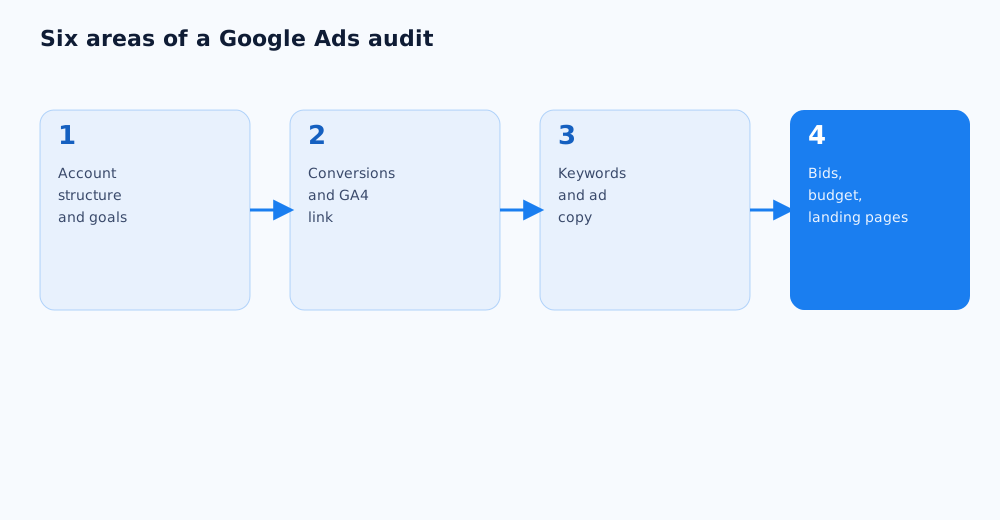
02 When you need an audit and how often
An audit is worth running on a schedule, not just when something is obviously broken — that's what catches campaign decay before it shows up in the headline numbers.
- Scheduled audit — once a quarter for a stable account: small inefficiencies build up even without an obvious failure.
- Handover audit — when campaigns move from one specialist or agency to another, the audit belongs before the handover, not after.
- Audit after a sudden drop in performance — if cost per lead jumps or conversion rate falls with no obvious cause, an audit separates a settings problem from a market shift.
- Audit before scaling the budget — before spending several times more, it's worth confirming the current structure and settings can handle the growth instead of amplifying existing mistakes.
03 Account structure and campaign goals
Account structure determines how precisely the budget splits across the business and how transparent the reporting is. The check starts with whether the campaign split actually mirrors the real business structure.
- Campaigns are split by logical lines — product category, service, geography — rather than lumped into one general campaign with unrelated ads.
- Campaign type matches the job: Search for explicit demand, Shopping for a product catalogue, Display for reach and remarketing.
- Every campaign has a goal that matches a real business outcome, not whatever was selected by default.
- There are no duplicate campaigns competing against each other for the same keywords and inflating the internal cost per click.
Mixed goals are a common finding: a "maximize conversions" campaign and a "maximize clicks" campaign bidding on the same keywords work against each other in the auction.
04 Conversion tracking and the analytics link
Without properly configured conversions, every optimisation in Google Ads runs on bad data: automated bidding strategies learn directly from conversions, and an error here distorts everything downstream.
- Conversions in Google Ads are tied to real business events — a lead, a call, a purchase — not just a visit to a "thank you" page.
- There's no double-counting: the same action isn't logged as two separate conversions because of overlapping tracking sources.
- The account is linked to Google Analytics 4, and the events imported from GA4 match what actually needs tracking. See setting up GA4 from scratch for the basics.
- Conversion values, where used, reflect the real value of the action instead of one flat number for every lead.
Google's own overview of setting up and checking conversions is in the Google Ads help on conversion measurement.
05 Keywords, negative keywords, and match types
This part of the audit shows how precisely the budget is landing on genuinely relevant queries. It starts with the search terms report, which is where the gap between what was intended and what's actually happening becomes visible.
- The search terms report shows no clearly irrelevant phrases without matching negative keywords — if it does, that's a direct budget leak.
- Keyword match types were chosen deliberately, not left on broad by default where that creates a real risk of irrelevant impressions.
- The negative keyword list is maintained at the account level rather than forgotten after the initial setup — see negative keywords in Google Ads for the full breakdown.
- There's no internal keyword competition between different campaigns in the same account.
06 Ads, extensions, and Quality Score
Even well-targeted campaigns underperform if the ads themselves don't match the query closely, or if Quality Score is dragged down by poor relevance. Quality Score directly affects cost per click and ad position, as described in Google Ads help on Quality Score.
- Each ad group runs at least 2–3 ad variants to compare performance, not a single unchanging ad.
- Headlines and copy reflect what's actually on the landing page, rather than generic phrases disconnected from the query.
- Relevant ad extensions are enabled — callouts, sitelinks, phone numbers, structured snippets — they increase the ad's visible footprint and often lift CTR without raising the bid.
- Quality Score on the core keywords isn't consistently stuck in the bottom third of the scale — when it is, the cause is usually ad or landing page relevance, not the bid.
07 Bids, budget, targeting, and landing pages
The last part of the audit connects the money to the outcome: how much is being spent, who the ads are actually reaching, and where the click ends up.
- Daily budgets aren't hitting their cap every day — if they are, the campaign is losing impressions during its most valuable hours.
- The bidding strategy matches the amount of data the account has: automated conversion-based strategies need a minimum number of monthly conversions to learn properly.
- Geo targeting, ad scheduling, and device adjustments were set deliberately, not left on defaults without checking them against real performance data.
- Ads land on a page that exists, loads quickly, and matches the query in content — sending a "buy X" click to a general catalogue page lowers conversion rate even when the click itself was on target.
If more than 3–4 systemic issues turn up after going through every section, fixing them alone can take longer than it looks at first — at that point it's often faster to get a Google Ads audit and setup from someone who already recognizes the patterns common to a specific niche.
After the audit, it's worth calculating how cost per lead changed for each campaign — the most direct way to see the effect of the fixes made.
Some audit items concern automated bid strategies; how to use AI in PPC without losing control of the budget is covered in a separate article.
Local campaigns deserve their own attention during an audit — what the format is and how to set it up is covered in the Google Ads local campaigns guide.
If an audit turns up a problem across dozens of campaigns or ads at once — stale copy or a wrong bid, say — fixing them one by one in the web interface isn't practical; bulk edits are covered in Google Ads Editor: bulk campaign management.
One item in a regular audit is checking for signs of click fraud and invalid traffic, which fits neatly into the same cycle as reviewing bids and placements.
08 FAQ
How long does a Google Ads account audit take?
A basic audit covering conversions, negative keywords, and structure takes 20–30 minutes for a small account with 3–5 campaigns. A full audit across all six areas, including ads and landing pages, usually takes 2–4 hours depending on how many campaigns there are and how much data has built up.
Can I audit a Google Ads account myself without experience?
The basics — checking conversions, negative keywords, and structure — are doable without deep Google Ads experience if you follow the checklist in order. Finer points like choosing a bidding strategy or diagnosing a low Quality Score need an understanding of how those mechanics work inside the auction, and that's where misreading the data happens more often.
How often should a Google Ads account be audited?
A stable account is fine with a scheduled audit once a quarter. Run an extra audit whenever an account changes hands, when performance shifts suddenly with no obvious cause, or before a significant budget increase.
What if the audit doesn't find any serious problems?
That's a normal outcome, especially if the campaigns were already run by experienced people. In that case, the audit confirms the budget is being spent correctly and becomes a baseline — the next quarterly audit will show whether anything new has crept in since.
What are the most common Google Ads mistakes?
Across most audits, the recurring issues are a missing or incomplete negative keyword list, broken or duplicated conversion tracking, mixed campaign goals inside the same account, and ads pointing to a page that's irrelevant or slow to load.
Do I still need an audit if an agency manages the account?
Yes — a periodic independent audit is worth doing even with an agency in place. It gives an objective outside view and confirms the agency's reporting matches what's actually configured in the account. It's not a sign of distrust, just standard quality control for any channel with an ongoing budget.