

Dynamic remarketing is an ad format where the ad is automatically built from the specific products a visitor already looked at on the site, instead of showing the same ad to everyone. For an online store with a catalogue of dozens of products or more, this usually outperforms standard remarketing, because the reminder feels personal rather than a generic brand ad. Below: how it works, what's needed to launch it in Google Ads and Meta, and the mistakes that most often cut into this format's returns.
01 Short answer
Launching dynamic remarketing for an online store takes three components.
- A product feed — a file with up-to-date data for every product: name, price, image, link, and availability.
- A pixel or tag on the site that tells the ad platform exactly which products a specific visitor looked at.
- A campaign set up in Google Ads (through Merchant Center) or Meta Ads Manager (through a catalogue) that ties behavioural data to the product feed.
Below: how this works in more detail, and what to watch for when setting it up on each platform.
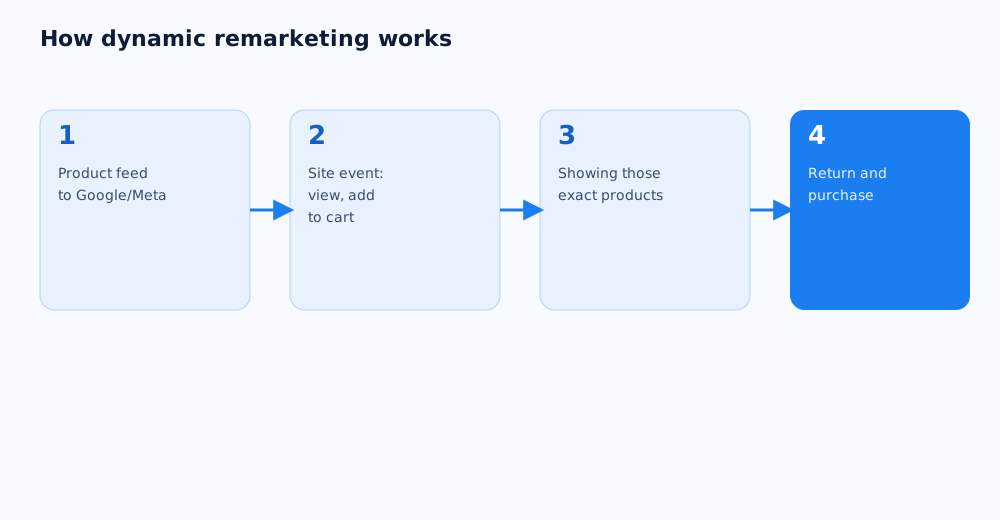
02 What dynamic remarketing is and how it differs from standard remarketing
Standard remarketing shows the same ad to everyone in a segment — everyone who visited the site but didn't buy, for example. Dynamic remarketing goes further: the system remembers exactly which products or category pages a visitor looked at, and automatically builds the ad from those.
The difference stands out most on a catalogue with hundreds of items. A static "10% off everything" banner performs worse than an ad showing a photo of the specific pair of sneakers someone added to their cart but never checked out on. The general principle of retargeting and remarketing is covered in retargeting and remarketing: what it is and how to set it up; this guide focuses specifically on the dynamic, catalogue-driven format.
03 What you need to launch it: a product feed and a pixel
Technically, dynamic remarketing doesn't work without two baseline components, and it's worth having both ready before touching the campaign settings on either platform.
- Product feed. A CSV, TSV, or XML file listing every product in the catalogue — ID, name, price, image, product page link, and availability status. For Google Ads, the feed is uploaded through Merchant Center — the full setup is covered in Google Shopping and Merchant Center: how to advertise products.
- Tracking pixel. Code on the site that sends the ad platform events — viewing a product, adding to cart, purchasing — paired with the specific product ID from the feed. Setting up Meta Pixel and Business Manager is covered in Meta Pixel and Business Manager: setup from scratch.
- Matching IDs. The product ID in the pixel event needs to exactly match the ID in the feed — otherwise the system can't connect the viewed product to its listing in the ad.
04 Dynamic remarketing in Google Ads
In Google Ads, dynamic remarketing runs through the Merchant Center-and-campaign connection, and setup requires working through a few steps in sequence.
- The product feed is uploaded and kept up to date in Merchant Center, and the Merchant Center account gets linked to the Google Ads account.
- The campaign is built on Performance Max or the Display Network — these campaign types support dynamic remarketing, unlike standard Search campaigns.
- An audience signal based on site visitor data gets added to the campaign — this is what connects a specific person's behaviour to the products in the feed.
- The official description of the mechanic is in Google Ads help on dynamic remarketing for retail, and the step-by-step campaign setup is in the guide to launching dynamic remarketing.
05 Dynamic ads in Meta (Facebook and Instagram)
In Meta Ads Manager, the equivalent format is called Advantage+ catalogue ads and works on a similar principle, but it's configured through Meta's own catalogue interface.
- A product catalogue is created in Meta Commerce Manager and linked to the Meta Pixel or Conversions API, so the system can see which products each visitor looked at.
- Catalogue requirements — mandatory fields like price, image, and availability — are covered in Meta's help on dynamic ad requirements.
- Products can be grouped into sets by category, brand, or other attributes, so different ads can show to different slices of the catalogue instead of treating the whole assortment the same.
- This format works well alongside an already-configured Meta Pixel, if one is already on the site for other tracking purposes.
06 Which audience segments to use
Dynamic remarketing performs better when the audience is segmented by stage of interaction with a product, rather than treating every site visitor with the same logic.
- Viewed a product but didn't add it to cart. The broadest, coldest segment — usually calls for softer creative and not necessarily a discount.
- Added to cart but didn't check out. A warmer segment with clear intent — a direct reminder fits better here, sometimes with a time-limited offer.
- Purchased before. Good for cross-selling related products, not for re-showing something already bought.
- Different segments are worth running in separate campaigns or ad groups, so each one's performance can be judged on its own instead of blending every funnel stage into one report.
07 Common mistakes and what to watch in the results
Most problems with dynamic remarketing come down to the quality of the underlying data, or misreading the results, rather than the format itself.
- A stale feed. If prices, availability, or images in the feed don't update promptly, ads show outdated information, which erodes trust and can get ads rejected by platform review.
- Too small an audience to start. Like other data-driven formats, dynamic remarketing needs a minimum volume of events to run reliably — a site with very low traffic may see unstable results for a while.
- Judging only by clicks, not order value. A cheap click on a dynamic ad doesn't guarantee a profitable order — performance is better measured through ROAS, not just CTR or CPC.
- Ignoring frequency. Showing the same product too often to someone who's clearly not interested annoys the audience and drags down the whole account's performance.
If setting up dynamic remarketing from scratch, or figuring out why it isn't delivering, feels like a lot, it can be handed off — see Grottix's paid search and social ads services.
08 FAQ
How is dynamic remarketing different from standard retargeting?
Standard retargeting shows the same ad to everyone in a segment, while dynamic remarketing automatically builds the ad from the specific products that particular user looked at. For a catalogue with many products, the dynamic format usually delivers higher relevance and, as a result, better conversion.
Can dynamic remarketing work without a product feed?
No, a feed with product data is a hard requirement for this format, since it's where the system pulls the name, price, image, and link for each ad from. Without a feed, only standard, non-dynamic remarketing is available.
How much traffic is needed to launch dynamic remarketing?
There's no exact threshold, but both Google Ads and Meta need a minimum volume of events (product views, cart adds) for the algorithm to run reliably. A site with very low traffic may see unstable dynamic remarketing results at first, until enough data builds up.
Should dynamic remarketing run on Google Ads and Meta at the same time?
Not necessarily from day one — it's usually smarter to launch one channel, confirm the feed and tracking are set up correctly, then add the second. Launching both platforms at once with no track record makes it harder to diagnose anything that isn't working as expected.
How often does the product feed need updating?
The feed needs to reflect current prices, availability, and images — ideally updating automatically whenever the site's catalogue changes. Outdated data in an ad doesn't just erode user trust, it can also get ads rejected by platform review.
Does dynamic remarketing work for a small catalogue of just a few products?
Technically the format works with a small catalogue too, but its main advantage — personalisation by specific product — matters more with a larger assortment. For a store with 5-10 products, standard remarketing with a few creative variants is often simpler to set up and delivers a comparable result.